There is more than one way to sell digital products with Gravity Forms, but using Gravity Forms and Download Monitor is a sure way to secure your digital products without worry.
There are other download manager plugins, but the great thing about Download Monitor is the Gravity Forms extension. It makes linking secure downloads to your forms easy.

5 Reasons To Use Download Monitor
- Easily secure your digital products
- The low cost
- No URL sharing
- Tracking
- It’s easy to use
Requirements
To make this work you will need the four things listed below installed on your site.
- Gravity Forms (any license)
- Download Monitor Plugin (free)
- Download Monitor Gravity Forms Extension (paid)
Step One: Create Your Download
- Go to Downloads > Add New
- Enter Title
- Upload Your File
- Fill in any of the other information as desired
- Click Publish
Step Two: Create Your Form
- Go to Forms > New Form
- Select a Template
- Enter Title
- Add Your Fields
- Add the DLM – GF Lock Field (Advanced section)
- Save Form
Step Three: Link Your Form and Download
- Go to Downloads > All Downloads
- Edit Download created in Step One
- Select Form Created in Step Two in the Gravity Forms Form Meta Box
- Click Update
Step Four: Using Your Secure Forms
Download Monitor introduces a few ways to use these forms. They have a few shortcodes that we’re going to use, and keep in mind, that you do not use the Gravity Forms shortcode, we’re using the Download Monitor provided shortcodes.
Download Monitor Form Shortcode
This is a short code that you will use to embed the form that we just linked this download to.
[dlm_gf_form download_id=5]You will replace 5 with your download ID, which can be located from the All Downloads list page or when in the download editor.
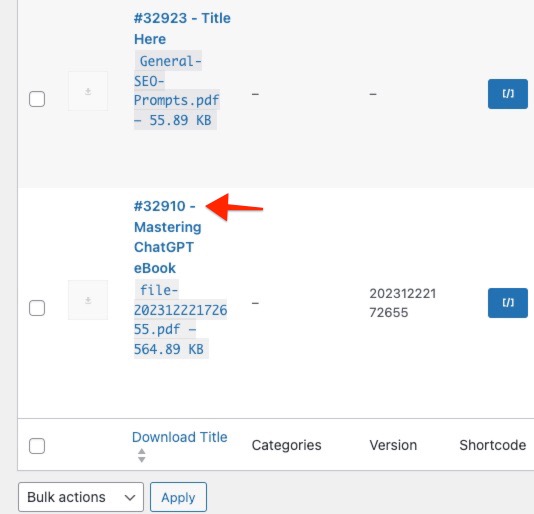
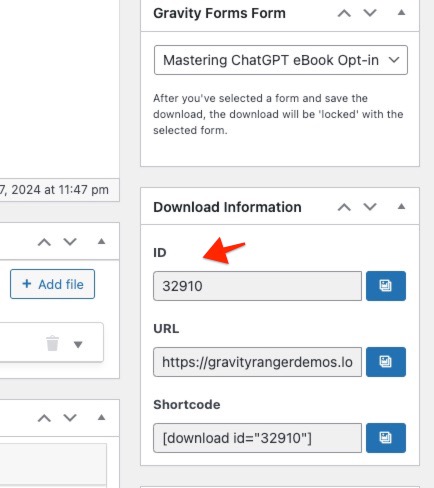
Once you have the ID added to the shortcode, you can embed that code anywhere shortcodes are supported. Once embedded your form will be displayed.
You’ll notice that it adds the download text link to the Gravity Forms confirmation message.

You might be concerned that it would be easy for someone to copy the link and share it, but do you remember one of my top 5 reasons for using Download Monitor, No URL Sharing!
This is what happens if you were to copy the URL and share it. It’s pretty sweet!

Download Shortcode – modal
Download Monitor has another shortcode called the download shortcode which can be added anywhere shortcodes are supported and will display a text link, that depending o your settings, when clicked, will either redirect you to a page to fillout the form or present the form in a modal.
This is the what the download shortcode looks like:
[download id=5]As explained above, you will replace 5 with your download ID, which can be located from the All Downloads list page or when in the download editor (screenshots above).
If you’re not using the modal feature, then you would be redirected to the No Access page to submit the form.

I am demonstrating the modal feature because it is cool and this is how I would implement this because I think it would result in better conversions.
The Wrap Up
There is a very detailed document from the Download Monitor crew that will walk you through step-by-step if you need additional assistance here: download-monitor.com/kb/gravity-forms/
If you need a simple to use, highly reliable, super cool plugin for protecting your downloads, I highly recommend using Download Monitor and the Gravity Forms extension!
As always if you have any questions or need additional assistance, feel free to use the comments below!

