Gravity Hopper is a modular toolkit that transforms how you build and manage Gravity Forms. Instead of installing 10 separate plugins, you get one suite with 10+ modules covering form organization, logging, email templates, and workflow enhancements.
What It Actually Does
Gravity Hopper doesn’t add new form fields. It makes the form-building experience itself better. Think of it as a management layer that sits on top of Gravity Forms—helping you organize, monitor, and optimize your existing forms without touching form logic.
Core Modules Included:
| Module | What It Does | Saves You From… |
|---|---|---|
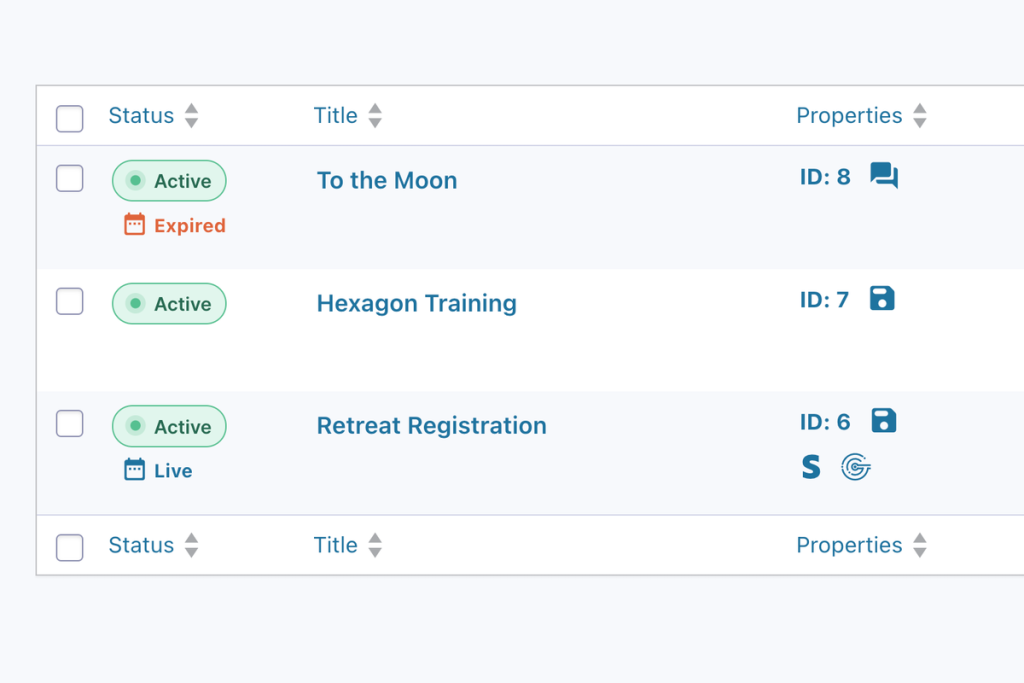
| Form Overview | Dashboard view of all forms + key stats | Clicking through 50 forms to find settings |
| Form Integrity | Auto-detects missing required plugins | Broken forms in production |
| Form Folders | Organize forms into collapsible folders | Scrolling endlessly in the forms list |
| Keyboard Shortcuts | Navigate without mouse | Reetitive clicking |
| Field Hinting | Shows field settings at a glance | Opening every field to check config |
| Field Notes | Add internal notes to any field | External docs that get out of sync |
| Smart Logs | Enhanced entry logging | Digging through raw database tables |
| Configurations | Save/apply GF environment presets | Manually toggling settings per site |
| Email Templates | Professional notification templates | Rebuilding emails from scratch |
The Pros
1. Modular architecture means you only enable what you need
Each module can be toggled on/off. Don’t need Form Network? Turn it off. Only want Form Folders and Keyboard Shortcuts? Done. No bloat.
2. Form Folders alone is worth the price
Once you hit 20+ forms, the default Gravity Forms list becomes unmanageable. Folders let you group by client, project, or function. Collapsible. Color-coded. Essential for agencies.
3. Form Integrity catches plugin dependency issues
If a form uses Gravity Wiz Populate Anything and that plugin is deactivated, Form Integrity flags it immediately. Prevents “why is my form broken??” panic at 2am.
4. Keyboard shortcuts actually save timeCtrl + Shift + N for new form. Ctrl + Shift + S for save. Navigation shortcuts between form settings. Once muscle memory kicks in, you’ll miss this on every other WordPress plugin.
5. Smart Logs surfaces entry data you actually need
Filterable, exportable logs with better formatting than Gravity Forms native. See payment failures, partial entries, and user paths without writing custom queries.
The Cons
1. Learning curve for 10+ modules
Gravity Hopper does a lot. You’ll need to spend 30 minutes clicking through each module to understand what’s available. Documentation helps, but it’s dense.
2. No individual module purchasing
Want just Form Folders? Tough. Gravity Hopper is all-or-nothing. For small sites using 2 modules, the value proposition weakens.
3. Some modules overlap with existing tools
If you already use GravityView for entry management or Gravity Wiz for advanced functionality, a few modules feel redundant.
4. Email Templates module is basic
While functional, the template editor isn’t as robust as dedicated email plugins. Fine for notifications, not for complex marketing sequences.
5. Annual renewal for updates
Like most premium plugins, you need active licenses for updates. Factor this into long-term costs for client sites.
Use Cases That Work
1. Agency Managing 50+ Client Forms
Form Folders organize by client. Form Integrity prevents plugin conflicts. Keyboard shortcuts speed up form building. Smart Logs help troubleshoot user issues without database access. This is the primary use case—agencies with volume.
2. Multisite Networks
The Form Network module (plus their separate Multisite Global Forms plugin) makes managing forms across a network actually sane. Create once, distribute everywhere.
3. Teams with Non-Technical Form Builders
Field Notes lets developers leave instructions for content editors. “Don’t change this—hooks into CRM.” Reduces accidental breakages.
4. High-Volume Forms Needing Monitoring
Smart Logs + Form Integrity catch issues before users complain. If you’re running payment forms or lead gen at scale, this visibility matters.
5. Power Users Who Hate Clicking
Keyboard shortcuts and Form Overview are for people who live in Gravity Forms daily. If you’re building forms weekly, you’ll appreciate the efficiency.
Pricing Breakdown
| Plan | Price | Covers | Best For |
|---|---|---|---|
| One Site | $59/year | 1 site | Solo operators, personal projects |
| Four Sites | $129/year | Up to 4 sites | Small agencies, multiple clients |
| Unlimited Sites | $199/year | Unlimited | Agencies, multisite networks |
| Orbital Forge Toolkit | From $99/year | Bundle | Need multiple Orbital Forge plugins |
Annual licensing required for updates and support.
Who Should Buy This?
✅ Agencies managing 20+ Gravity Forms
✅ Multisite administrators
✅ Power users who build forms weekly
✅ Teams with multiple form editors (developers + content folks)
✅ Anyone who’s ever said “where the hell is that form??”
❌ Skip if you have 3 forms and rarely touch them
❌ Skip if you already solved organization with custom code
❌ Skip if budget is tight and you only need one module
The Verdict
Gravity Hopper isn’t trying to be Gravity Wiz or GravityView. It’s trying to make the Gravity Forms admin experience less painful. And it succeeds.
Form Folders and Form Integrity alone justify the $59-199/year cost for agencies. The keyboard shortcuts and Smart Logs are genuinely useful daily tools. Yes, you’ll only use 60% of the modules. But that 60% saves hours.
If you build forms professionally, this belongs in your toolkit.

