Problem
I recently had someone ask if it was possible to style radio buttons like a toggle switch in Gravity Forms. There is no built-in option for styling the radio button field type, but I found a solution with a bit of CSS.
This is an example of what they were looking for:
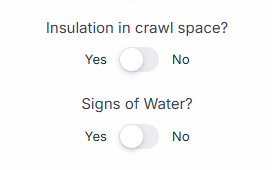
Solution
As mentioned, I was able to come up with a solution using some CSS and a custom CSS selector. This is what the end result looks like:

For this to work, follow these steps:
- Add your radio button field with two choices

- Set one of the choices as the default for each field

- Add the gf-toggle-switch CSS selector to the fields’ custom CSS input in the Appearance settings

- Add the CSS below to the Customizer or wherever you put your custom CSS

Custom CSS
/* ============================================
   Gravity Forms Toggle Switch - Radio Field
   Add class "gf-toggle-switch" to the radio field
   Works with: Orbital theme + Legacy markup / 2.5 theme
   Labels outside track, track & labels clickable
   ============================================ */

/* Scope for Orbital - override theme framework */
.gform-theme--framework .gfield.gf-toggle-switch,
.gfield.gf-toggle-switch {
  display: flex !important;
  flex-direction: column !important;
  align-items: flex-start !important;
  width: 100%;
}

.gform-theme--framework .gfield.gf-toggle-switch .gfield_label,
.gfield.gf-toggle-switch .gfield_label {
  width: 100%;
  margin-bottom: 8px;
  text-align: left;
}

/* Toggle row: [Left label] [Track] [Right label] */
.gform-theme--framework .gfield.gf-toggle-switch .gfield_radio,
.gfield.gf-toggle-switch .gfield_radio {
  display: flex !important;
  flex-direction: row !important;
  align-items: center;
  position: relative;
  gap: 12px;
  list-style: none;
  margin: 0;
  padding: 0;
  width: fit-content;
}

/* Flatten structure - override Orbital's default choice layout */
.gform-theme--framework .gfield.gf-toggle-switch .gchoice,
.gfield.gf-toggle-switch .gchoice {
  display: contents !important;
  margin: 0;
}

/* Hide radio inputs - both Orbital (.gfield-choice-input) and Legacy */
.gform-theme--framework .gfield.gf-toggle-switch .gfield_radio input[type="radio"],
.gform-theme--framework .gfield.gf-toggle-switch .gfield_radio .gfield-choice-input,
.gfield.gf-toggle-switch .gfield_radio input[type="radio"],
.gfield.gf-toggle-switch .gfield_radio .gfield-choice-input {
  position: absolute !important;
  opacity: 0 !important;
  width: 0 !important;
  height: 0 !important;
  margin: 0 !important;
  pointer-events: none !important;
  clip: rect(0, 0, 0, 0) !important;
  appearance: none !important;
}

/* Disable Orbital's radio/checkbox pseudo-elements */
.gform-theme--framework .gfield.gf-toggle-switch .gfield-choice-input::before,
.gform-theme--framework .gfield.gf-toggle-switch .gfield-choice-input::after,
.gform-theme--framework .gfield.gf-toggle-switch input[type="radio"]::before,
.gform-theme--framework .gfield.gf-toggle-switch input[type="radio"]::after {
  display: none !important;
}

/* Left label */
.gform-theme--framework .gfield.gf-toggle-switch .gchoice:first-child .gform-field-label,
.gfield.gf-toggle-switch .gchoice:first-child .gform-field-label {
  order: 1;
  padding: 6px 0;
  margin: 0 !important;
  cursor: pointer;
  font-size: 0.875rem;
  flex-shrink: 0;
  z-index: 1;
  position: relative;
}

/* Extend Yes label click area over left half of track */
.gform-theme--framework .gfield.gf-toggle-switch .gchoice:first-child .gform-field-label::before,
.gfield.gf-toggle-switch .gchoice:first-child .gform-field-label::before {
  content: '';
  position: absolute;
  top: -6px;
  bottom: -6px;
  right: -44px;
  width: 44px;
  z-index: -1;
}

/* Track (gray pill) - between the two labels */
.gform-theme--framework .gfield.gf-toggle-switch .gchoice:first-child::after,
.gfield.gf-toggle-switch .gchoice:first-child::after {
  content: '';
  order: 2;
  flex-shrink: 0;
  width: 56px;
  height: 28px;
  background-color: #e0e0e0;
  border-radius: 999px;
}

/* Right label */
.gform-theme--framework .gfield.gf-toggle-switch .gchoice:last-child .gform-field-label,
.gfield.gf-toggle-switch .gchoice:last-child .gform-field-label {
  order: 3;
  padding: 6px 0;
  margin: 0 !important;
  cursor: pointer;
  font-size: 0.875rem;
  flex-shrink: 0;
  z-index: 1;
  position: relative;
}

/* Extend No label click area over right half of track */
.gform-theme--framework .gfield.gf-toggle-switch .gchoice:last-child .gform-field-label::before,
.gfield.gf-toggle-switch .gchoice:last-child .gform-field-label::before {
  content: '';
  position: absolute;
  top: -6px;
  bottom: -6px;
  left: -44px;
  width: 44px;
  z-index: -1;
}

/* Sliding knob - positioned over the track */
.gform-theme--framework .gfield.gf-toggle-switch .gfield_radio::before,
.gfield.gf-toggle-switch .gfield_radio::before {
  content: '';
  position: absolute;
  width: 20px;
  height: 20px;
  top: 50%;
  left: calc(50% - 28px + 4px);
  transform: translateY(-50%);
  background: #fff;
  border-radius: 50%;
  box-shadow: 0 2px 4px rgba(0, 0, 0, 0.15);
  transition: transform 0.25s ease;
  z-index: 2;
  pointer-events: none;
}

/* Knob slides right when "No" (second choice) selected - Orbital & Legacy */
.gform-theme--framework .gfield.gf-toggle-switch .gfield_radio:has(.gchoice:last-child input[type="radio"]:checked)::before,
.gform-theme--framework .gfield.gf-toggle-switch .gfield_radio:has(.gchoice:last-child .gfield-choice-input:checked)::before,
.gfield.gf-toggle-switch .gfield_radio:has(.gchoice:last-child input[type="radio"]:checked)::before,
.gfield.gf-toggle-switch .gfield_radio:has(.gchoice:last-child .gfield-choice-input:checked)::before {
  transform: translateY(-50%) translateX(28px);
}

/* Dim unselected label - Orbital & Legacy */
.gform-theme--framework .gfield.gf-toggle-switch input[type="radio"]:not(:checked) + .gform-field-label,
.gform-theme--framework .gfield.gf-toggle-switch .gfield-choice-input:not(:checked) + .gform-field-label,
.gfield.gf-toggle-switch input[type="radio"]:not(:checked) + .gform-field-label,
.gfield.gf-toggle-switch .gfield-choice-input:not(:checked) + .gform-field-label {
  color: #9e9e9e;
}
Need Help?
If you need any help, please use the comments or the live chat function below!

