
Advanced Data Tables for Gravity Forms
Turn Gravity Forms entries into interactive, filterable front-end data tables with sorting, export, and inline editing.
What it does
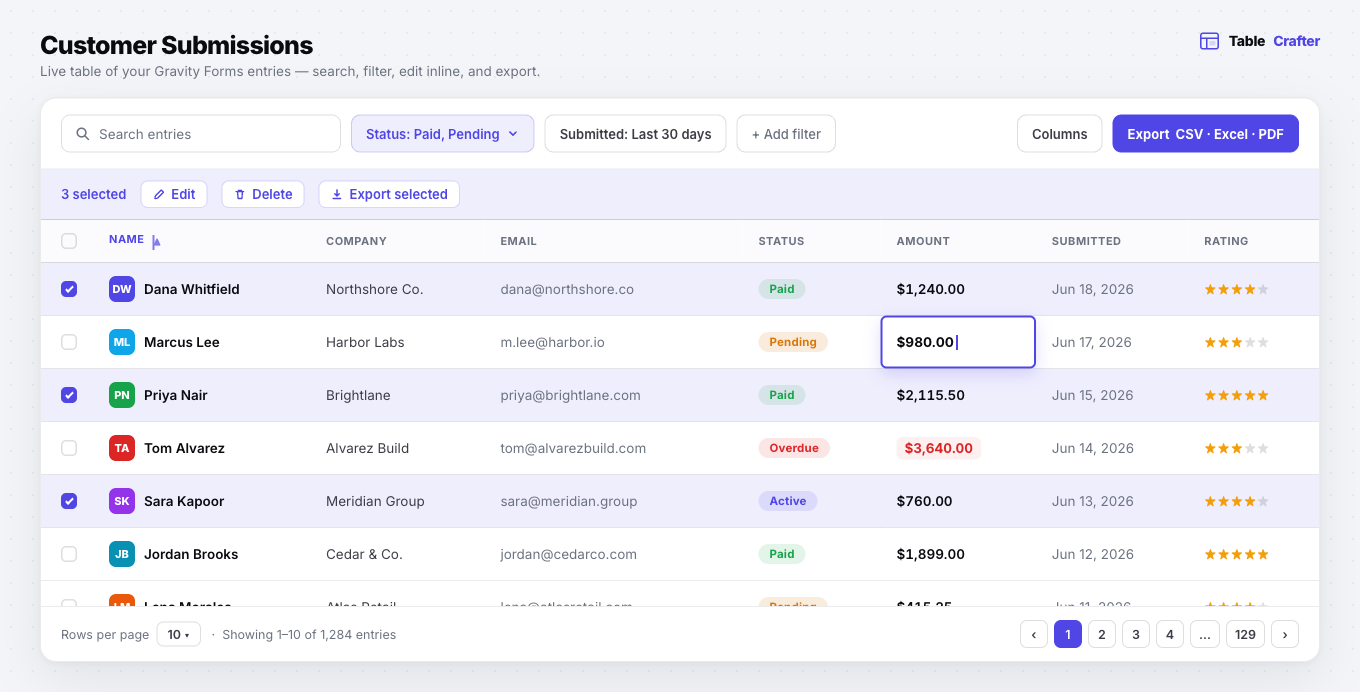
When you collect data through Gravity Forms, the entries sit in your WordPress admin and aren't easy to share with customers or team members. Advanced Data Tables (TableCrafter) takes those entries and displays them as clean, responsive tables on any page your visitors can see.
You embed a table with a shortcode, choose which fields to show, and the plugin handles sorting, pagination, and filtering automatically. Pro users can also let visitors edit rows directly in the table, run bulk actions, export data, and apply role-based permissions so different users see or edit only what they should.
It suits customer portals, team dashboards, event registrations, and inventory tracking. A free version on WordPress.org supports up to 3 tables with 8 columns and 500 entries each, so you can try it before buying.
Key features
- Responsive front-end tables built from Gravity Forms entries
- Sorting, pagination, and filtering included in the free version
- Frontend inline editing with real-time validation (Pro)
- Bulk edit, delete, and export actions (Pro)
- Export to CSV, Excel (.xlsx), and PDF (Pro)
- Role-based view and edit permissions (Pro)
- Conditional formatting and advanced date-range or multi-select filters (Pro)
Good for
Written from iSuperCoder’s own listing. Version and dates come straight from the source and are checked weekly.
Does the free version have any limits?
Yes. The free version supports up to 3 tables, 8 columns per table, and 500 entries per table.
Can visitors edit entries directly in the table?
Yes, but only on the Pro plan. It supports frontend inline editing with real-time validation.
What export formats are available?
Pro users can export tables to CSV, Excel (.xlsx), and PDF.
Is there a trial for the Pro plan?
Yes, every Pro plan includes a 10-day free trial.