Resonanz User Role Permissions for Gravity Forms
Control which WordPress user roles can access Gravity Forms features, without giving out admin accounts.
What it does
By default, only Administrators can use Gravity Forms. That creates a problem when editors or content managers need to build forms or review submissions — you either block them entirely or hand over full admin access.
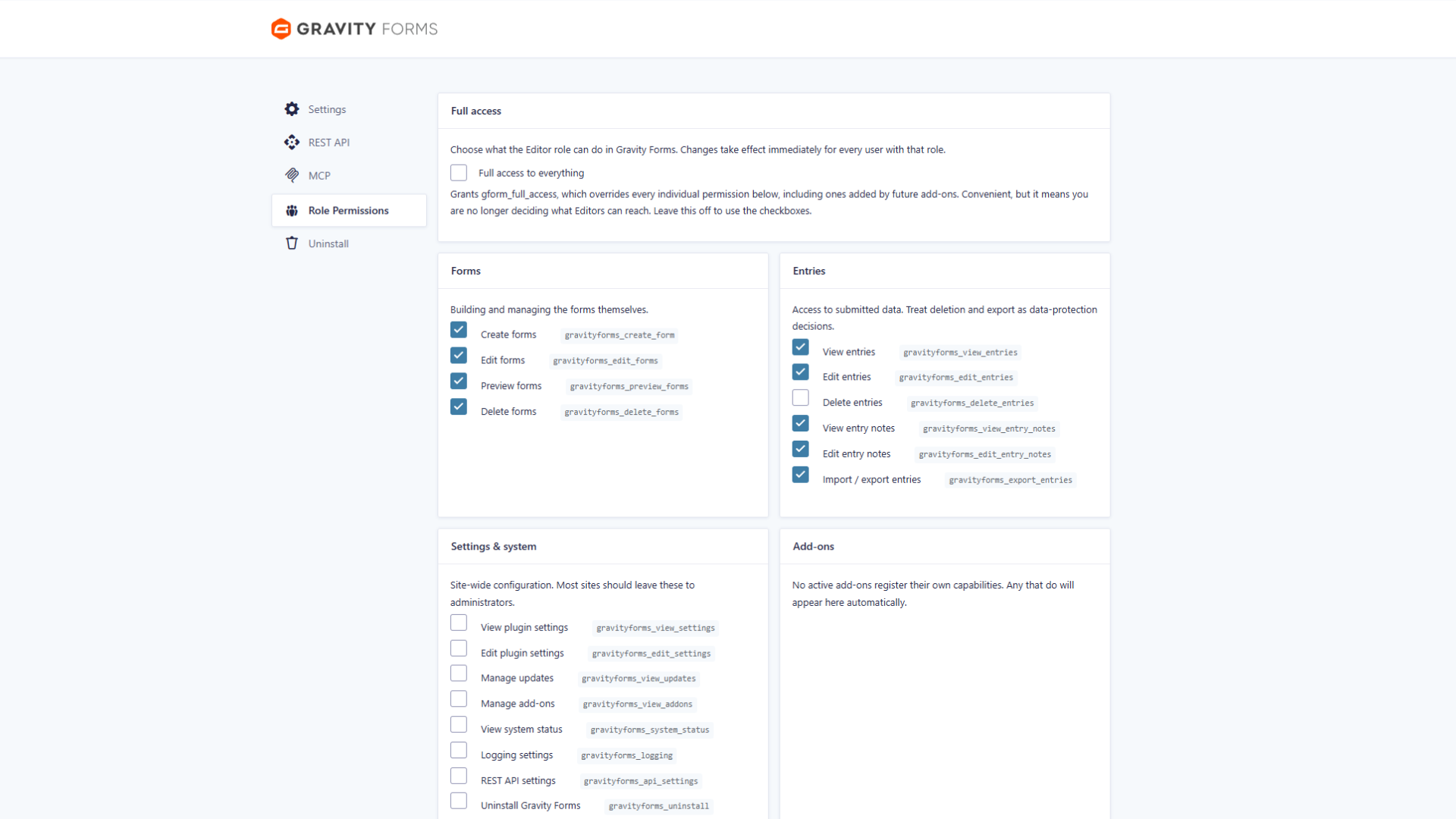
This plugin adds a Role Permissions settings screen under Forms → Settings. On activation, it gives the Editor role a sensible starting set of capabilities: building, previewing, and deleting forms, plus viewing, editing, exporting, and annotating entries. Entry deletion and site configuration changes are not included by default.
From the settings screen you can turn each individual capability on or off with a checkbox. It is a straightforward way to match Gravity Forms access to what each person on your team actually needs.
Key features
- Grants Editors access to Gravity Forms on activation
- Editors can build, preview, and delete forms out of the box
- Editors can view, edit, export, and annotate entries by default
- Entry deletion is not granted by default, keeping data safer
- Single settings screen under Forms → Settings → Role Permissions
- Toggle each capability on or off with a checkbox
Good for
Written from Resonanz Digital GmbH’s own listing. Version and dates come straight from the source and are checked weekly.
Does this plugin work with roles other than Editor?
The listing describes Editor role access specifically; it does not mention support for other roles.
Can editors delete entries?
No, entry deletion is not granted by default, though you can adjust capabilities from the settings screen.
Where do I manage the permissions?
There is a settings screen at Forms → Settings → Role Permissions where you toggle each capability with a checkbox.
Does it cost anything?
No, the plugin is free.