Seat Booking for Gravity Forms
Add an interactive seat map to your Gravity Forms so visitors can pick specific seats when booking events or venues.
What it does
When you sell tickets or reservations for a venue, letting people choose their own seat is often expected. Without a seat map, you end up managing assignments manually or fielding complaints about unwanted spots.
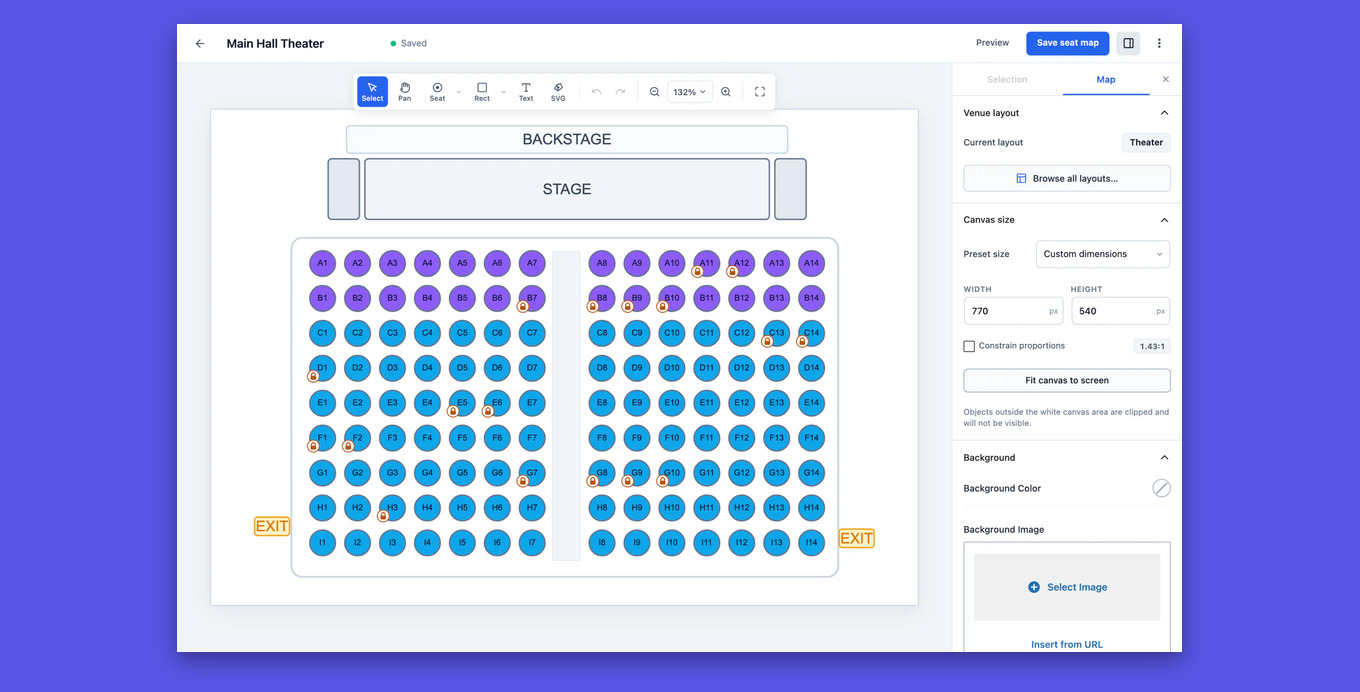
Seat Booking for Gravity Forms adds a Seats field to your form. You build a visual seat map in a drag-and-drop editor, set pricing tiers, and configure event dates and time slots. When a visitor submits the form, their chosen seats are held while payment processes and released automatically if payment fails.
It works for theaters, flights, trains, stadiums, banquets, classrooms, and any other venue where a specific seat matters. Because seats are priced like a product field, your existing Gravity Forms payment add-ons and coupons keep working without extra setup.
Key features
- Visual seat map editor with preset layouts for theaters, flights, stadiums, trains, and banquets
- Support for multiple events on one map, with recurring dates, multiple daily time slots, and excluded dates
- Tiered pricing with a color and price per tier that adds to the Gravity Forms order total
- Seat holds during checkout, released automatically if payment fails or is never received
- Booking details (seats, date, time, status) stored on each entry, in exports, and on a dedicated Bookings screen
- Merge tags for seats and booking details in form notifications
- Keyboard, screen reader, and pinch-to-zoom support, plus wheelchair-accessible seat designation
Good for
Written from IdeaWP’s own listing. Version and dates come straight from the source and are checked weekly.
Can one seat map handle multiple events or dates?
Yes. You can run any number of events on a single map, including recurring dates, multiple time slots per day, and excluded dates.
How does pricing work with my existing payment add-on?
Seats are priced like a product field, so they add to the Gravity Forms total and your current payment add-ons and coupons apply automatically.
What happens if a payment fails after someone picks seats?
Chosen seats are held while the visitor completes payment and are released back to the map if the payment fails or never arrives, preventing double bookings.
Where can I see who booked which seats?
Seat, date, time, and status appear on each form entry, in exports, and on a dedicated Bookings screen.