
KodaDash
Build front-end dashboards, client portals, and project trackers using data collected by your Gravity Forms.
What it does
Gravity Forms handles data collection well, but viewing and working with that data usually means digging through wp-admin. KodaDash lets you display and manage form entries on the front end of your site without writing any code.
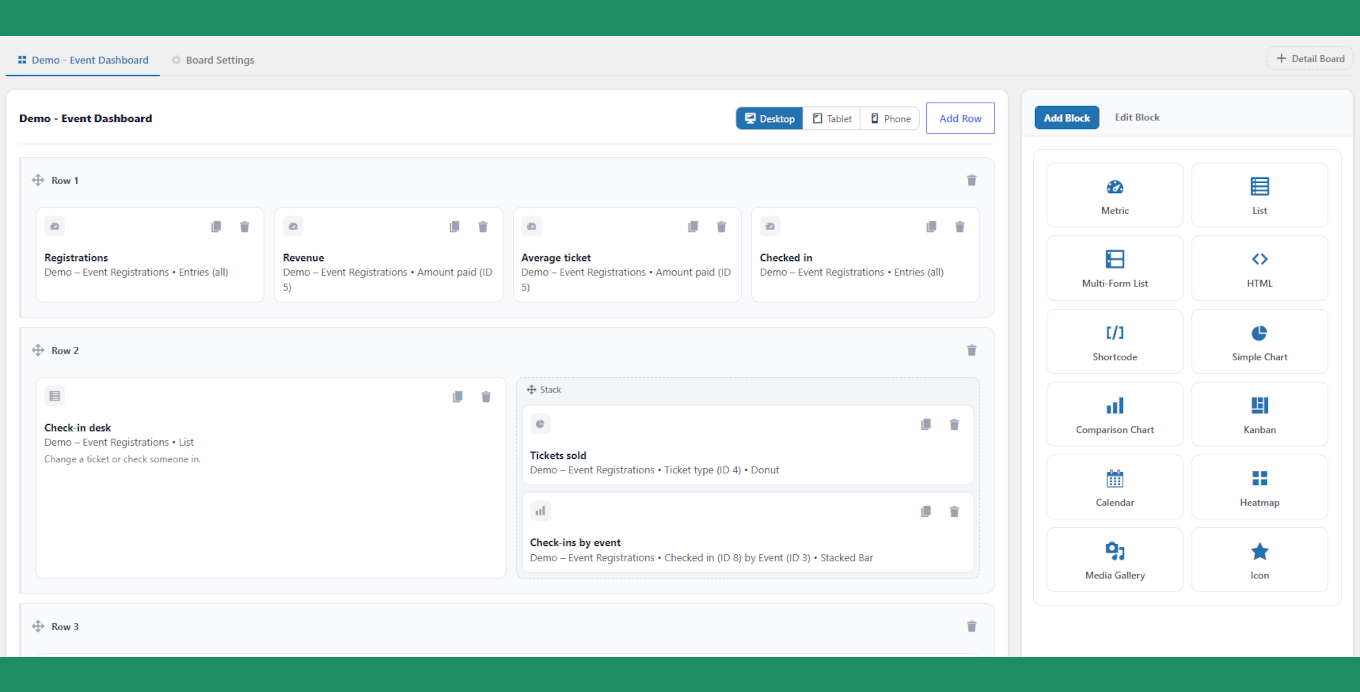
You drag blocks onto a board to arrange the layout you want. Boards can pull entries from multiple forms at once, so you can combine data from different sources in one place. Use cases include client portals, project trackers, booking calendars, and team dashboards.
The plugin is aimed at site owners who want to give clients or team members a polished front-end view of form data without purchasing several separate add-ons.
Key features
- Drag-and-drop board builder for front-end dashboards
- Mix entries from multiple Gravity Forms on one board
- Build client portals, project trackers, booking calendars, and team dashboards
- No code required
- No need to visit wp-admin to view or manage entries
- Replaces functionality you would otherwise buy as separate add-ons
Good for
Written from Kodaloo’s own listing. Version and dates come straight from the source and are checked weekly.
Do I need to write any code to build a board?
No, boards are built by dragging blocks into place with no coding required.
Can I show entries from more than one form on the same board?
Yes, you can mix entries from as many forms as you like on a single board.
Does this replace multiple add-ons?
According to the developer, it bundles functionality you would normally buy as separate add-ons into one plugin.