
Charts for Gravity Forms
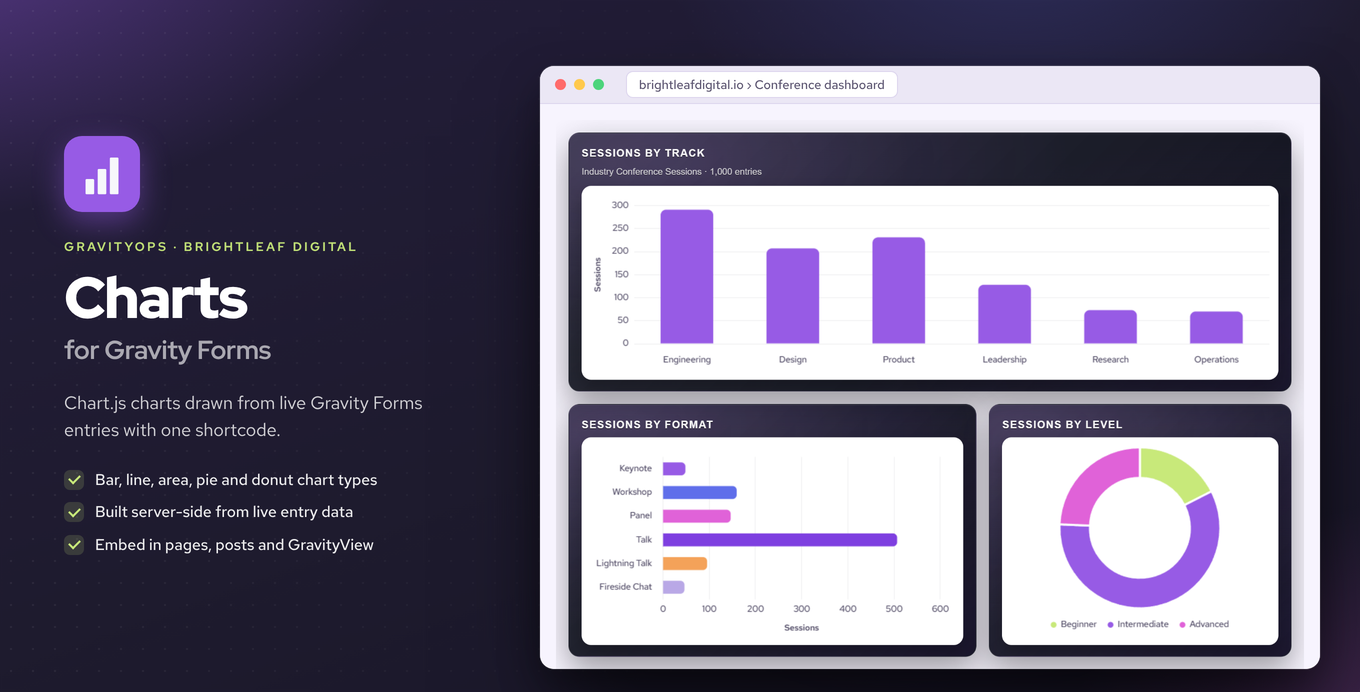
Render bar, line, pie, and other charts directly from Gravity Forms entry data using a shortcode.
What it does
Keeping track of form entry data usually means exporting to a spreadsheet or logging into a separate dashboard. Charts for Gravity Forms skips all of that by building charts straight from your live entry data on the server side.
You drop a shortcode into any page, post, or GravityView and the chart appears automatically. Supported chart types include bar, horizontal bar, stacked bar, line, area, pie, and donut. Currency fields and comma-separated numbers are parsed without any extra setup.
The premium version adds date-range and field-value filters with any/all logic, time-series grouping by day or month, and the ability to embed charts inside GravityView single and multiple entry views. It is a good fit for anyone who wants to display form data visually without leaving WordPress.
Key features
- Bar, horizontal bar, stacked bar, line, area, pie, and donut chart types
- Charts built server-side from live entry data via GFAPI
- Shortcode works in pages, posts, and GravityView
- Automatic parsing of currency fields and comma-separated numbers
- Premium: date-range and field-value filters with any/all logic
- Premium: time-series grouping by day or month
- Premium: charts inside GravityView single and multiple entry views
Good for
Written from Brightleaf Digital’s own listing. Version and dates come straight from the source and are checked weekly.
Does it need an external service or dashboard?
No. Charts are generated server-side from your live Gravity Forms entries, so no exports or third-party dashboards are involved.
How do I add a chart to a page?
You drop a shortcode into any page, post, or GravityView and the chart renders automatically.
Are filters and time-series grouping available in the free version?
No. Date-range filters, field-value filters with any/all logic, and time-series grouping by day or month are premium features.
Does it handle currency fields automatically?
Yes. Currency fields and comma-separated numbers are parsed automatically without any extra configuration.