
Converly
Send ad platform conversions from Gravity Forms submissions to Google Ads, Meta Ads, Microsoft Ads, LinkedIn Ads, and more.
What it does
When someone submits a Gravity Form, you want that conversion to show up in your ad accounts so you know which campaigns are bringing in leads. The problem is that browser-based tracking gets blocked by ad blockers, Safari, and iOS privacy settings, so you often miss a large share of your conversions.
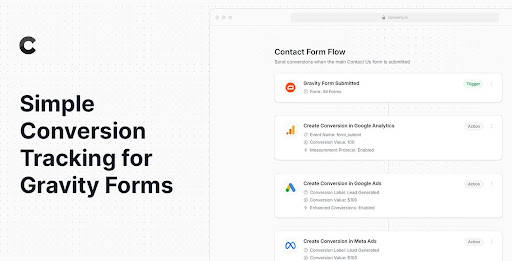
Converly fixes this by sending conversions server-side, directly to the ad platform's servers. You add a small code snippet to your site, then build a conversion flow in a drag-and-drop builder: pick a trigger (a Gravity Form submission) and choose your actions (send to Google Ads, Meta Ads, etc.). Converly also passes along click IDs, IP address, browser data, and form field data like name and email to improve match rates.
This is a good fit for anyone running paid ads who needs accurate conversion data from their Gravity Forms. A full debug log lets you see exactly what data was captured and sent, so you can confirm everything is working or spot problems quickly.
Key features
- Server-side conversion sending that bypasses ad blockers and browser privacy restrictions
- Drag-and-drop builder to set up triggers and actions without coding
- Supports Google Ads, Meta Ads, Microsoft Ads, LinkedIn Ads, and more
- Passes click IDs, IP address, device, browser, and form field data with each conversion
- Full debug log showing what data was captured, sent, and received by each platform
- 14-day free trial available
Good for
Written from Converly’s own listing. Version and dates come straight from the source and are checked weekly.
Does Converly work with any Gravity Form on my site?
Yes, you select a Gravity Form submission as the trigger in the builder, so it works with any form you have.
Why send conversions server-side instead of using a pixel?
Server-side sending bypasses ad blockers and iOS/Safari privacy restrictions, which means more of your conversions get recorded.
Can I see whether my conversions are actually being received?
Yes, Converly includes a full debug log that shows what data was captured, what was sent to each platform, and whether it was received successfully.
Is there a trial before I have to pay?
Yes, Converly offers a 14-day free trial.