
SubscriptionFlow for Gravity Forms
Connect Gravity Forms to SubscriptionFlow to create and sync customer subscriptions when a form is submitted.
What it does
Managing subscriptions manually is time-consuming and error-prone. This add-on links your Gravity Forms to SubscriptionFlow so that every submission automatically finds or creates a customer record and starts the right subscription plan.
When someone submits a form, the add-on matches them by email in SubscriptionFlow. If they already exist, their record is updated instead of duplicated. A new subscription is then created on the plan you selected. If you use a Gravity Forms payment add-on like Stripe or PayPal, the first payment taken in the form is recorded against the first SubscriptionFlow invoice, and renewals are handled from there.
This add-on suits site owners who sell subscription products or services and want their forms to drive the full billing workflow without manual data entry.
Key features
- Matches customers by email and updates existing records to avoid duplicates
- Maps form fields to SubscriptionFlow customer and subscription fields, including billing and shipping address lines
- Lets you pick products and plans from drop-downs loaded directly from your SubscriptionFlow account
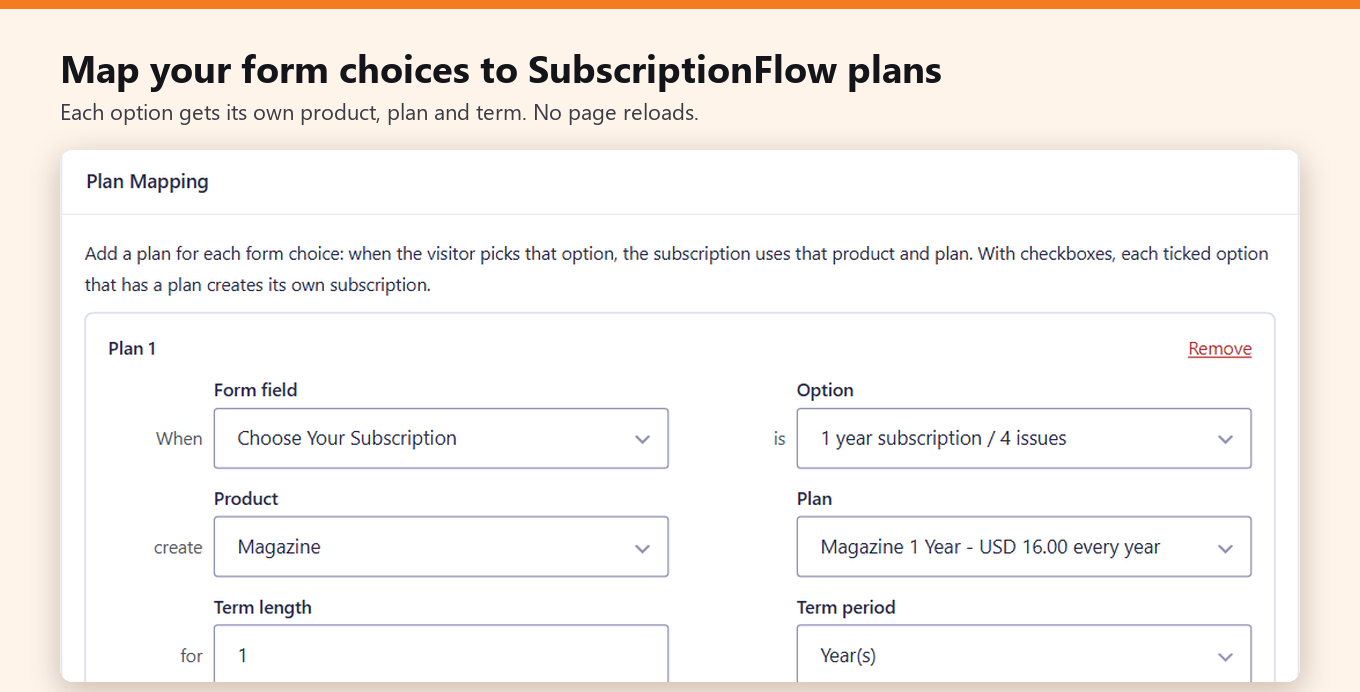
- Maps radio buttons, drop-downs, or checkboxes to different plans using Add Plan
- Records the first payment from a Gravity Forms payment add-on against the first SubscriptionFlow invoice
- Adds entry notes with the subscription ID for easy reference
- Supports conditional logic and background processing
Good for
Written from SubscriptionFlow’s own listing. Version and dates come straight from the source and are checked weekly.
What does the add-on need to work?
You need Gravity Forms 2.5 or later and a SubscriptionFlow account with an Instance URL, Client ID, and Client Secret.
Does it create duplicate customer records?
No. It matches customers by email and updates an existing record rather than creating a new one.
Can I offer multiple subscription plans on one form?
Yes. You can map radio button, drop-down, or checkbox options to different products and plans using the Add Plan feature.
How does it handle the first payment?
If a Gravity Forms payment add-on like Stripe or PayPal collects the first payment, the add-on records it against the first invoice in SubscriptionFlow, which then manages renewals.