AFL UTM Tracker from Appfromlab solves a frustrating gap in WordPress marketing: knowing which campaigns actually convert. It tracks UTM parameters through cookie-based first-party attribution and displays conversion reports directly in your Gravity Forms entries, EDD orders, and WooCommerce dashboards—without touching Google Analytics or expensive third-party tracking tools.
What It Actually Does
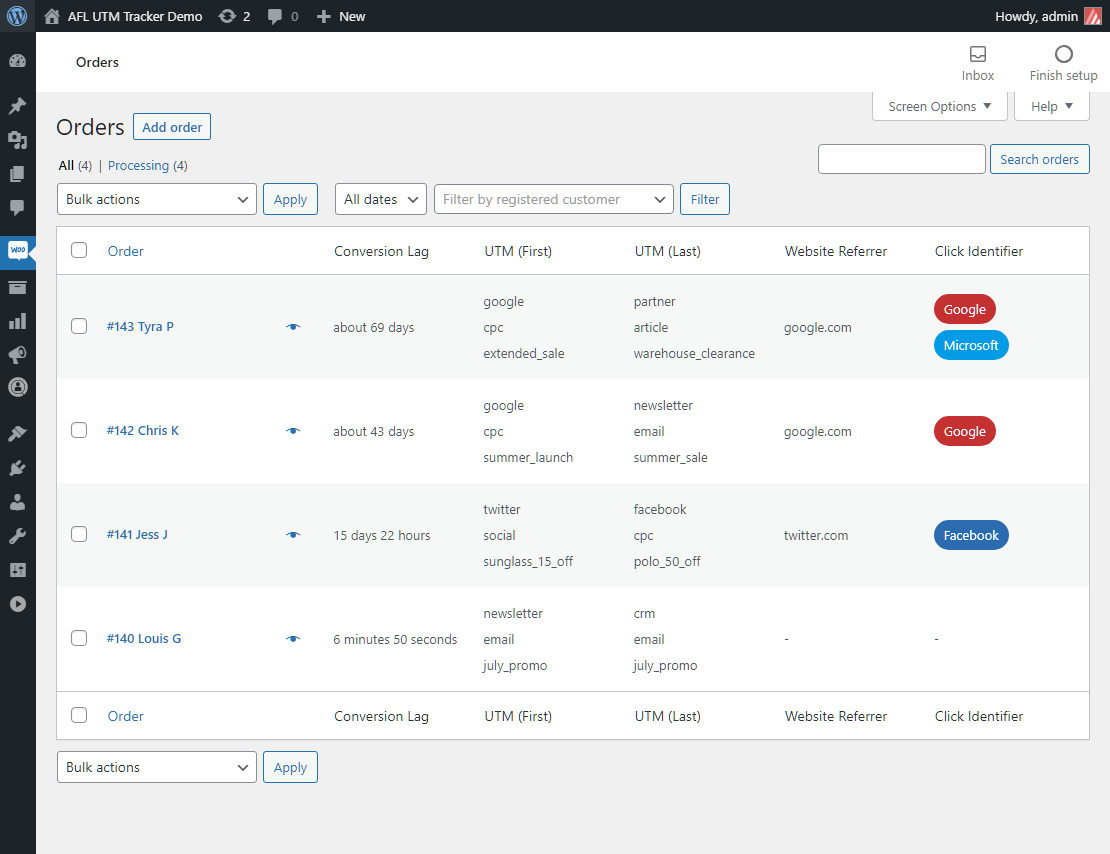
AFL UTM Tracker captures UTM parameters from URL strings when visitors land on your site, stores them in first-party cookies, then reports those values when the visitor converts. The plugin tracks first-touch and last-touch UTM data, first landing page, referring URLs, and conversion lag (time from first visit to purchase).
For supported integrations—Gravity Forms, Easy Digital Downloads, WooCommerce, Fluent Forms, Contact Form 7, and Ninja Forms—you get native reporting without hidden fields. For other form builders, JavaScript merge tags populate hidden fields manually.
The Pros
1. No hidden field configuration for Gravity Forms
Unlike other UTM trackers that require you to add hidden fields to every form, AFL UTM Tracker works automatically with Gravity Forms. Install, activate, and attribution data appears in your entries. With hundreds of forms, this saves hours of tedious field configuration.
2. First-party cookie tracking
Data stays on your domain in HTTPS first-party cookies. No third-party scripts. No data sharing with external platforms. This bypasses iOS 14.5’s App Tracking Transparency and Intelligent Tracking Prevention because it’s not cross-domain tracking—it’s your own site’s data.
3. Conversion lag tracking
Know exactly how long the customer journey takes. See that a lead from your Facebook ad visited three times over two weeks before converting. This insight changes how you evaluate campaign performance and patience levels.
4. GDPR/cookie consent integrations
Native support for Borlabs Cookie, Cookiebot, Complianz, OneTrust, and WP Consent API. Google Consent Mode and Google Tag Manager compatibility included. The plugin waits for consent before tracking, keeping you compliant without custom code.
5. Conditional last-touch rules
Set rules for when last-touch attribution updates. After 7 days, ignore organic traffic overwriting your paid campaign attribution. Or allow email campaigns to update last-touch for 30 days. This prevents “over-attribution” while staying flexible enough to capture meaningful user journeys.
6. Custom click identifiers
Beyond standard gclid, fbclid, and msclkid, track gbraid, wbraid, li_fat_id, ttclid, or your own custom parameters (ref, aff, etc.). Capture whatever tracking tokens your ad platforms use.
7. Cache-friendly implementation
Works with page caching technologies without breaking cache. The JavaScript loads efficiently and doesn’t require dynamic page generation. Your performance stays fast.
8. Data ownership
All attribution data lives in your WordPress database. No monthly SaaS fees. No usage limits. No risk of a third-party service shutting down and taking your historical data with it. Export and analyze however you want.
The Cons
1. Requires HTTPS
No SSL certificate means no tracking. The plugin won’t function on HTTP-only sites. If you’re still running without SSL in 2026, this plugin (and good security practice) requires you to fix that first.
2. Advanced features limited to supported integrations
The seamless no-hidden-fields experience only works with the six supported plugins. For WPForms, Formidable, WS Forms, JetFormBuilder, HubSpot, Zoho, Jotform, or Calendly embeds, you’re back to manually configuring hidden fields with JavaScript merge tags. It works, but it’s more effort.
3. No subscription tracking
The plugin tracks initial conversions well, but recurring subscription attribution (renewal tracking) isn’t built in. If your business model depends heavily on subscription analytics, you’ll need supplemental tracking.
4. Learning curve on attribution windows
Conditional last-touch rules are powerful but require understanding attribution logic. Set windows too short, you miss legitimate touchpoints. Too long, your attribution gets muddied. Expect some trial and error to find the right settings for your sales cycle.
5. Gravity Forms webhook/Zapier required for CRM push
To send UTM data to external CRMs from Gravity Forms, you need the Webhook Add-On or Zapier. The plugin captures the data; getting it out to your CRM requires additional tools.
Use Cases That Work
1. Multi-Touch B2B Sales Cycles
A prospect discovers you through organic search (first touch), retargets via Facebook (middle touch), and finally converts after clicking a LinkedIn sponsored post (last touch). AFL UTM Tracker shows the complete journey, not just the final click. You know which campaigns initiated interest versus which closed the deal.
2. Agency Client Reporting
Run Gravity Forms-based lead generation for multiple clients. Each form submission includes full attribution data. Export reports showing which channels drive leads, conversion lag by source, and first landing page performance. No digging through Google Analytics—it’s all in the WordPress dashboard.
3. E-Commerce Campaign Validation
Running Easy Digital Downloads or WooCommerce? See exactly which UTM parameters drove each order. Identify that your “Spring Sale” email campaign had a 2-day conversion lag while Facebook ads converted same-day. Adjust campaign timing and expectations accordingly.
4. Content Marketing ROI
Track which blog posts (first landing page) initiate conversions that happen weeks later. Your “Ultimate Guide to Gravity Forms” post might not show immediate conversions in analytics, but AFL UTM Tracker reveals it’s the entry point for 40% of your high-value leads. Justify content investment with actual attribution data.
5. Affiliate and Partnership Tracking
Use custom parameters (ref, aff) to track partner referrals beyond standard UTM codes. See which partnerships drive first-time visitors versus repeat conversions. Negotiate partner deals based on actual first-touch and last-touch contribution data.
Pricing
Appfromlab offers tiered licensing based on site count:
- Single Site – $79.00/year
- 5 Sites – $149.00/year
- 25 Sites – $299.00/year
- 100 Sites – $499.00/year
- WordPress Multisite Network – $499.00/year
Note: Specific pricing requires inquiry or checkout on Appfromlab’s website. Pricing is not publicly displayed.
Who Should Buy This?
✅ Gravity Forms users who want attribution without hidden field headaches
✅ WooCommerce/EDD stores running multi-channel campaigns
✅ Agencies managing client lead generation
✅ Privacy-conscious marketers avoiding third-party trackers
✅ Anyone frustrated with Google Analytics attribution gaps
❌ Skip if you need subscription renewal attribution
❌ Skip if your site doesn’t have SSL/HTTPS<br/❌ Skip if you use unsupported form builders exclusively
❌ Skip if you want fully automated CRM integration (requires webhooks/Zapier)
The Verdict
AFL UTM Tracker fills a genuine need: simple, privacy-compliant attribution without SaaS costs or complex configuration. For Gravity Forms users, the “no hidden fields” automation alone justifies the purchase. The first-party data approach sidesteps ad-blockers, iOS privacy changes, and GDPR complications that plague third-party trackers.
The plugin isn’t perfect. HTTPS requirement, limited advanced features for unsupported form builders, and no native subscription tracking are real limitations. But for most WordPress marketers running Gravity Forms, EDD, or WooCommerce with standard sales cycles, it delivers exactly what it promises: clear, actionable attribution data that stays in your control.
If you’ve been flying blind on campaign performance or wrestling with Google Analytics 4’s attribution limitations, this plugin offers a simpler, faster path to understanding what actually drives conversions on your site.

