
AskEntries for Gravity Forms
Search Gravity Forms entries using natural-language questions and take bulk actions on the results.
What it does
Gravity Forms has a built-in search, but it only matches exact words. AskEntries lets you type a plain question—like
or
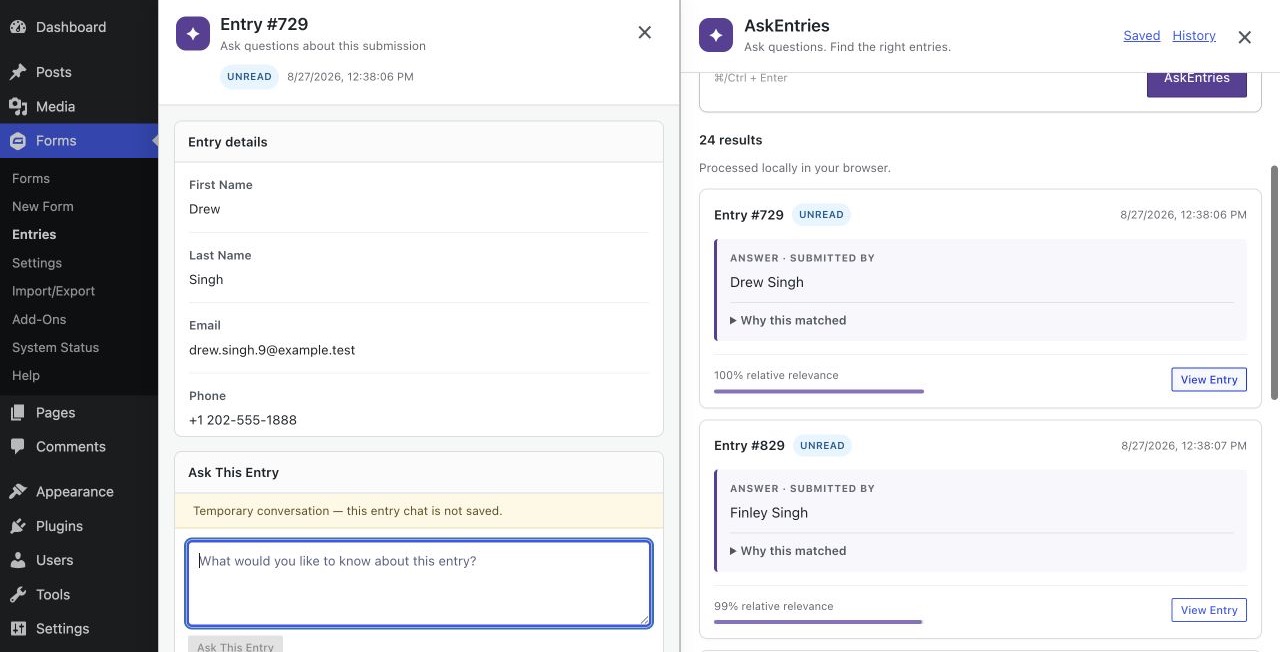
—and it finds entries that match the meaning, not just the wording. You see extracted answers and highlighted passages so you can judge relevance without opening each entry.
Once you have results, you can select individual entries, the whole results page, or every qualifying entry. From a floating panel you can add notes, send personalized emails using Gravity Forms merge tags, and mark entries as read, starred, or unstarred. A batch progress summary shows you what succeeded and what didn't.
All semantic analysis runs inside your browser. Entry text is never sent to an external AI service, and no third-party API key is needed. The add-on integrates directly with the Gravity Forms Entries and Entry Detail screens and respects existing Gravity Forms user capabilities.
Key features
- Ask natural-language questions across a form's entries using browser-side semantic search
- Filter results by read status and date range; adjust minimum relevance without re-running the query
- View extracted answers alongside supporting passages and links to original entries
- Select individual, page-wide, or all qualifying entries for bulk actions
- Send personalized batch emails using Gravity Forms merge tags with recipient preview before sending
- Open an entry panel beside results to read a submission without losing your place
- Save and reuse questions per user and form; device-local history restores cached results
Good for
Written from Ujwol Bastakoti’s own listing. Version and dates come straight from the source and are checked weekly.
Does this send my entries to an external AI service?
No. Semantic analysis and answer extraction run entirely inside your browser. No entry text is sent to an external API, and no third-party AI key is required.
How many entries can one query cover?
Each query is limited to the newest 1,000 matching entries and up to 6,000 passages.
Can I email multiple people from the results?
Yes. You can select individual entries, the current results page, or all qualifying results, then send personalized emails using Gravity Forms merge tags. You review recipient counts and masked addresses before sending.
What are the minimum requirements?
You need WordPress 6.4 or higher, Gravity Forms 3.0 or higher, PHP 8.0 or higher, a supported modern browser, and a valid AskEntries license.