
Manage Drafts
Manage Drafts gives you an admin screen to view, annotate, remind, extend, export, and delete every Save & Continue draft across your forms.
What it does
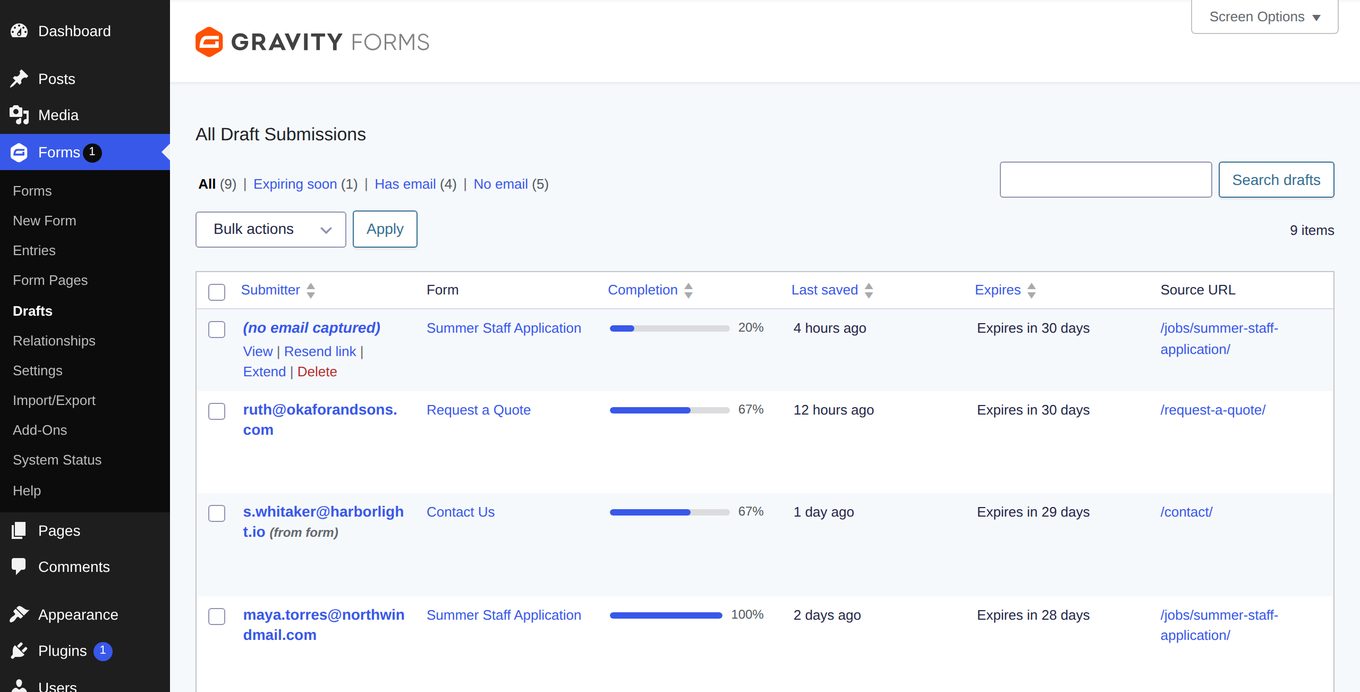
Gravity Forms' Save & Continue feature lets visitors pause and return to a form later, but there's no built-in way for you to see those unfinished submissions. Manage Drafts adds a native Drafts screen under Forms → Drafts so you can see exactly what's sitting in progress.
From that screen you can read draft field values, send submitters a reminder email with their resume link, extend expiry dates, add notes, and export or delete drafts in bulk. Notes you add to a draft carry over to the entry's notes when the person eventually submits.
The add-on also shows you where people stall — which form page they abandon and which required fields they leave blank. A dashboard widget and optional digest email keep you updated on aging drafts without having to check manually.
Key features
- One list of all Save & Continue drafts across every form, with filtering, search, and sortable columns
- Entry-style detail view showing field values, pending file uploads, and submitter email source
- Send reminder emails with the private resume link through Gravity Forms notifications or a fallback template
- Reveal and copy the resume link on demand — it stays hidden until you request it
- Extend expiry dates or bulk-act on many drafts at once (remind, extend, export, delete)
- Stall analytics showing which form page people abandon and which required fields go unfilled
- Dashboard widget and optional scheduled digest email summarizing aging drafts
Good for
Written from Odd Jar’s own listing. Version and dates come straight from the source and are checked weekly.
Do I need a license to use the basic draft screen?
No. The drafts list, detail view, resume-link reveal, notes, and delete actions work without a license. A license adds reminder emails, expiry extension, CSV export, completion tracking, stall analytics, the dashboard widget, and the scheduled digest.
Can I control who on my team can see drafts?
Yes. Access follows Gravity Forms capabilities (view, edit, delete, and export entries), and there is a configurable view capability setting.
Is the resume link ever exposed in exports or page source?
No. The resume token is treated like a password — it is hidden until you explicitly reveal it, and it is never included in CSV exports.
What happens to notes I add to a draft?
When the submitter completes and submits the form, any notes you added to the draft migrate automatically to the resulting entry's native notes.