
The Problem
This one came up in the Gravity Forms community: an agency’s client sites email the owners whenever a form comes in, but the emails keep landing in spam or getting lost, and the clients aren’t happy. They’d rather get a text. The only option they found was the Twilio add-on, and setting up Twilio just to text one person about new leads turned into a project of its own.
Good news: you probably don’t need SMS at all. What the client wants is an alert on their phone that they can’t miss. Here are the options, from quickest to most reliable.
First, Fix the Email
Lost notification emails are almost always a delivery problem, and it’s worth fixing whatever else you do. WordPress sends mail from your web server by default, which inbox providers trust very little. Send it through a proper mail service instead, with SPF and DKIM records set up for the domain.
Gravity SMTP is included with Gravity Forms Elite and Nonprofit licenses, and any reputable SMTP plugin and service will do the job. Also make sure the notification’s From Email uses the site’s own domain, not the visitor’s address.
Skip the Email-to-Text Trick
Many guides still suggest sending the notification to an address like [email protected], which the carrier turns into a text message. That no longer works for most people. T-Mobile’s gateway went offline in December 2024, AT&T and Cricket shut theirs down on June 17, 2025, and Verizon’s is unreliable and being phased out (source).
Why Twilio Feels So Heavy
It isn’t really Twilio’s fault. Sending texts from an app to US numbers on a regular 10-digit number requires A2P 10DLC registration with the carriers: details about the business sending the messages, plus a “campaign” describing what you send and how people opt in. That’s sensible for marketing texts, and a lot of paperwork for “you have a new lead.”
Option 1: Pushover Email Alias (Any License)
Pushover is a simple notification app for iPhone, Android and desktop. Each user gets an email alias, shown in the app’s settings, and any email sent to it arrives on their phone as a push notification.
- Have the client install Pushover and copy their Pushover email alias from the app’s settings.
- In the form’s Settings → Notifications, add a new notification (keep the existing one) and set Send To to that alias.
- Keep it short, because it lands on a phone screen. A subject like New lead: {Name:1} and a few key fields in the message are plenty; skip
{all_fields}.
It works with any Gravity Forms license, and the alert skips the client’s inbox entirely, so their spam filter is out of the picture. It still relies on your site sending email, though, so do the SMTP fix above. Pushover has a 30-day free trial, then a one-time $4.99 per platform with no subscription.
Option 2: Slack (Pro License and Up)
If the client already lives in Slack, the official Slack add-on posts each submission to a channel or straight to a person as a direct message, and the Slack app on their phone does the alerting. It’s included with Pro, Elite and Nonprofit licenses and doesn’t depend on email at all.
Option 3: Pushover via Webhooks (Elite or Nonprofit)
This is the most reliable option: the site talks to Pushover directly, so no email is involved anywhere. It needs the Webhooks add-on, which is included with Elite and Nonprofit licenses.
- In your Pushover account, create an application (for example “Website leads”) and copy its API token. Copy the client’s user key from their Pushover dashboard.
- In the form, go to Settings → Webhooks and add a new feed.
- Set Request URL to
https://api.pushover.net/1/messages.json, Request Method to POST and Request Format to FORM. - Set Request Body to Select Fields and add these, choosing Add Custom Key and Add Custom Value for each:
| Key | Value |
|---|---|
token | your application’s API token |
user | the client’s user key |
title | New lead: {form_title} |
message | {Name:1} ({Phone:3}) and {Message:4}, using your own field merge tags |
url | {admin_url}admin.php?page=gf_entries&view=entry&id={form_id}&lid={entry_id} |
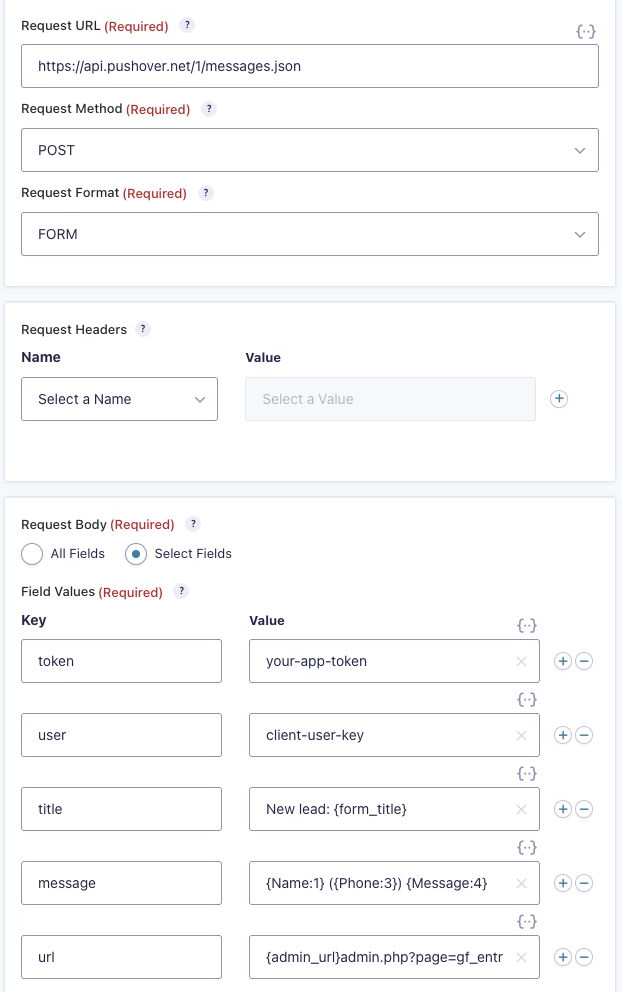
The url line puts a link to the entry right in the alert. Build it as shown rather than using {entry_url}: in a webhook, {entry_url} comes through with its & characters HTML-encoded, and the link breaks on the phone.
Save the feed and submit a test entry. Pushover’s free allowance is 10,000 messages a month per account, far more than a contact form will ever send.
If It Really Has to Be a Text
Some clients will only accept an actual SMS. Then the Twilio add-on is the right tool, and the registration is a one-time job: register the business and a campaign for your Twilio number, or ask Twilio about a toll-free number, which goes through its own verification instead. Budget for the setup time and Twilio’s monthly fees, and let the client know why it costs more than an app alert.
Which One Should You Use?
| Option | License | Relies on email? | Setup |
|---|---|---|---|
| Pushover email alias | Any | Yes | 5 minutes |
| Slack add-on | Pro and up | No | 10 minutes |
| Pushover via Webhooks | Elite or Nonprofit | No | 10 minutes |
| Twilio SMS | Twilio add-on | No | Carrier registration |
For most client sites: fix the email delivery, then add a Pushover alert. The clients get their instant phone alert, and nobody has to fill in carrier paperwork.
Need More Help?
If you still need help, use the chat or leave a comment below and we’ll get back to you.
Comments