
The Problem
This one came up in the Gravity Forms community: the Forms list shows Entries, Views and Conversion for every form, but the numbers are for all time. Is it possible to see the conversion rate for a specific date range, like last month or the week a campaign ran?
Not out of the box. Gravity Forms has no date filter on that screen, and an all-time number hides exactly what you want to know: whether a form is converting better or worse than it used to.
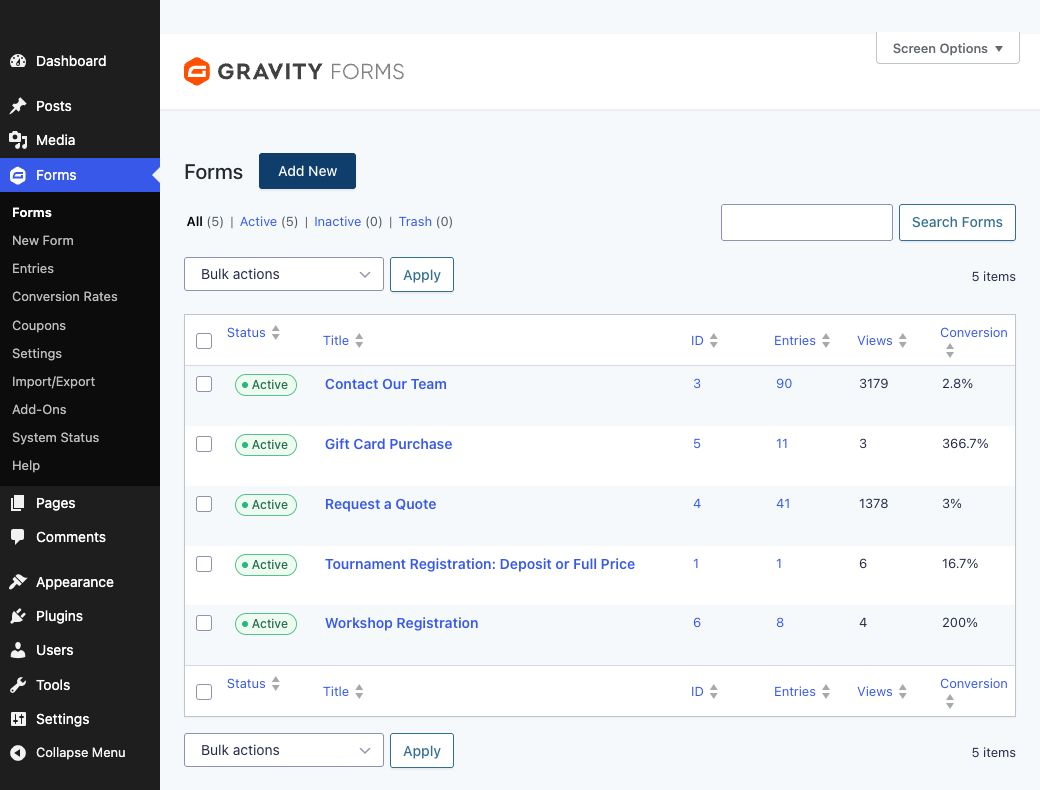
How Gravity Forms Counts Views
The good news is that the data for a date range is already in your database. Gravity Forms counts a view each time a form is displayed to someone who isn’t logged in as an administrator, and it stores views per form with a date: the first view starts a record, and the views over the next 24 hours are added to it. Entries have their own date too.
So you can count entries and views between any two dates, as long as you’re happy with day-level precision.
Why “Reset Views” Isn’t the Answer
You may have spotted Reset Views in the Forms list’s bulk actions. It permanently deletes a form’s view history, but the Entries column still counts every entry ever received, so the conversion rate shoots up instead of starting fresh. Leave it alone unless you really want the history gone.
The Solution: A Conversion Rates Page
This snippet adds a Conversion Rates page under the Forms menu. Pick a start and end date and it shows the entries, views and conversion rate of every form for that period. It opens on the last 30 days.
Step 1: Add the Snippet
Add this to your child theme’s functions.php or a code snippets plugin:
/**
 * Adds Forms → Conversion Rates: entries, views and conversion
 * for each form in a date range (default: the last 30 days).
 */
add_filter( 'gform_addon_navigation', function ( $menus ) {
	$menus[] = array(
		'name'       => 'gr_conversion_rates',
		'label'      => 'Conversion Rates',
		'callback'   => 'gr_conversion_rates_page',
		'permission' => 'gravityforms_view_entries',
	);

	return $menus;
} );

function gr_conversion_rates_page() {
	global $wpdb;

	if ( ! class_exists( 'GFFormsModel' ) ) {
		return;
	}

	// Dates come in as Y-m-d in the site's timezone. Default: the last 30 days.
	$today = current_time( 'Y-m-d' );
	$start = isset( $_GET['start'] ) ? sanitize_text_field( wp_unslash( $_GET['start'] ) ) : '';
	$end   = isset( $_GET['end'] ) ? sanitize_text_field( wp_unslash( $_GET['end'] ) ) : '';

	if ( ! preg_match( '/^\d{4}-\d{2}-\d{2}$/', $start ) ) {
		$start = gmdate( 'Y-m-d', strtotime( $today . ' -29 days' ) );
	}
	if ( ! preg_match( '/^\d{4}-\d{2}-\d{2}$/', $end ) ) {
		$end = $today;
	}
	if ( $start > $end ) {
		list( $start, $end ) = array( $end, $start );
	}

	// Gravity Forms stores entry and view dates in UTC.
	$start_utc = get_gmt_from_date( $start . ' 00:00:00' );
	$end_utc   = get_gmt_from_date( $end . ' 23:59:59' );

	$views = $wpdb->get_results(
		$wpdb->prepare(
			'SELECT form_id, SUM(count) AS total FROM %i WHERE date_created BETWEEN %s AND %s GROUP BY form_id',
			GFFormsModel::get_form_view_table_name(),
			$start_utc,
			$end_utc
		),
		OBJECT_K
	);

	// Same rule as the Forms list: active entries only (no spam or trash).
	$entries = $wpdb->get_results(
		$wpdb->prepare(
			"SELECT form_id, COUNT(id) AS total FROM %i WHERE status = 'active' AND date_created BETWEEN %s AND %s GROUP BY form_id",
			GFFormsModel::get_entry_table_name(),
			$start_utc,
			$end_utc
		),
		OBJECT_K
	);

	$rows = array();
	foreach ( GFAPI::get_forms( null ) as $form ) {
		$form_id   = (int) $form['id'];
		$v         = isset( $views[ $form_id ] ) ? (int) $views[ $form_id ]->total : 0;
		$e         = isset( $entries[ $form_id ] ) ? (int) $entries[ $form_id ]->total : 0;
		$rows[]    = array(
			'id'         => $form_id,
			'title'      => $form['title'],
			'entries'    => $e,
			'views'      => $v,
			'conversion' => $v > 0 ? round( $e / $v * 100, 1 ) . '%' : '—',
		);
	}

	// Busiest forms first.
	usort( $rows, function ( $a, $b ) {
		return $b['views'] <=> $a['views'] ?: $b['entries'] <=> $a['entries'];
	} );
	?>
	<div class="wrap">
		<h1>Conversion Rates</h1>

		<form method="get" style="margin:1em 0;">
			<input type="hidden" name="page" value="gr_conversion_rates">
			<label>From <input type="date" name="start" value="<?php echo esc_attr( $start ); ?>"></label>
			<label>To <input type="date" name="end" value="<?php echo esc_attr( $end ); ?>"></label>
			<?php submit_button( 'Show', 'secondary', '', false ); ?>
		</form>

		<table class="widefat striped">
			<thead>
				<tr><th>ID</th><th>Form</th><th>Entries</th><th>Views</th><th>Conversion</th></tr>
			</thead>
			<tbody>
			<?php foreach ( $rows as $row ) : ?>
				<tr>
					<td><?php echo (int) $row['id']; ?></td>
					<td><a href="<?php echo esc_url( admin_url( 'admin.php?page=gf_entries&id=' . $row['id'] ) ); ?>"><?php echo esc_html( $row['title'] ); ?></a></td>
					<td><?php echo (int) $row['entries']; ?></td>
					<td><?php echo (int) $row['views']; ?></td>
					<td><?php echo esc_html( $row['conversion'] ); ?></td>
				</tr>
			<?php endforeach; ?>
			</tbody>
		</table>

		<p class="description">Views are grouped by Gravity Forms into one record per form per day, so counts near the start and end dates are approximate.</p>
	</div>
	<?php
}
It reads the same tables as the Forms list and counts entries the same way: active entries only, so spam and trash are left out. Dates are in your site’s timezone (Settings → General). Anyone who can view entries can open the page.
Step 2: Pick a Date Range
- Go to Forms → Conversion Rates.
- Choose the From and To dates and click Show.
- Click a form’s name to open its entries.
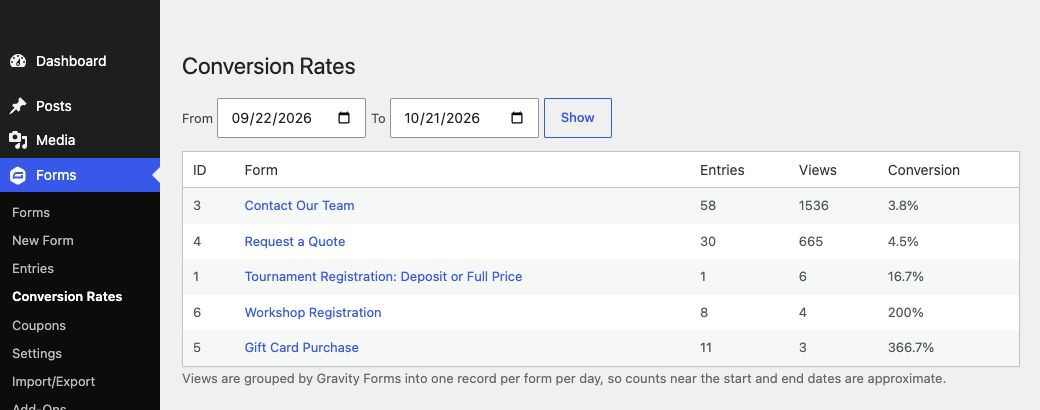
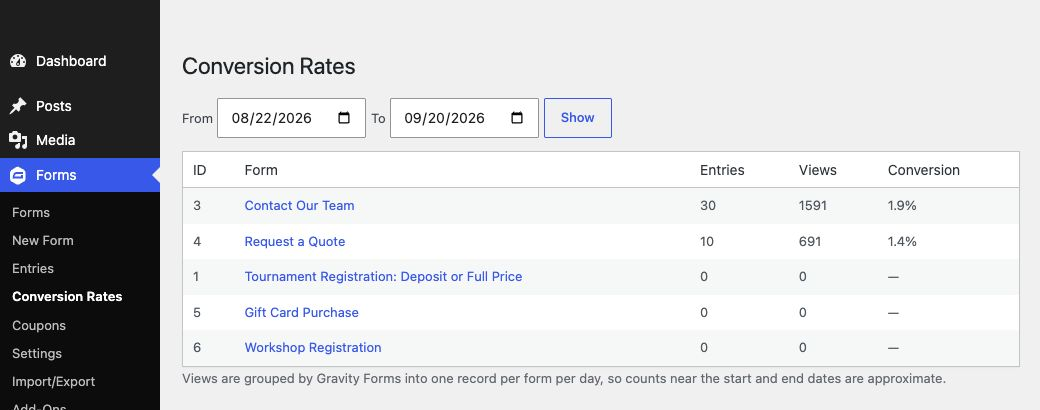
On my test site, the Contact Our Team form shows 2.8% in the Forms list. Split into two 30-day periods, it’s 1.9% for the first and 3.8% for the second: the form doubled its conversion rate, and the all-time number gave no hint of it.
Reading the Numbers
A few things affect the view count, and they apply to the Forms list as much as to this page:
- Your own visits don’t count. Views by logged-in administrators are skipped, but entries you add yourself are counted. Test submissions while logged in, entries you add in the admin and imported entries can push a form over 100%.
- Page caching can hide views. A page served from a full-page cache doesn’t run Gravity Forms, so that visit isn’t counted as a view. If your site caches the pages your forms sit on, treat the conversion rate as a comparison between periods rather than an exact figure.
- Views are grouped by day. Each view record covers up to 24 hours from its first view and is dated by that first view, so counts at the very start and end of a range can be off slightly. Ranges of a week or more aren’t really affected.
- A turned-off counter shows nothing. If the
gform_disable_view_counterfilter is used on a form, it has no views and the page shows a dash.
Download the Plugin
It’s free. Get the plugin from this tutorial, ready to import and activate.
Need More Help?
If you still need help, use the chat or leave a comment below and we’ll get back to you.
Comments