
Business Finder for Gravity Forms
Turn Gravity Forms submissions into a searchable, map-based business directory with distance filtering.
What it does
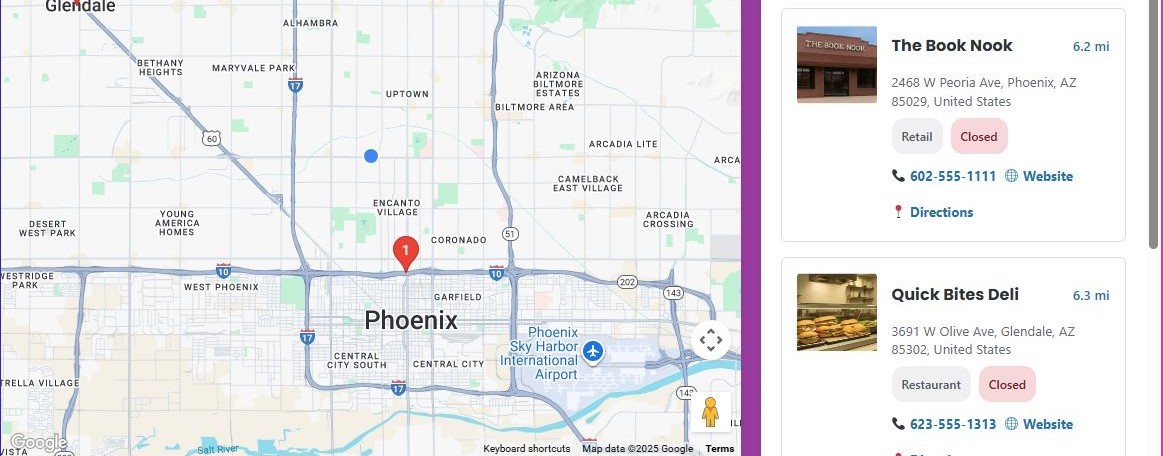
Finding local businesses is hard when listings are buried in plain text pages. Business Finder takes the data your visitors submit through a Gravity Form and plots each entry on an interactive Google Map, so anyone can browse by location at a glance.
When someone submits a form with a business address, the plugin automatically geocodes it using the Google Maps API. Visitors can then search by distance, filter by category, and tap a button to find businesses near their current location.
It suits anyone running a local directory site — from a chamber of commerce to a franchise locator — and works with all Gravity Forms license types.
Key features
- Automatic address geocoding via Google Maps API on every form submission
- Distance-based search with a radius you can set between 5 and 100 miles
- "Use My Location" button lets visitors find nearby listings instantly
- Smart business hours parsing that shows open or closed status
- Category filtering and sorting options for easier browsing
- CSV bulk import with automatic geocoding for existing listings
- Admin dashboard for managing all directory entries
Good for
Written from Dmitry Alexander’s own listing. Version and dates come straight from the source and are checked weekly.
Does this work with my current Gravity Forms license?
Yes, the listing states it is compatible with all Gravity Forms licenses.
Do I need to set up Google Maps myself?
The plugin uses the Google Maps API for geocoding and the map display, so you will need a Google Maps API key.
Can I import existing business data instead of entering it one by one?
Yes, you can bulk import businesses from a CSV file and the plugin will geocode the addresses automatically.
How does the distance search work?
Visitors can filter results by radius, and you can configure the available range anywhere from 5 to 100 miles.