
Record Lookup for Gravity Forms
Let form submitters check the status of their own entry using a reference number, without needing an account.
What it does
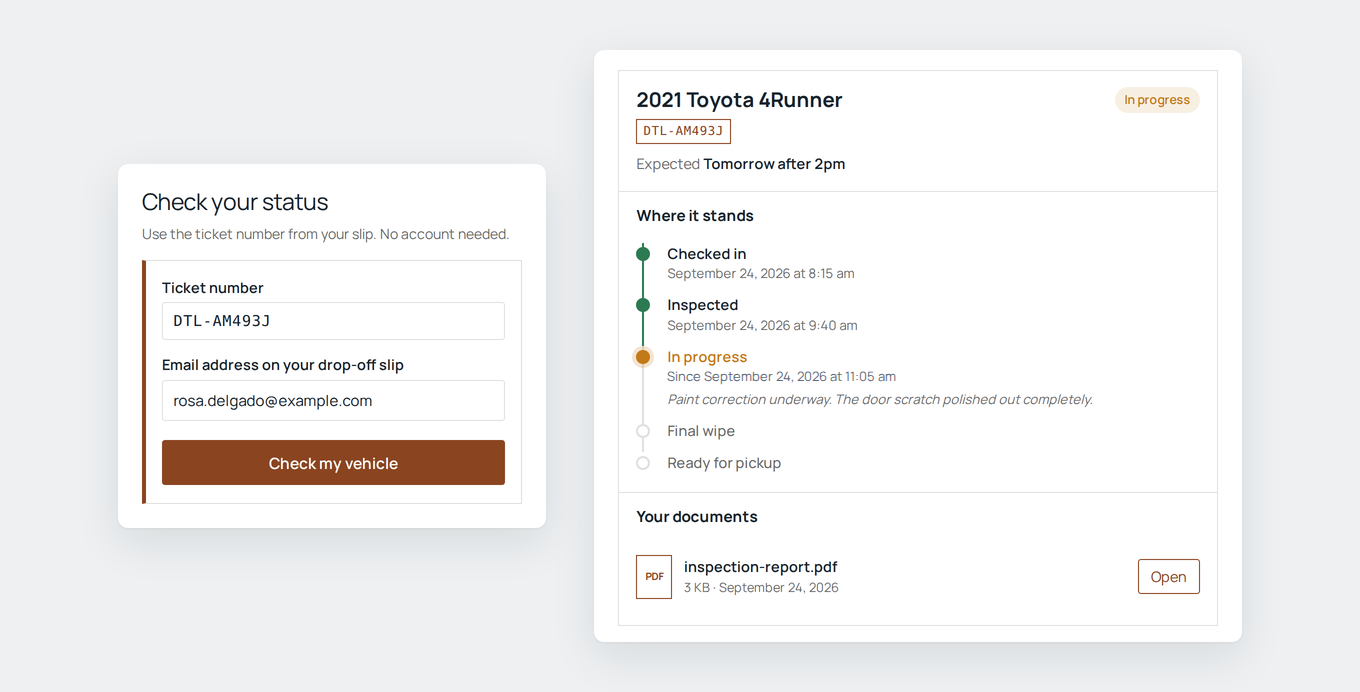
When someone submits a form and then has to wait, they often follow up by phone or email just to ask where things stand. Record Lookup gives each submission a reference number that appears in the confirmation and notification emails, so the customer can check their own status anytime.
To look up a record, the customer enters their reference number plus a detail only they would know, like their email address. Both have to match, or nothing is shown. Repeated wrong guesses lock the lookup temporarily, and the same message appears whether or not a reference exists, so there is no way to probe for valid numbers.
You control what the customer sees: which fields are displayed, how stages are labeled, notes, expected dates, and documents released when ready. Stage changes can trigger Gravity Forms notifications, and customers with multiple submissions can view all their records at once.
Key features
- Each entry gets a reference number that appears in confirmations and emails via a merge tag
- Two-factor lookup: reference number plus a known detail like email address
- You choose which fields are shown, grouped by the form's own section breaks
- Move records through custom stages from the entry screen or in bulk from the Entries list
- Attach notes, expected dates, and documents to a record and release them when ready
- Stage changes can trigger Gravity Forms notifications to the customer
- Lookup works on any page via a block or shortcode, styled with your site's fonts and an accent color
Good for
Written from Dmitry Alexander’s own listing. Version and dates come straight from the source and are checked weekly.
Does the customer need an account to look up their record?
No. They only need their reference number and a matching detail like their email address.
Can I use my own stage names instead of a default set?
Yes. You define the stages yourself, so a repair shop can use its own terminology and a city office can use theirs.
How does setup work?
Settings live inside each form. A checklist shows what's left and lets you add the reference to the confirmation, create the lookup page, and add a status email each in one click.
What happens if someone guesses the wrong reference number repeatedly?
The lookup locks for a period after repeated wrong guesses, and the same message always appears whether or not a reference exists.