
Gravity Forms Power Automate Add-On
Connect Gravity Forms to 1,500+ Microsoft Power Automate services without writing code or paying per-task fees.
What it does
Every time someone submits a Gravity Forms form, you can automatically trigger a process in Microsoft Power Automate. That means entries can flow into Excel, files can land in SharePoint, leads can appear in Dynamics 365, and your team can get a Teams notification — all without manual work.
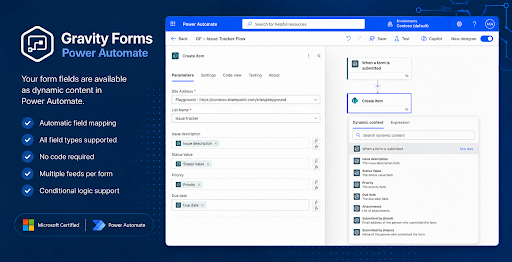
You set up a feed on any form, map your fields, and build your flow in Power Automate. Your form fields show up automatically as dynamic content inside Power Automate the moment the feed is active. One form can run multiple flows using conditional logic.
This add-on is built for teams already on Microsoft 365. There are no per-task fees, so running thousands of submissions costs the same as running a handful. The Standard edition handles entry-triggered flows; a Professional upgrade adds bi-directional actions like creating, updating, or fetching entries from inside Power Automate.
Key features
- Trigger Power Automate flows on every Gravity Forms submission
- Automatic field mapping — form fields appear as dynamic content in Power Automate
- Multiple feeds per form with conditional logic
- No per-task pricing regardless of submission volume
- Connects to 1,500+ Power Automate services including Excel, SharePoint, Teams, and Dynamics 365
- Microsoft Certified connector built by Reenhanced
- 30-day free trial and 30-day money-back guarantee
Good for
Written from Reenhanced’s own listing. Version and dates come straight from the source and are checked weekly.
Does this cost extra per form submission?
No. There are no per-task fees, so your cost stays the same whether you get 100 or 100,000 submissions.
Do I need to write any code?
No. Field mapping is automatic and setup takes about 5 minutes through the plugin settings.
What's the difference between Standard and Professional?
Standard fires Power Automate flows when entries are created. Professional adds the ability to create, update, delete, fetch, or validate entries from inside Power Automate, plus triggers for payments, approvals, status changes, and notes, with an extra secret-key security layer.
Is there a way to try it before buying?
Yes. You can try it free for 30 days using coupon onemonthfree at checkout on the 1-month, 1-domain plan, and every plan includes a 30-day money-back guarantee.