
Search for Gravity Forms
Search Gravity Forms entries across one or many forms and display results anywhere on your site using shortcodes.
What it does
Finding and displaying specific Gravity Forms entries in posts, pages, or notifications normally requires custom PHP. Search for Gravity Forms handles this with shortcodes, so you can pull entries from one form, a few forms, or every form on your site without writing code.
You control which entries appear by setting filter conditions using operators like equals, contains, greater-than, and less-than. Results can be sorted, limited in number, and de-duplicated. You then shape the output with a display template that supports HTML, CSS classes, links, and field placeholders.
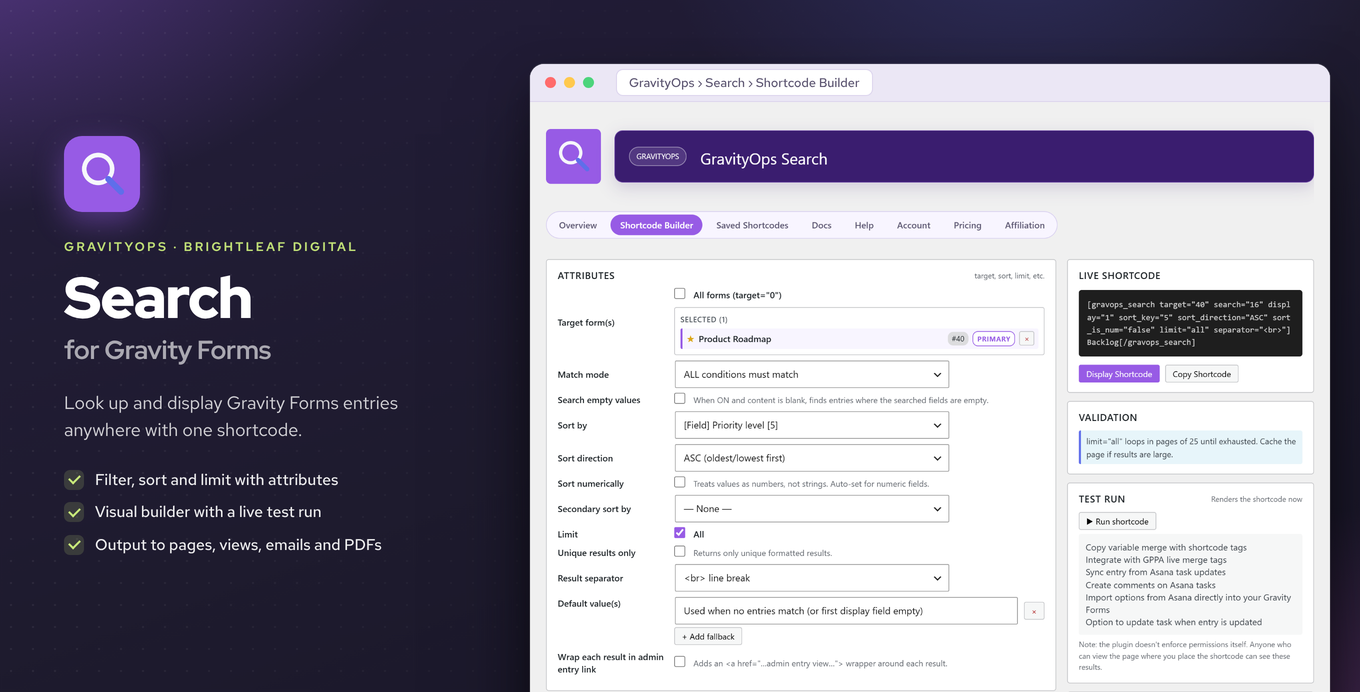
The add-on works in pages, posts, GravityViews, form confirmations, notifications, and PDFs. Shortcodes can also be nested for layered lookups. The premium version adds a visual shortcode builder with live preview, test runs, and a saved-shortcodes library.
Key features
- Search entries across one form, multiple forms, or all forms on your site
- Filter results with operators: equals, contains, like, in/not in, greater-than, less-than
- Sort, limit, and de-duplicate results via shortcode attributes
- Shape output with HTML templates using field placeholders, classes, and links
- Nest shortcodes for layered or related-entry lookups
- Display results in pages, posts, confirmations, notifications, GravityViews, and PDFs
- Premium visual builder with live preview, test runs, and saved-shortcode library
Good for
Written from Brightleaf Digital’s own listing. Version and dates come straight from the source and are checked weekly.
Do I need to write PHP to use this?
No. Everything is configured through shortcode attributes and a display template.
Where can I display the search results?
Results can appear in pages, posts, GravityViews, form confirmations, notifications, and PDFs.
What filter operators are available?
You can filter using equals, contains, like, in, not in, greater-than, and less-than.
What does the premium version add?
Premium includes a visual shortcode builder with live preview, test runs, and a library for saving shortcodes.