
If your plugin or product lives on GitHub, support requests that arrive by email end up being copied into issues by hand. Some never make it, and the person who asked has no way to follow along.
This tutorial builds a Gravity Forms support form that opens an issue in your GitHub repository as soon as it’s submitted. There are two ways to do it: the Webhooks Add-On, with no code, or a code snippet that works with any Gravity Forms license and also adds labels and a link to the new issue in the confirmation. The form is the same for both.
What You Need
- Gravity Forms. The no-code method needs the Webhooks Add-On, which comes with the Elite license (see Gravity Forms Pricing). The code snippet works with any license.
- A GitHub repository with Issues turned on, and a GitHub account that can create issues in it.
- For the snippet: a place to add PHP snippets, like WPCode Box, and access to your site’s
wp-config.phpfile.
Webhooks or Code: Which One?
| Webhooks Add-On | Code snippet | |
|---|---|---|
| License | Elite | Any |
| Code | None | One PHP snippet |
| Labels (bug, enhancement, question) | No | Yes, by request type |
| Link to the issue in the confirmation | No | Yes |
| Where the GitHub token is kept | In the feed settings | In wp-config.php |
| Empty optional fields | Shown as empty rows | Left out |
| @mentions and #123 in the visitor’s text | Sent as typed | Made harmless |
| When the issue is created | In the background, after the submission | During the submission |
If you have Elite and just want issues to show up, use the Webhooks Add-On. If you want labels, a link for the visitor, or you don’t have Elite, use the snippet.
Step 1: Create a GitHub Token
Gravity Forms needs a token to create issues for you. In GitHub, go to Settings → Developer settings → Personal access tokens → Fine-grained tokens and click Generate new token:
- Token name: something you’ll recognize later, like “Support form on example.com”.
- Expiration: pick a date and put a reminder in your calendar to replace it.
- Repository access: Only select repositories, then your repository.
- Permissions: Issues → Read and write. GitHub adds read-only Metadata by itself. Nothing else is needed.
Copy the token (it starts with github_pat_). GitHub only shows it once. It can only work with issues in that one repository, so if it ever leaks, nobody can touch your code with it.
Issues are opened under the GitHub account that owns the token. Visitors don’t need a GitHub account to use the form.
Step 2: Build the Support Form
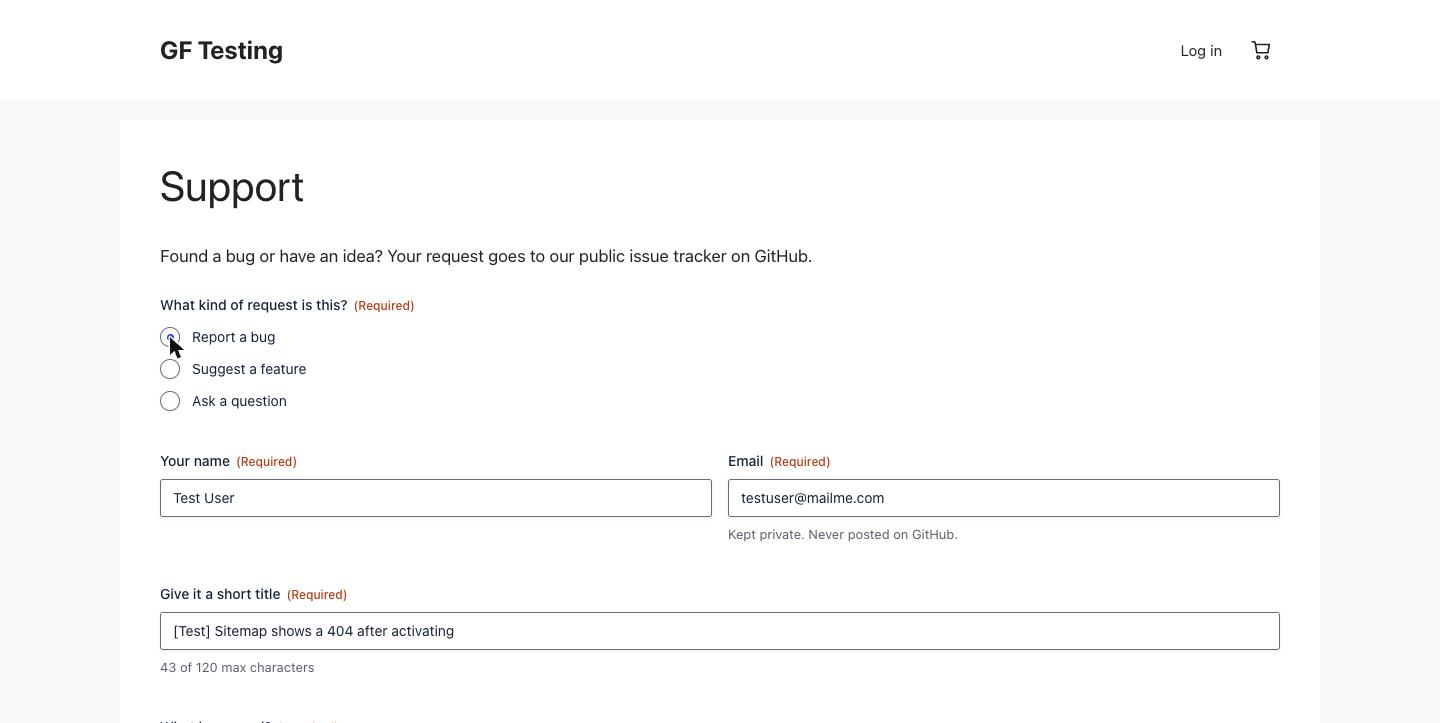
Create a new form with these fields. The Admin Field Labels (field Advanced tab) are what the code snippet looks for. The Webhooks method doesn’t need them, but they don’t hurt.
| Label | Field | Admin Field Label | Notes |
|---|---|---|---|
| What kind of request is this? | Radio Buttons | request_type | Report a bug, Suggest a feature, Ask a question. Turn on Show Values and set the values to bug, feature, question |
| Your name | Single Line Text | Required. Stays in the entry | |
| Required. Description: “Kept private. Never posted on GitHub.” | |||
| Give it a short title | Single Line Text | request_title | Required. Maximum Characters 120. Becomes the issue title |
| What happened? | Paragraph Text | request_details | Required. Placeholder: 1. What you were doing 2. What you expected to happen 3. What happened instead |
| Plugin version | Single Line Text | version | Optional |
| WordPress version | Single Line Text | wp_version | Optional |
| PHP version (optional) | Single Line Text | php_version | Optional |
| Theme and other plugins (optional) | Single Line Text | environment | Optional |
| Public issue | Consent | Required. Checkbox text: “I understand my title and description will be posted publicly on GitHub, so I haven’t included passwords or private details.” |
Put the three version fields side by side in one row, and change the submit button text to Send to GitHub so it’s clear where the request goes.
Now pick a method.
Method 1: Webhooks Add-On (No Code)
The Webhooks Add-On sends the entry to any URL. GitHub has a URL for creating issues, so all you do is fill in the feed.
Step 3: Add the Webhooks Feed
Go to Form Settings → Webhooks → Add New and fill it in. Replace OWNER/REPO with your repository (for example your-name/your-plugin):
| Setting | Value |
|---|---|
| Name | Open a GitHub issue |
| Request URL | https://api.github.com/repos/OWNER/REPO/issues |
| Request Method | POST |
| Request Format | JSON |
| Request Headers | Add three, each with Add Custom Key and Add Custom Value:Authorization = Bearer github_pat_… (your token after the word Bearer and a space)Accept = application/vnd.github+jsonX-GitHub-Api-Version = 2022-11-28 |
| Request Body | Select Fields |
Step 4: Map the Title and Body
Under Field Values, add two rows:
- Key
title: choose the Give it a short title field. - Key
body: choose Add Custom Value and paste the issue text below. The Webhooks Add-On fills in merge tags in custom values, so you can write the whole issue in GitHub’s markdown.
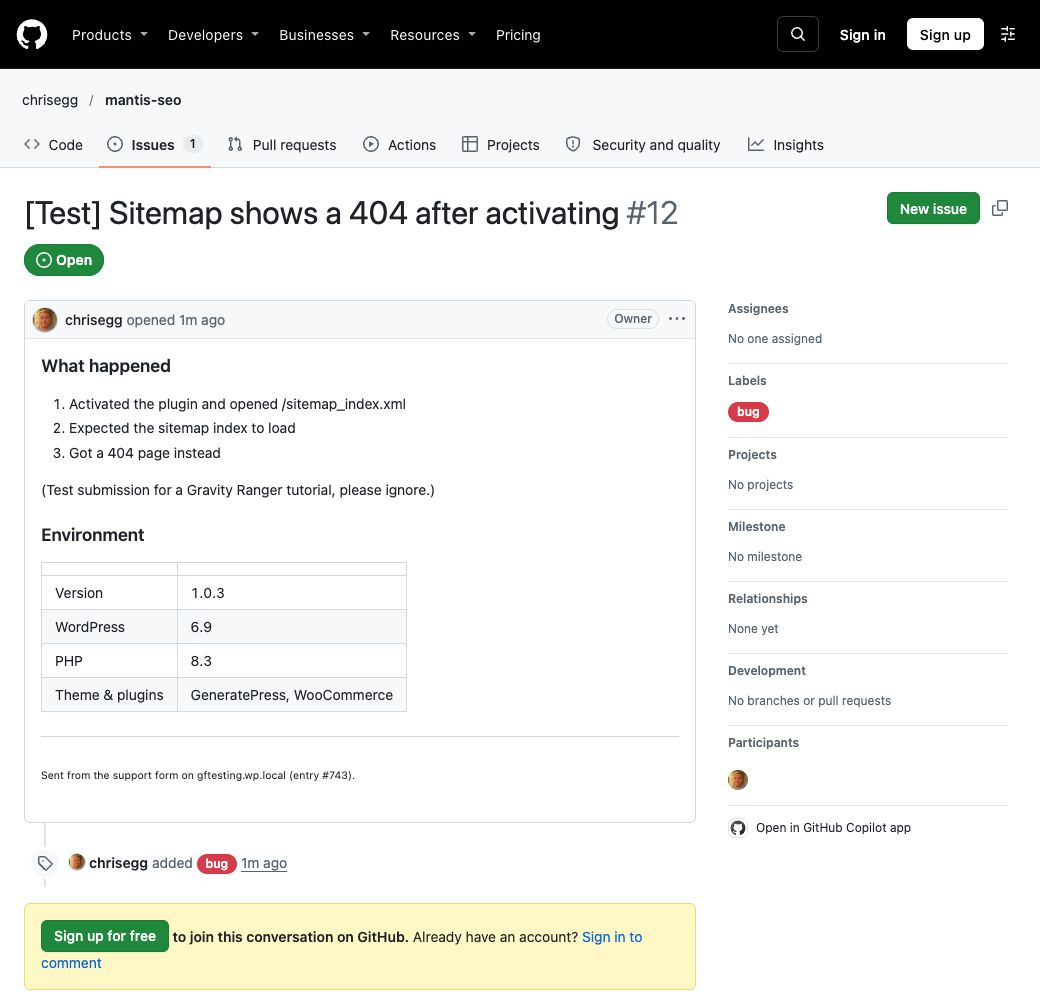
### {What kind of request is this?:1}

{What happened?:5}

### Environment

| | |
|---|---|
| Version | {Plugin version:6} |
| WordPress | {WordPress version:7} |
| PHP | {PHP version (optional):8} |
| Theme & plugins | {Theme and other plugins (optional):9} |

---
<sub>Sent from the support form on {embed_url} (entry #{entry_id}).</sub>
The number after the colon in each merge tag is the field ID. If your form is different, insert your own fields with the merge tag button. {embed_url} is the page the form was on and {entry_id} lets you find the entry later. Leave the name and email out: everything in the body is public.
Step 5: Set the Confirmation
Webhooks feeds run in the background after the visitor sees the confirmation, so the confirmation can’t link to the issue. Keep it simple: “Thanks, we have it. Your request is on its way to our public issue tracker on GitHub. We’ll reply by email.”
Test It
Submit the form, open the entry and look at the Notes. Webhook sent. Response code: 201. means GitHub created the issue. The add-on writes “Webhook sent” for every answer, so read the number: 401 is a wrong or expired token, 404 a wrong repository name or a token without access to it, and 422 means GitHub didn’t accept the data. Those three create nothing.
What the Webhooks Method Can’t Do
- Labels. GitHub wants labels as a list, and the add-on sends text. If you add a
labelskey, GitHub answers 422 (“is not an array”) and no issue is created. Add labels on GitHub while you triage, or use the snippet. - A link for the visitor. See Step 5.
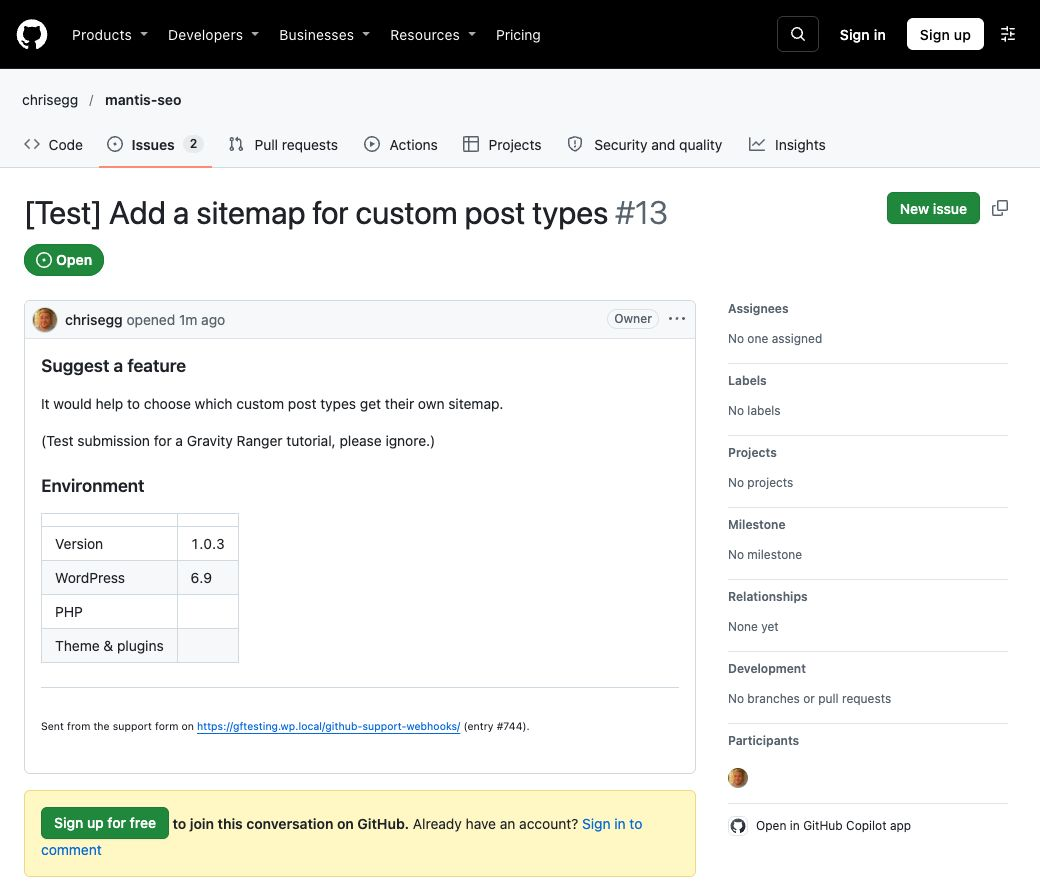
- Skipping empty fields. Rows for optional fields the visitor left blank stay in the table, empty.
- Keeping the token out of the database. It’s saved in the feed, so anyone who can edit your forms can see it. That’s one more reason to give it access to one repository and nothing else.
- Cleaning the text. If someone types
@usernamein the details, GitHub notifies that user.#12links to issue 12.
Method 2: Code Snippet (Any License)
The snippet calls the same GitHub URL from PHP while the form submits, so it can read the answer and show the visitor a link to their issue.
Step 3: Add the CSS Class
Go to Form Settings → Form Layout and set CSS Class Name to gr-github-issue. The snippet only acts on forms with this class, so you can use it on more than one form and your other forms aren’t touched.
Step 4: Check the Admin Field Labels
Make sure the fields have the Admin Field Labels from the table in Step 2. The snippet finds fields by these labels, not by ID, so you can reorder or rebuild the form freely. Only request_type, request_title and request_details matter; the version fields are optional. Fields without one of these labels, like name and email, are never sent.
Step 5: Put the Token in wp-config.php
Open wp-config.php and add this line above /* That's all, stop editing! */, with your token:
define( 'GR_GITHUB_TOKEN', 'github_pat_...' );This keeps the token out of the database, form exports and the snippet, so it can’t leak through a backup you share or a form you send someone.
Step 6: Add the Snippet
In WPCode Box, add a new PHP snippet, paste the code, and make sure it runs on the whole site, not only in the admin or only on the front end. Change your-name/your-repo to your repository:
<?php
/**
 * Gravity Forms: open a GitHub issue when a support form is submitted.
 * From GravityRanger.com
 *
 * Setup:
 * 1. Form Settings → CSS Class Name: gr-github-issue
 * 2. Give your fields these Admin Field Labels (Advanced tab):
 *      request_type     Radio buttons with the values bug, feature, question
 *      request_title    Single Line Text
 *      request_details  Paragraph Text
 *      version          Optional
 *      wp_version       Optional
 *      php_version      Optional
 *      environment      Optional
 *    Fields without one of these labels (name, email) are never sent to GitHub.
 * 3. Add your token to wp-config.php, never to this snippet:
 *      define( 'GR_GITHUB_TOKEN', 'github_pat_...' );
 * 4. Set your repository below.
 * 5. Put {github_issue_message} or {github_issue_url} in the form's confirmation.
 */

// Your repository, as owner/repo.
define( 'GR_GITHUB_REPO', 'your-name/your-repo' );

// Labels for each request type. Use labels that exist in your repository.
function gr_github_labels() {
	return array(
		'bug'      => array( 'bug' ),
		'feature'  => array( 'enhancement' ),
		'question' => array( 'question' ),
	);
}

// Is this one of our support forms?
function gr_github_is_support_form( $form ) {
	$classes = preg_split( '/\s+/', (string) rgar( $form, 'cssClass' ) );
	return in_array( 'gr-github-issue', $classes, true );
}

// Visitor text going into a public issue: no HTML, and no @mentions or #123
// references that would ping people or link other issues.
function gr_github_clean( $text ) {
	$text = wp_strip_all_tags( (string) $text );
	$text = preg_replace( '/(^|\s)@(\w)/u', "$1@\u{200B}$2", $text );
	return preg_replace( '/(^|\s)#(\d)/u', "$1#\u{200B}$2", $text );
}

// Create the issue right after the entry is saved, so the confirmation can link to it.
add_action( 'gform_entry_created', function ( $entry, $form ) {
	if ( ! gr_github_is_support_form( $form ) || 'spam' === rgar( $entry, 'status' ) ) {
		return;
	}
	if ( ! defined( 'GR_GITHUB_TOKEN' ) || '' === GR_GITHUB_TOKEN ) {
		GFAPI::add_note( $entry['id'], 0, 'GitHub', 'No issue opened: GR_GITHUB_TOKEN is not set in wp-config.php.', 'gr-github', 'error' );
		return;
	}

	// Collect values by Admin Field Label.
	$keys = array( 'request_type', 'request_title', 'request_details', 'version', 'wp_version', 'php_version', 'environment' );
	$v    = array_fill_keys( $keys, '' );
	foreach ( $form['fields'] as $field ) {
		if ( in_array( $field->adminLabel, $keys, true ) ) {
			$v[ $field->adminLabel ] = trim( (string) rgar( $entry, (string) $field->id ) );
		}
	}

	$type  = in_array( $v['request_type'], array( 'bug', 'feature', 'question' ), true ) ? $v['request_type'] : 'question';
	$title = gr_github_clean( preg_replace( '/\s+/', ' ', $v['request_title'] ) );
	$title = '' !== $title ? mb_substr( $title, 0, 120 ) : ucfirst( $type ) . ' from the website';

	// Issue body in GitHub markdown.
	$headings = array( 'bug' => 'What happened', 'feature' => 'The idea', 'question' => 'The question' );
	$body     = '### ' . $headings[ $type ] . "\n\n" . ( '' !== $v['request_details'] ? gr_github_clean( $v['request_details'] ) : '_No details given._' ) . "\n";

	$rows = array(
		'Version'         => $v['version'],
		'WordPress'       => $v['wp_version'],
		'PHP'             => $v['php_version'],
		'Theme & plugins' => $v['environment'],
	);
	$table = '';
	foreach ( $rows as $label => $value ) {
		if ( '' !== $value ) {
			$table .= '| ' . $label . ' | ' . str_replace( array( '|', "\r", "\n" ), array( '\|', ' ', ' ' ), gr_github_clean( $value ) ) . " |\n";
		}
	}
	if ( '' !== $table ) {
		$body .= "\n### Environment\n\n| | |\n|---|---|\n" . $table;
	}
	$body .= "\n---\n<sub>Sent from the support form on " . wp_parse_url( home_url(), PHP_URL_HOST ) . ' (entry #' . $entry['id'] . ").</sub>\n";

	$labels = gr_github_labels();

	$response = wp_remote_post( 'https://api.github.com/repos/' . GR_GITHUB_REPO . '/issues', array(
		'timeout' => 20,
		'headers' => array(
			'Accept'               => 'application/vnd.github+json',
			'Authorization'        => 'Bearer ' . GR_GITHUB_TOKEN,
			'Content-Type'         => 'application/json',
			'X-GitHub-Api-Version' => '2022-11-28',
		),
		'body'    => wp_json_encode( array(
			'title'  => $title,
			'body'   => $body,
			'labels' => isset( $labels[ $type ] ) ? $labels[ $type ] : array(),
		) ),
	) );

	$code = (int) wp_remote_retrieve_response_code( $response );
	$data = json_decode( (string) wp_remote_retrieve_body( $response ), true );

	if ( 201 !== $code || empty( $data['html_url'] ) ) {
		$error = is_wp_error( $response ) ? $response->get_error_message() : 'HTTP ' . $code . ': ' . rgar( (array) $data, 'message' );
		GFAPI::add_note( $entry['id'], 0, 'GitHub', 'No issue opened. ' . $error, 'gr-github', 'error' );
		return;
	}

	gform_update_meta( $entry['id'], 'github_issue_url', esc_url_raw( $data['html_url'] ) );
	gform_update_meta( $entry['id'], 'github_issue_number', (int) $data['number'] );
	GFAPI::add_note( $entry['id'], 0, 'GitHub', 'Opened issue #' . (int) $data['number'] . ': ' . $data['html_url'], 'gr-github', 'success' );
}, 10, 2 );

// {github_issue_url} and {github_issue_message} merge tags.
add_filter( 'gform_custom_merge_tags', function ( $tags ) {
	$tags[] = array( 'label' => 'GitHub Issue URL', 'tag' => '{github_issue_url}' );
	$tags[] = array( 'label' => 'GitHub Issue Message', 'tag' => '{github_issue_message}' );
	return $tags;
} );

add_filter( 'gform_replace_merge_tags', function ( $text, $form, $entry ) {
	if ( false === strpos( $text, '{github_issue_' ) || empty( $entry['id'] ) ) {
		return $text;
	}
	$url    = (string) gform_get_meta( $entry['id'], 'github_issue_url' );
	$number = (int) gform_get_meta( $entry['id'], 'github_issue_number' );

	$message = $url
		? sprintf( '<p>Your request is now <a href="%s">issue #%d on GitHub</a>. Bookmark it to follow along.</p>', esc_url( $url ), $number )
		: '<p>We have your request and will reply by email.</p>';

	return str_replace( array( '{github_issue_url}', '{github_issue_message}' ), array( esc_url( $url ), $message ), $text );
}, 10, 3 );
What it does:
- Runs right after the entry is saved (
gform_entry_created), before the confirmation is shown. Entries marked as spam are skipped. - Builds the issue: the title, a heading that matches the request type, the details, and an Environment table with only the rows the visitor filled in.
- Adds labels by request type:
bug,enhancementorquestion. Those are GitHub’s default labels; change them ingr_github_labels()if your repository uses others. - Makes the text safe for a public issue: HTML is stripped, and an invisible space after
@and#stops mentions and issue links. - Writes the result to the entry: a note with the issue number and link, or the error GitHub sent back. The link is saved with the entry for the merge tags.
Step 7: Show the Issue Link in the Confirmation
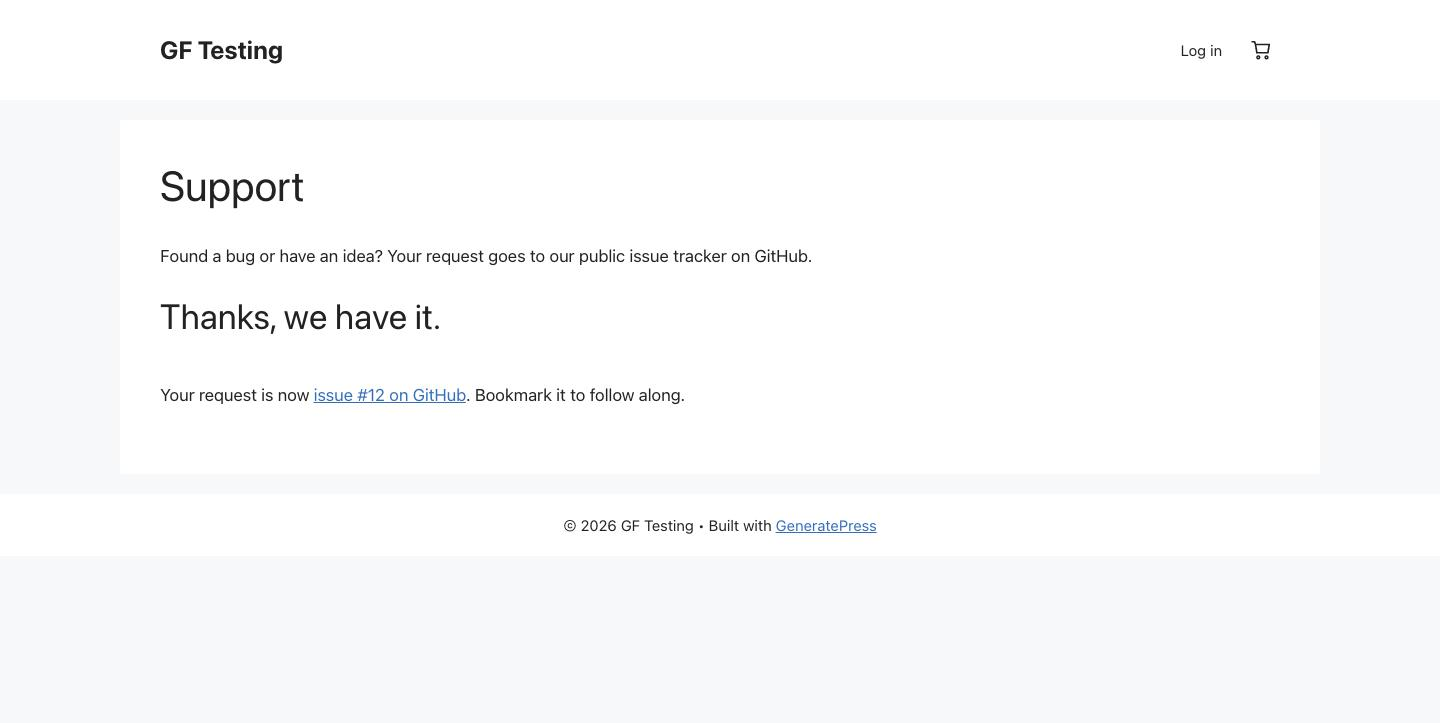
The snippet adds two merge tags to the merge tag menu: {github_issue_url} (just the address) and {github_issue_message} (a sentence with the link). Set the confirmation message to:
<h2>Thanks, we have it.</h2>
{github_issue_message}
If the issue couldn’t be created, {github_issue_message} says “We have your request and will reply by email.” instead, so the visitor never sees an error. The entry note tells you what went wrong.
Test It
Submit the form. The confirmation should link to the issue, and the entry’s Notes should say Opened issue #12 with the link. If it says No issue opened, the rest of the note is GitHub’s reason (for example “HTTP 401: Bad credentials” for a wrong or expired token).
Things to Know
- Issues in a public repository are public. The consent box and the note under the email field make that clear before anyone types. If your repository is private, the issues are private too, but visitors can’t open the link, so use a plain confirmation.
- Reply where the visitor will see it. Visitors aren’t notified about comments on GitHub unless they subscribe to the issue. Their email is in the entry, so send a short email when there’s news.
- Stop spam before it becomes an issue. Gravity Forms doesn’t run feeds for spam entries, and the snippet skips them too. Keep the honeypot on and add Gravity Forms Zero Spam or the Akismet Add-On.
- Tokens expire. When yours does, issues stop and the entry notes show 401. Replace the token before the date you picked in Step 1.
- Test without filling your repository. On a staging site, leave
GR_GITHUB_TOKENout: the snippet adds a note to the entry and opens nothing. Or point the form at a test repository while you set it up.
Download the Form Template
It’s free. Get the support form from this tutorial, ready to import, with the code snippet, the issue text for the Webhooks feed and setup notes for both methods.
Need More Help?
If you still need help, use the chat or leave a comment below and we’ll get back to you.
Comments