
Product Table for Gravity Forms
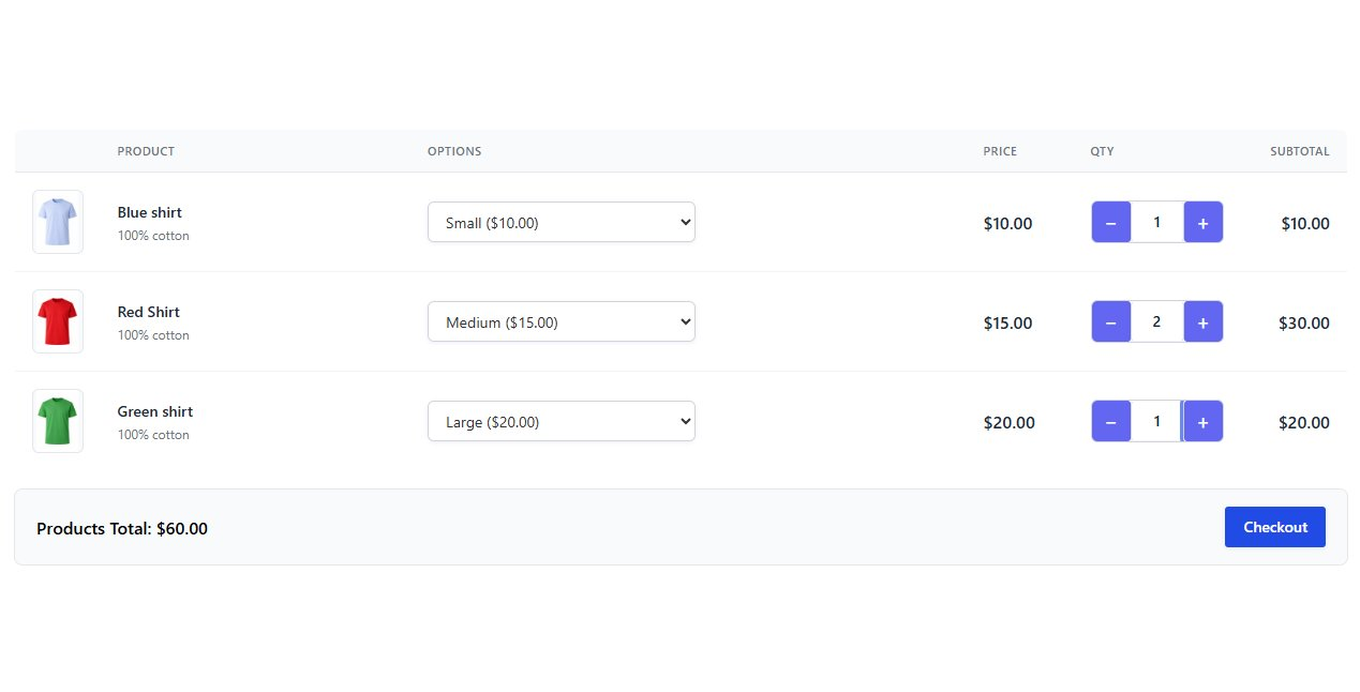
Transform Gravity Forms product fields into a visual order table with images, quantity controls, and live subtotals.
What it does
Gravity Forms handles products and payments well, but the default layout can feel plain. Product Table adds a visual order table so customers see product images, descriptions, and running totals as they shop—without changing how Gravity Forms processes the order behind the scenes.
You configure everything from the form editor and a settings page. Customers get plus/minus quantity buttons, inline option selectors for things like sizes and colors, and a total that updates instantly. On mobile, the table switches to a card layout automatically.
It works with any Gravity Forms payment add-on—Stripe, PayPal, Square, Authorize.net, and others—so you don't need to change your payment setup to use it.
Key features
- Add product images and descriptions directly in the form editor
- Plus/minus quantity buttons with instant subtotal updates
- Live running total that syncs with the native Gravity Forms Total field
- Inline dropdown selectors for product options like size or color
- Group products into separate tables with headings
- Quote Mode hides all pricing columns to turn an order form into a quote request
- Minimum and maximum quantity rules enforced on submit
Good for
Written from Dmitry Alexander’s own listing. Version and dates come straight from the source and are checked weekly.
Does it work with my existing payment add-on?
Yes. It is compatible with Stripe, PayPal, Square, Authorize.net, and all Gravity Forms payment add-ons.
Can I prevent customers from submitting an empty order?
Yes. There is a setting that requires at least one item before the form can be submitted.
Does conditional logic still work on product fields?
Yes. If a product field is hidden by conditional logic, its table row hides and its price is removed from the total. It returns when the field becomes visible again.
Can I limit how many of a product someone can order?
Yes. You can set minimum and maximum quantities per product, and the plus/minus buttons respect those limits.