
The Gravity Forms FreshBooks Add-On is a Gravity Labs add-on, included with your Gravity Forms license, that turns form submissions into FreshBooks records: clients, invoices, estimates, recurring invoices, expenses, other income, projects, time entries and more. It connects to the current FreshBooks (not FreshBooks Classic) and can record a payment on the invoice when someone pays through your form. It is an early alpha, so it is not officially supported yet.
Tested October 2026 with version 0.1.0-alpha.1. I connected it to my own FreshBooks account from my test site, built three forms, and ran real submissions, including Stripe payments in test mode. Every screenshot below comes from that test.
What It Does
You add FreshBooks feeds to a form, the same way you add a Mailchimp or Stripe feed. Each feed does one thing in FreshBooks when the form is submitted:
- Create / Update Client, matched by email address
- Create Invoice or Create Estimate, with line items from your pricing fields, a fixed line, or a FreshBooks item. Optionally emailed to the client.
- Create Recurring Invoice (a FreshBooks invoice profile, such as monthly hosting)
- Create Credit Note
- Create Expense and Create Other Income
- Create Project, Create Time Entry and Create Item
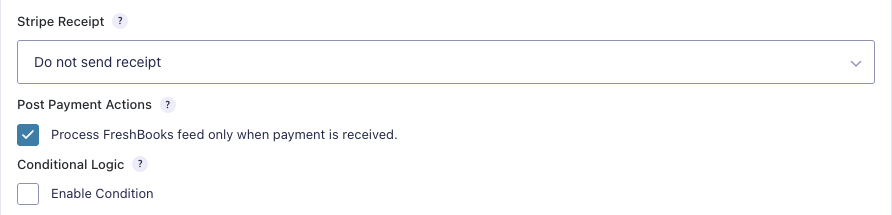
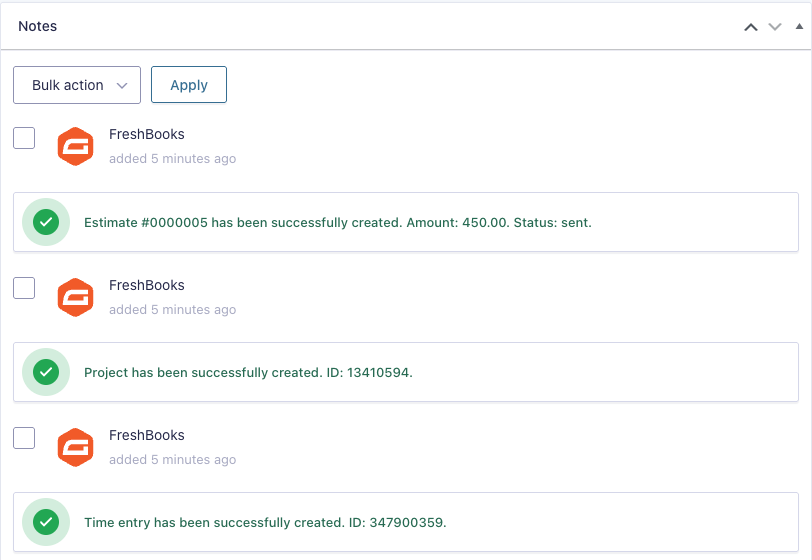
A form can have several feeds, and each feed can use conditional logic. Invoice feeds can also mark the invoice as paid after a Gravity Forms payment completes, and the add-on adds a “Process FreshBooks feed only when payment is received” option to your payment feeds. Every feed adds a note to the entry with what it created.
Setting It Up
This is the part that takes the longest, because Gravity Forms doesn’t host a FreshBooks app for you. You create your own:
- In FreshBooks, open the developer page and create an app.
- In WordPress, go to Forms → Settings → FreshBooks and copy the OAuth Redirect URI (it looks like
https://yoursite.com/gf-freshbookslabs-oauth/) into the app. Set the app’s Website URL to your site. - Turn on the scopes the add-on needs. The add-on’s README lists them: profile read, plus read and write for clients, invoices, estimates, payments, billable items, expenses, other income, time entries and projects, plus taxes read and teams read (for the staff list on expense feeds). If one is missing, FreshBooks rejects the connection.
- Paste the Client ID and Client Secret into the add-on settings, save, and click Connect to FreshBooks. If your FreshBooks login has more than one business, pick the one to use.
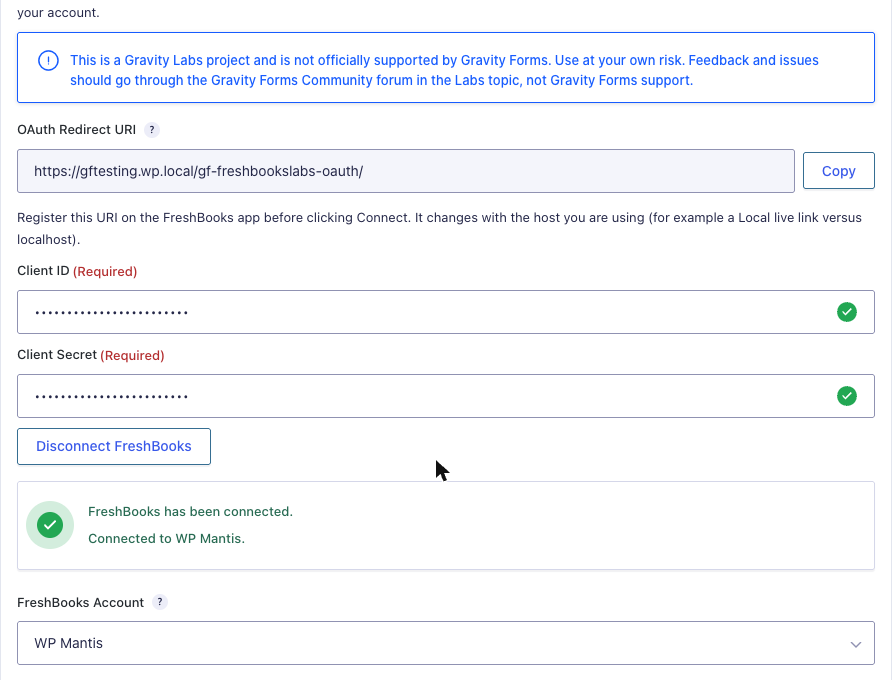
FreshBooks requires HTTPS for the redirect. My local test site runs on HTTPS, and connecting from it worked fine. Copy the redirect URI from the same domain you click Connect on; if you move from staging to live, add the live URI to your FreshBooks app and connect again.
What I Tested
I built three test forms on my test site and checked every record in FreshBooks afterwards (all of them are in the download below).
| Form | Feeds | Result |
|---|---|---|
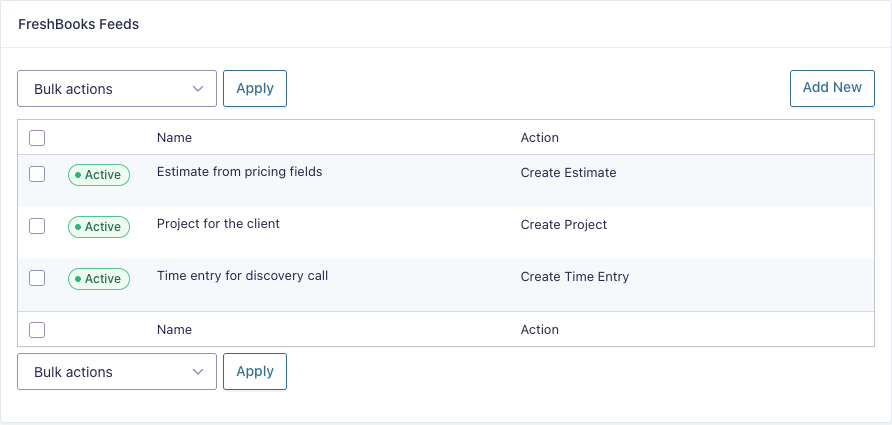
| Project request (name, email, company, phone, address, service product + add-ons, hours) | Estimate from pricing fields (emailed), Project, Time Entry | Client, $1,800 estimate (emailed) and project created. A second submission with the same email updated the client instead of creating a duplicate, and logged a 2-hour time entry on the first project. |
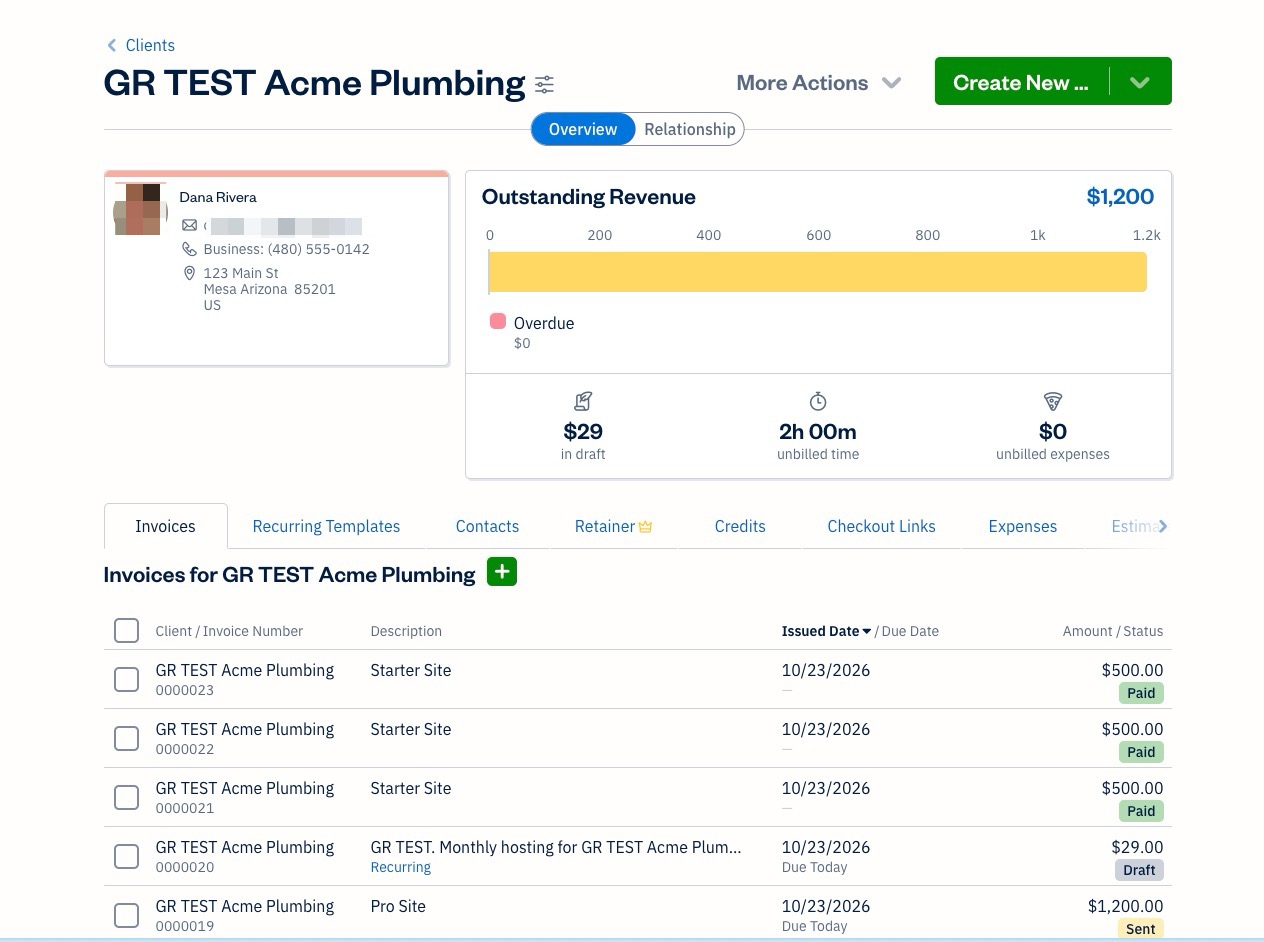
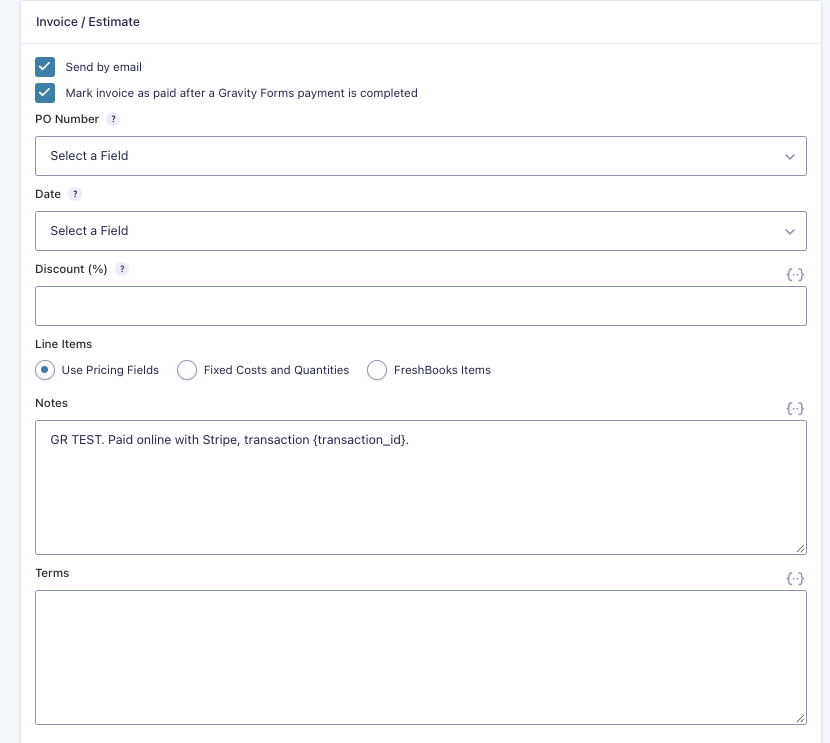
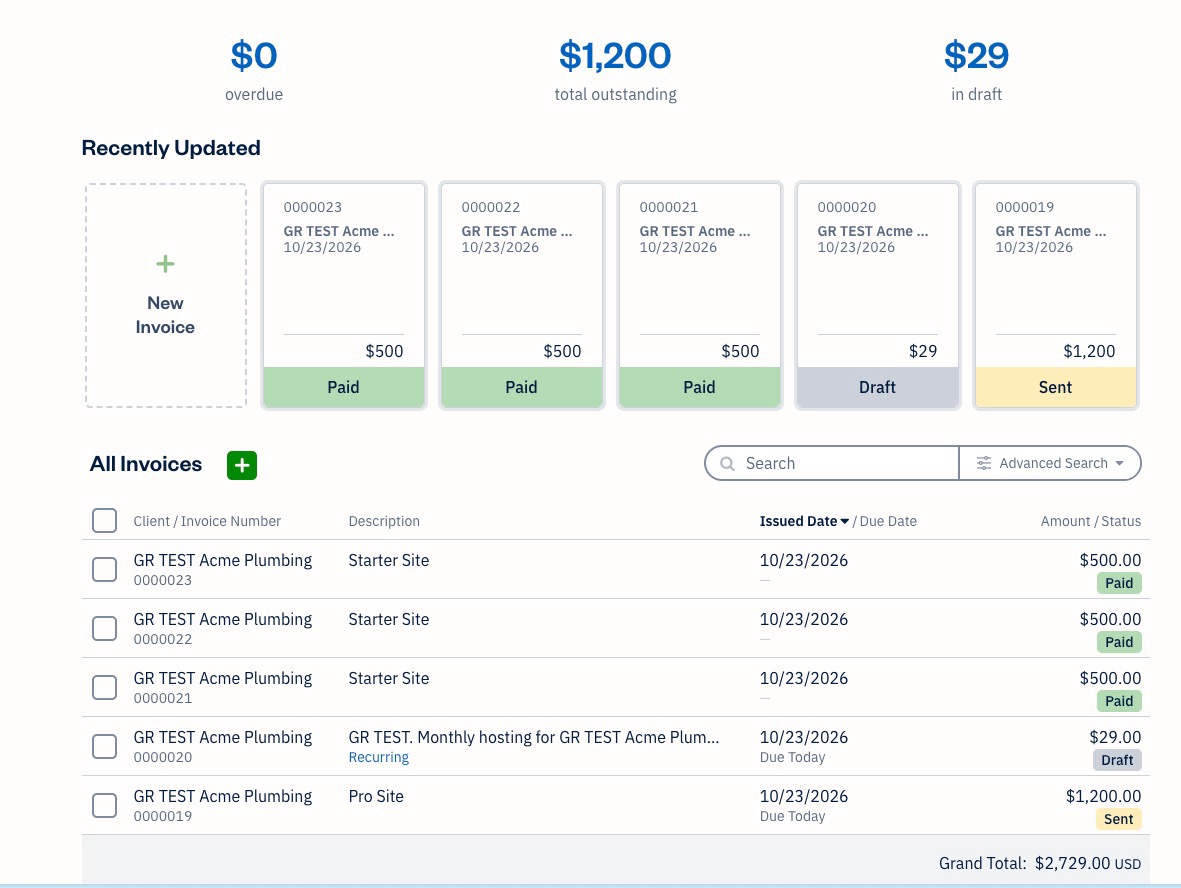
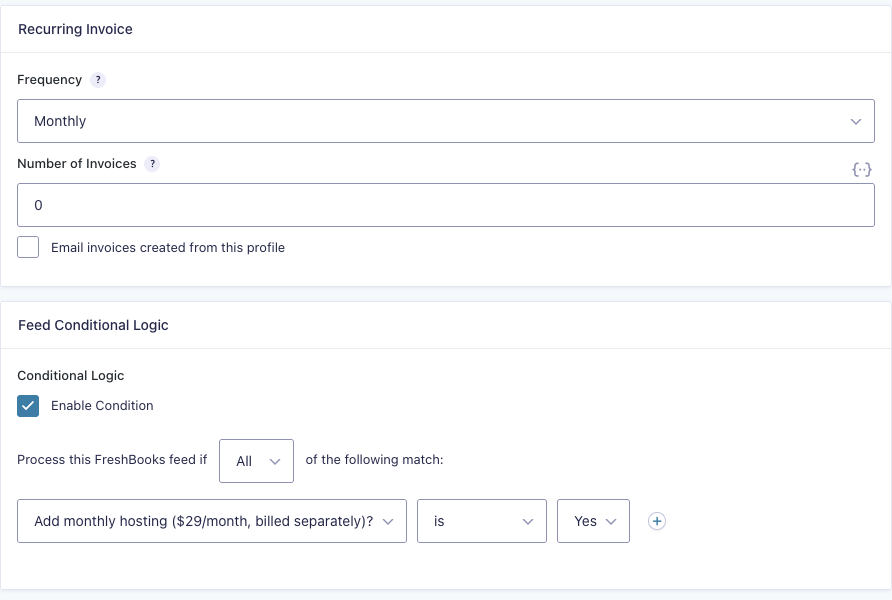
| Website package order with the Stripe Field | Invoice from pricing fields (emailed, mark as paid), Recurring Invoice when hosting = Yes | Invoice created and emailed, then marked paid in FreshBooks a few seconds later when Stripe completed the payment. Monthly $29 hosting profile created only when “Yes” was picked. |
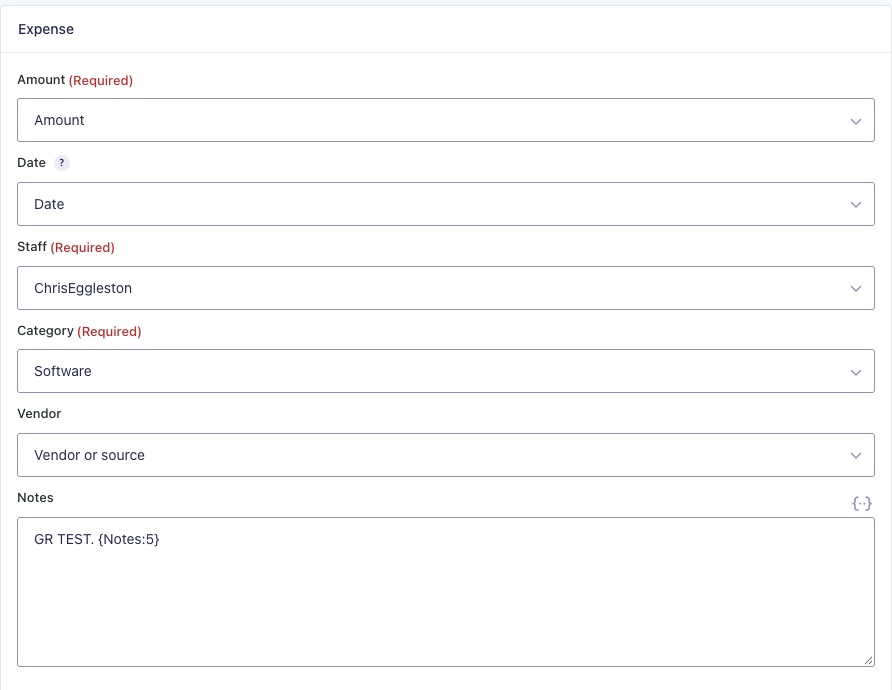
| Log an expense or income | Expense when Type = Expense, Other Income when Type = Income | Each submission created only the matching record, with the date, vendor/source and notes from the form. |
Clients
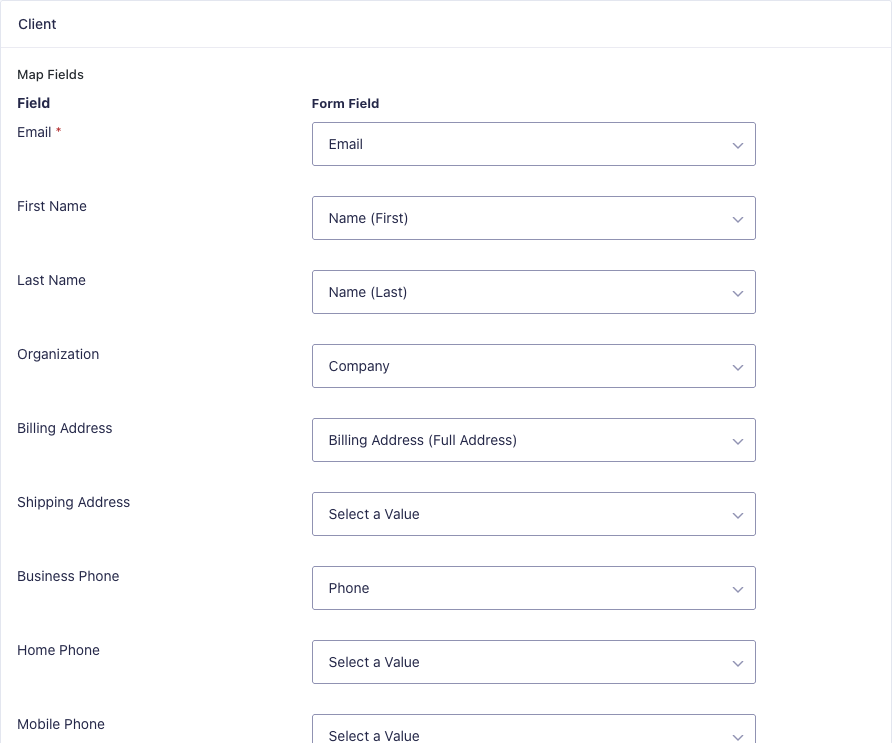
Invoice, estimate, credit note and recurring feeds always need a client. You map Email (required), First Name and Last Name, and optionally the organization, phones, billing and shipping address, VAT details, currency and language. Project, time entry and expense feeds can assign a client too. Turn on Update an existing client if email addresses match to avoid duplicate clients. It worked in my test: the second submission changed the company name on the same FreshBooks client.
Invoices and Estimates
Use Pricing Fields turns your products and options into invoice lines, so the FreshBooks total matches the form total ($1,500 website + $300 copywriting = $1,800 in my test). Fixed Costs and Quantities adds one line from text or merge tags, and FreshBooks Items uses an item from your FreshBooks catalog. New invoices and estimates are drafts unless you turn on Send by email, which sends the normal FreshBooks email to the mapped client email.
Payments
With the Stripe Add-On, the add-on created the invoice when the form was submitted, then recorded a payment on it in FreshBooks once Stripe confirmed the charge. FreshBooks showed the invoice as Paid with nothing outstanding, and the payment was only recorded once.
Recurring Invoices, Expenses and Income
A recurring invoice feed creates a FreshBooks invoice profile with a frequency (daily up to yearly) and a number of invoices (0 means no end date). Look for it under Recurring Invoices in FreshBooks, not the invoice list. In my test, FreshBooks also created the first $29 invoice from the profile right away, as a draft.
Expense feeds need a staff member and a category, both picked from lists pulled from your FreshBooks account. Other income feeds take an amount, date, category (such as Online sales), source and notes.
Pricing
There is no separate price. The add-on is a Gravity Labs download that comes with an active Gravity Forms license: log in to Gravity Labs with your Gravity Forms account to get it. You also need a FreshBooks plan that has the features you’re sending data to (for example, projects and time tracking). See Gravity Forms pricing if you don’t have a license yet.
Pros and Cons
Pros
- Built by the Gravity Forms team and included with your license.
- Covers far more than invoices: clients, estimates, recurring invoices, expenses, income, projects, time entries, items and credit notes.
- Pricing fields become invoice lines, so FreshBooks totals match the form.
- Payments are recorded on the invoice when Stripe (or another payment add-on) completes the payment.
- Updates existing clients by email instead of creating duplicates.
- Clear entry notes for every record it creates.
Cons
- Alpha software with no official support.
- Manual FreshBooks developer app setup.
- Time entries can’t use a project created in the same submission.
- One-way only: no data comes back from FreshBooks.
Who Should Use It
Freelancers, agencies and service businesses that already use FreshBooks and take requests or payments through Gravity Forms. If you’re retyping form entries into FreshBooks today, or paying for a Zapier zap to do it, this does the same job inside WordPress. It is also the replacement to move to if you still use the old FreshBooks Classic add-on.
If you need it on a busy live site right now, test it on staging first and check the invoice payment behavior above. Alpha add-ons can change between releases.
The Verdict
For an alpha, it is impressive. Every record type I tried landed in FreshBooks correctly; client matching worked, and the Stripe payment flow resulted in a paid invoice with no double payments. The setup is a bit technical, but for an add-on that comes with your Gravity Forms license, it is already the best way to connect Gravity Forms to the current FreshBooks, and it should only get better as it moves out of Labs.
Download the Form Templates
Get the three test forms from this review (project request, paid website order and expense or income) to import and connect to your own FreshBooks feeds.
Frequently Asked Questions
What is the Gravity Forms FreshBooks Add-On?
It is a Gravity Labs add-on from the Gravity Forms team that sends form submissions to the current version of FreshBooks. It can create or update clients and create invoices, estimates, credit notes, recurring invoices, expenses, other income, projects, time entries and items.
Is the FreshBooks add-on free?
There is no separate price. It is a Gravity Labs download that comes with an active Gravity Forms license. You log in to labs.gravity.com with your Gravity Forms account to download it. You also need a FreshBooks plan.
Does it work with FreshBooks Classic?
No. It uses the current FreshBooks REST API with OAuth 2.0. The older Gravity Forms FreshBooks add-on is for FreshBooks Classic and is deprecated. Both add-ons can be active on the same site, but Classic feeds are not moved over.
Can it mark a FreshBooks invoice as paid?
Yes. Turn on “Mark invoice as paid after a Gravity Forms payment is completed” in an invoice feed. When the payment add-on, such as Stripe, completes the payment, the add-on records a payment on the invoice in FreshBooks. In version 0.1.0-alpha.1 it also did this with the option turned off, so test it before you rely on it.
Is the FreshBooks add-on officially supported?
No. Gravity Labs add-ons are experiments and are not covered by Gravity Forms support. Feedback goes to the Labs topic on the Gravity Forms Community forum or the feedback form on the Labs page.
Need More Help?
If you still need help, use the chat or leave a comment below and we’ll get back to you.
Comments