
Every submission becomes a Google Doc. The Gravity Forms Google Docs Add-On from Gravity Labs connects your site to Google with OAuth, then creates a new document in your Drive for each entry that matches a feed. You write the title and body as templates with merge tags, optionally drop the doc into a folder, and the entry gets a note with the link. Two merge tags put the document URL and ID into your confirmations and notifications.
Reviewed October 2026, version 0.1.1-alpha.3. I built a project brief form on my test site, connected my own Google account, and submitted real entries that created real docs. Every screenshot below comes from that setup, and you can download the form at the end of this post.
What It Does
- One new Google Doc per submission. Each feed creates a document in the connected Google account’s Drive. There is no “add to an existing doc” mode and no Google Docs template picker: the feed’s Document Title and Document Content fields are the template.
- Merge tags everywhere. Title and content take any Gravity Forms merge tag, so the doc can carry field values,
{date_mdy},{entry_url}and so on. - Optional Drive folder. Paste a folder ID and new docs land there instead of the root of your Drive.
- Conditional logic per feed. Create a doc only for some submissions, or use several feeds to send different projects to different folders with different templates.
- Entry notes and merge tags. A note on the entry links to the doc, and
{google_docs:document_url}and{google_docs:document_id}work in confirmations and notifications. - A feed-failure notification event, a per-minute API rate limit setting, and logging under Forms → Settings → Logging.
Setup: Google Cloud and WordPress
This is a bring-your-own-credentials integration, so most of the setup happens in the Google Cloud Console rather than in WordPress. Budget 15 minutes the first time:
- Create a project and enable the Google Docs API and the Google Drive API.
- Set up the OAuth consent screen (External for a normal Google account), add the five scopes the add-on asks for, and add your own Google account as a test user.
- Create an OAuth client ID of type Web application, and paste the add-on’s Redirect URI as an authorized redirect URI. The URI is your admin URL with
page=gf_settings&subview=gravityformsgoogledocs, and it has to match exactly, includinghttpvshttps. - Copy the Client ID and Client Secret into Forms → Settings → Google Docs, save, and click Connect with Google.
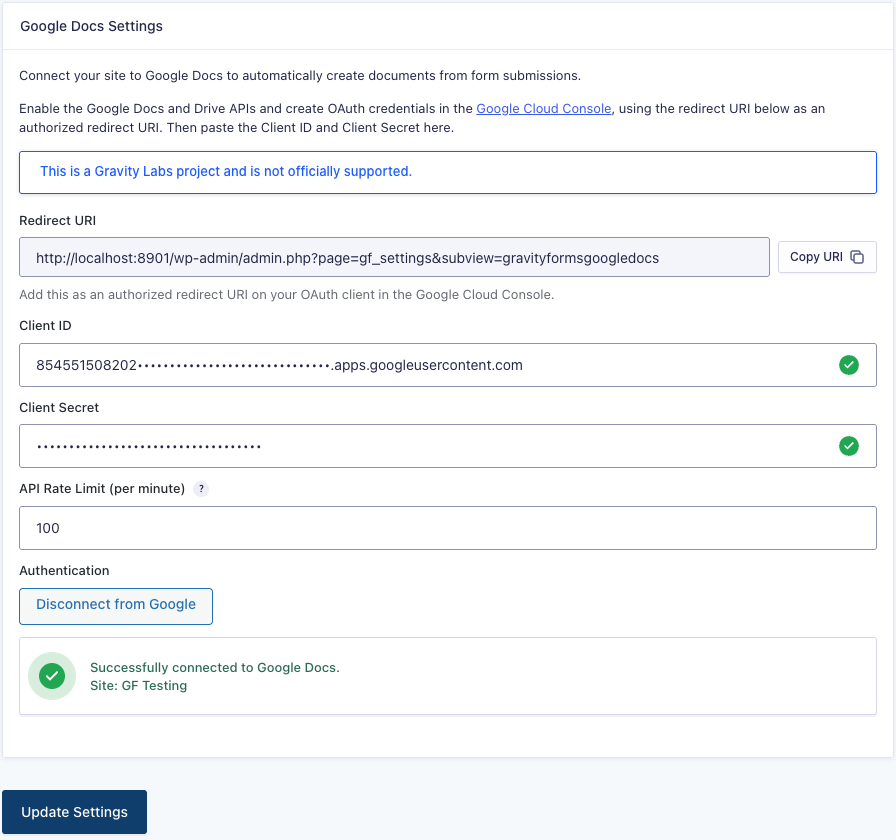
The add-on only asks for the drive.file scope, which means it can see and edit the files it creates, not your whole Drive. That is the right call for a plugin that holds a long-lived token on your web server.
Building a Feed
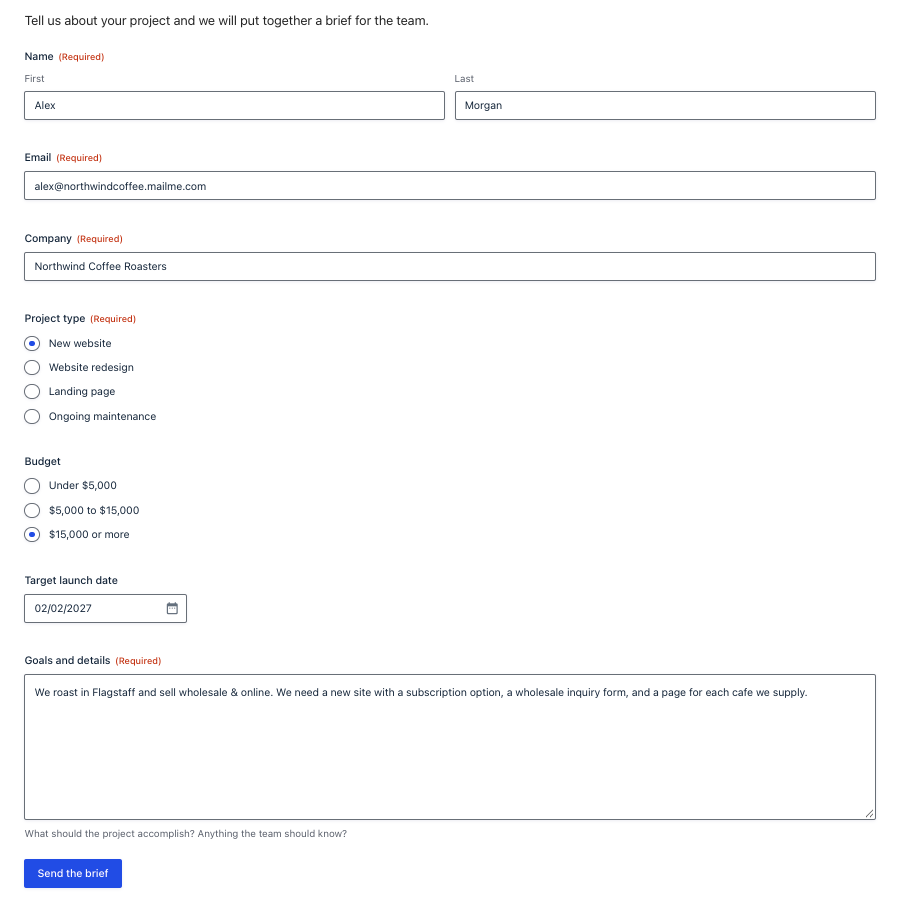
My test form is a project brief: name, email, company, project type, budget, target launch date and a paragraph for goals. The idea is that every brief becomes a doc the team can comment on and turn into a proposal.
Under Form Settings → Google Docs → Add New there are three things to fill in: a Document Title, the Document Content and an optional Google Drive Folder ID. Both text fields have the merge tag picker.
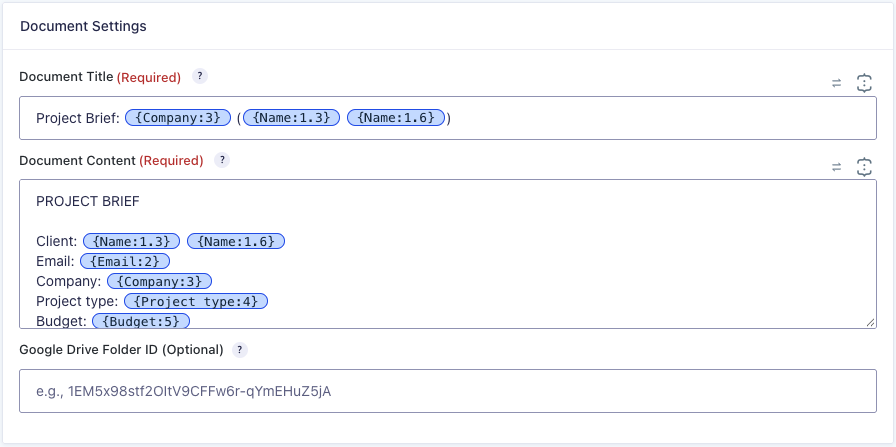
My title template was Project Brief: {Company:3} ({Name:1.3} {Name:1.6}) and the content was a short labeled list of the fields, the goals paragraph, and the entry link at the bottom. The folder ID comes from the end of a Drive folder URL (drive.google.com/drive/folders/this-part); leave it blank and docs go to the root of your Drive.
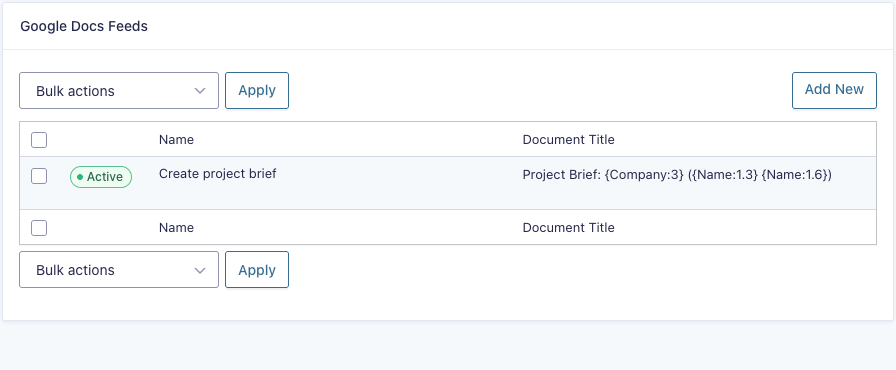
Tip: use the first and last name sub-tags ({Name:1.3} {Name:1.6}) rather than the whole-field {Name:1} tag. On my Gravity Forms 3.2 test site the whole-field Name tag came out empty, in the doc and in a plain notification alike, so this is a Gravity Forms quirk rather than the add-on’s, but you will notice it here first.
What You Get
I submitted the form a few times. Each submission created a doc within a second or two of the confirmation showing (the feed runs during the submission, not in the background), titled from the template and filled in from the entry:
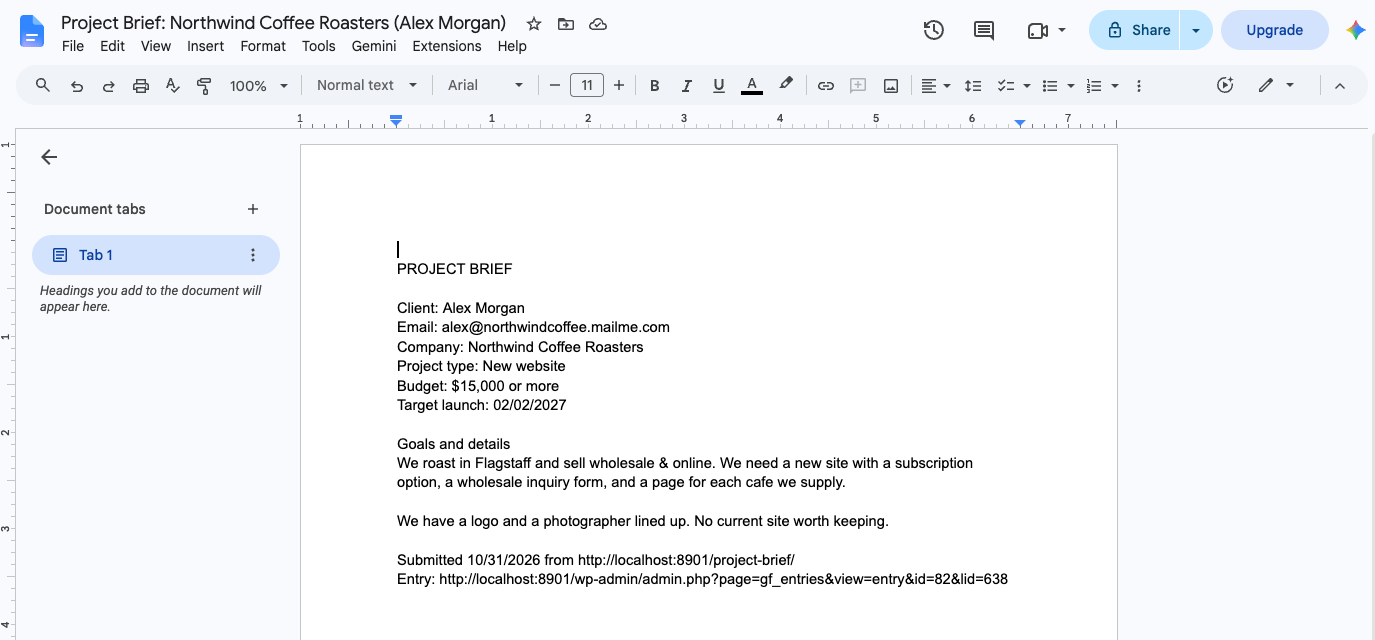
The doc is plain text: line breaks are kept, but there are no headings, bold or links. If you want a formatted brief, you can apply a style to the doc afterwards in Google Docs, but the add-on does not do it for you (more on that below).
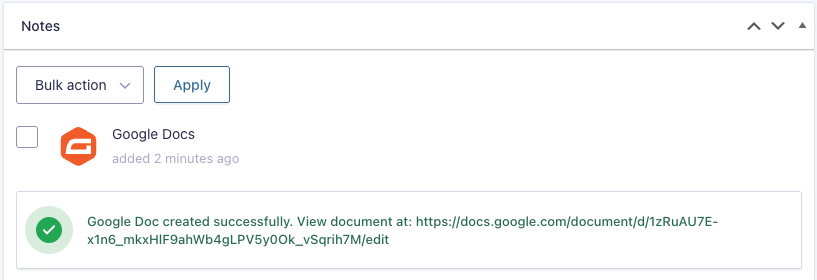
Back in WordPress, the entry gets a note with the document link:
Sending the link to people
This is the part I liked most. The add-on registers two merge tags, {google_docs:document_url} and {google_docs:document_id}, which show up in the merge tag picker for confirmations and notifications once the form has a Google Docs feed. I put the URL tag in a client-facing notification:
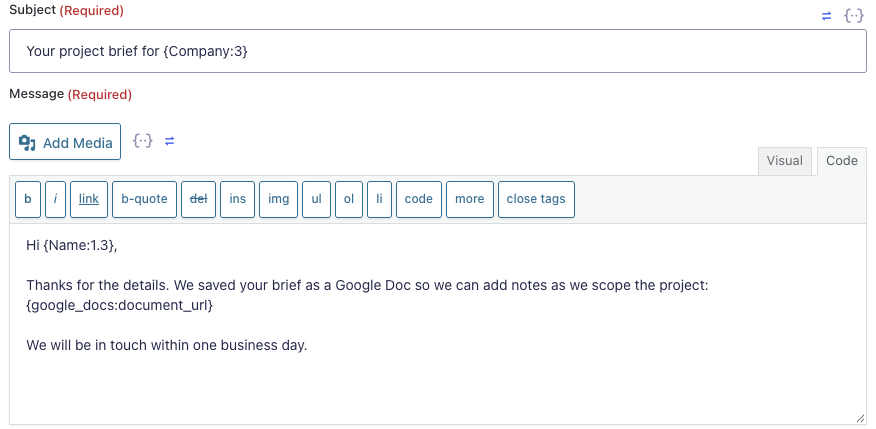
Because the feed runs before notifications are sent, the link is already filled in when the email goes out:
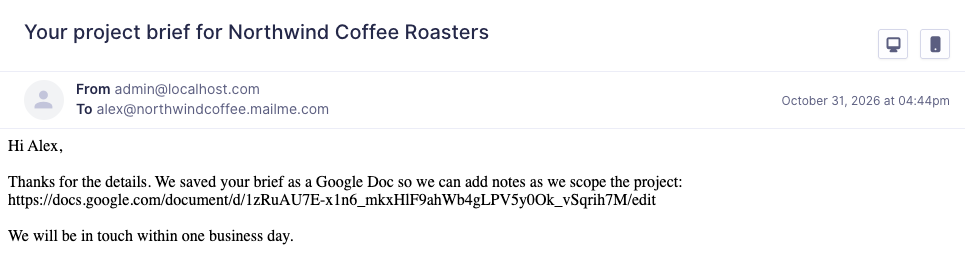
One thing to keep in mind if you send the link to the person who submitted the form: the doc is in your Drive and private by default, so they will hit a “request access” page unless you share it, or share the folder it lands in.
Things to Know
- It is a Gravity Labs project and not covered by Gravity Forms support, including Elite priority tickets. Questions go to the Labs category on the community forum or the feedback form on the Labs page.
- Plain text only. The content is inserted as text through the Docs API, so HTML in the template shows up as literal tags and there is no bold, headings or links. Keep the template simple and format in Docs afterwards if you need to.
- No templates or updates to existing docs. The Labs listing talks about mapping fields to a template document and updating an existing doc, but the current build creates a fresh doc per submission from the feed’s title and content fields. That is simpler than it sounds, and for most “give me a doc per entry” cases it is all you need.
- Publish your Google Cloud app. While the OAuth consent screen is in Testing status, Google issues refresh tokens that expire after 7 days, and the add-on silently stops creating docs until you disconnect and reconnect. Switch the app to In production before you rely on it on a live site, then reconnect once.
- The Redirect URI must match exactly. A
redirect_uri_mismatcherror from Google almost always meanshttpvshttpsorwwwvs non-www. - One Google account per site. The connection is site-wide, and every doc is owned by that account. Use a shared team account if several people need to find the docs.
- Feeds run during the submission by default. Each doc takes two API calls (create the file, then insert the body), so expect a short pause before the confirmation. A constant (
GF_GOOGLE_DOCS_ASYNC_FEEDS) switches the feed to background processing if you would rather not make visitors wait.
Alternatives
If you need formatted documents from a template, Zapier‘s Google Docs “Create Document from Template” action fills placeholders in a real Docs template, at the cost of a Zapier plan and a hop through a third party. If what you really want is a PDF to attach to a notification, Gravity PDF is the mature answer. And if the goal is a row per entry rather than a document per entry, the Labs Google Sheets Add-On uses the same kind of Google Cloud setup.
Pricing
There is no separate price. It is a Gravity Labs download for anyone with an active Gravity Forms license, and any license tier qualifies. See Gravity Forms pricing if you do not have one yet. Google’s side is free: the Docs and Drive APIs have no cost at this volume.
Who Should Use It
Teams that already live in Google Docs and want each intake form, brief, application or request to show up as a doc they can comment on, assign and build from. Agencies collecting project briefs, HR teams collecting applications, editors collecting pitches. If a plain-text doc with the entry’s answers is a useful starting point for your work, this does that with no middleman.
It is not for anyone who needs a designed document straight from the form. For that, look at a template-based tool or a PDF add-on.
The Verdict
For an alpha it is in good shape. In my testing every submission produced a doc, the title and content matched the template, the folder setting worked, the entry note and merge tags were reliable, and errors from Google land in a note on the entry instead of vanishing. The setup is the hard part, and that is Google’s doing more than the add-on’s. If you can get through the Cloud Console once, and you publish the app so the token does not expire, it quietly does its job. Try it on a staging site first, like any Labs project.
Download the Project Brief Form
Get the form from this post with its two notifications (team alert and client copy, both using the document URL merge tag), plus the feed templates to paste in.
Frequently Asked Questions
Does Gravity Forms integrate with Google Docs?
Yes. The Gravity Forms Google Docs Add-On from Gravity Labs creates a new Google Doc for each submission that matches a feed. You connect your site to Google with OAuth, write the document title and content as templates with merge tags, and optionally choose a Drive folder. The entry gets a note with the link, and merge tags put the document URL into notifications.
Is the Gravity Forms Google Docs Add-On free?
There is no separate price. It is a Gravity Labs download for anyone with an active Gravity Forms license on any tier. Labs projects are experimental and are not covered by Gravity Forms support.
Can it fill in a Google Docs template?
Not in the current build. The feed's Document Title and Document Content fields are the template, and each submission creates a new plain-text doc from them. It does not insert values into placeholders in an existing Google Doc or update a doc that already exists.
Why did the add-on stop creating documents after a week?
The Google Cloud OAuth app is probably still in Testing status. Google gives apps in Testing refresh tokens that expire after 7 days. Set the consent screen to In production in Google Cloud Console, then disconnect and reconnect the add-on under Forms → Settings → Google Docs.
Can I send the Google Doc link to the person who submitted the form?
Yes, with the {google_docs:document_url} merge tag in a notification. The doc lives in the connected Google account's Drive and is private by default, so share the doc or its folder if people outside that account need to open it.
Need More Help?
If you still need help, use the chat or leave a comment below and we’ll get back to you.
Comments