
Gravity Forms Image Choices
Add images to radio button and checkbox fields in Gravity Forms using the WordPress media library, no HTML required.
What it does
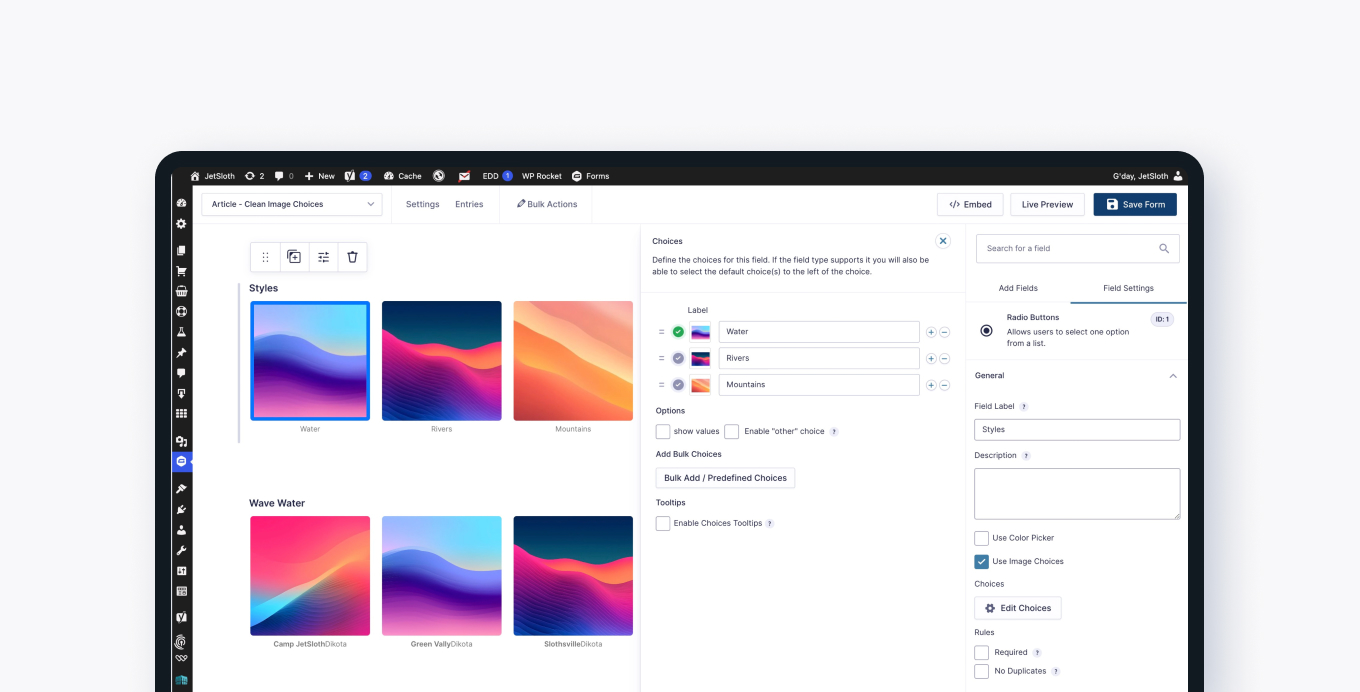
When you build a form with radio buttons or checkboxes, plain text labels don't always communicate the options clearly. Gravity Forms Image Choices lets you attach an image to each option directly from the WordPress media library, keeping the image separate from the label text.
Instead of copying image URLs and writing HTML markup inside field labels, you browse your media library and insert the image with a familiar WordPress interface. The add-on handles the display automatically.
It also works with Poll, Survey, and Quiz fields when those are set to radio buttons or checkboxes, so you can present visual choices for voting or quizzes.
Key features
- Add images to radio button and checkbox field options
- Browse and insert images using the standard WordPress media library
- Image is stored separately from the label text—no HTML markup needed
- Lightbox support lets visitors click a zoom icon to view a larger version of each image
- Compatible with Poll, Survey, and Quiz fields set to radio buttons or checkboxes
Good for
Written from JetSloth’s own listing. Version and dates come straight from the source and are checked weekly.
Do I need to write any HTML to add images to my fields?
No. You use the standard WordPress media library browser to select and insert images, and the add-on keeps the image separate from your label text.
Which field types does this work with?
It works with radio button and checkbox fields, and also with Poll, Survey, and Quiz fields when they are set to radio buttons or checkboxes.
Can visitors see a larger version of an image before choosing?
Yes. A zoom icon appears on each image choice, and clicking it opens the image in a lightbox.