GFChart is a Gravity Forms extension that transforms your form entries into charts, graphs, and calculations. No coding required. If you’re collecting survey responses, sales data, or assessments, GFChart makes that data actually useful.
What It Actually Does
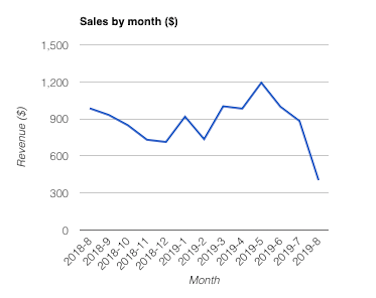
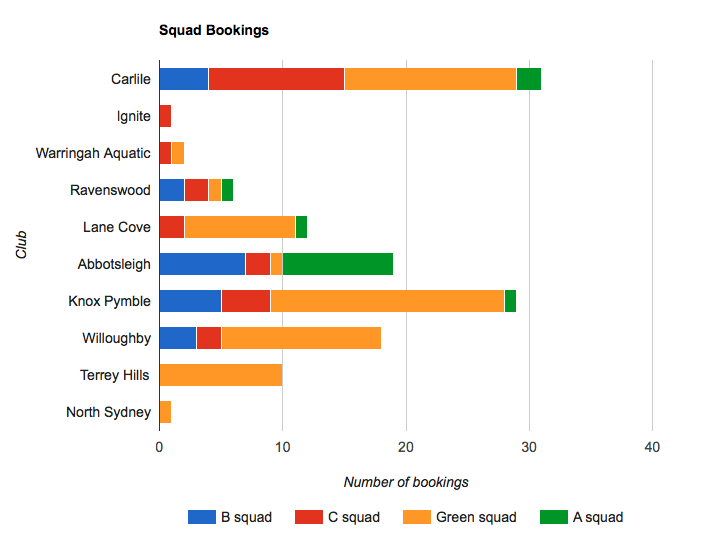
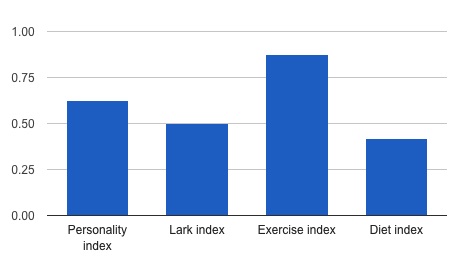
GFChart sits on top of Gravity Forms and turns entry data into visual reports. Think pie charts from checkbox fields, bar graphs from rating scales, calculations from number fields. The reports auto-update when new entries come in—no manual exports to Excel.
Chart Types Available:
| Type | Best For |
|---|---|
| Pie/Doughnut | Multiple choice, checkbox fields |
| Bar/Column | Comparing values across categories |
| Line | Trends over time (ALL edition) |
| Progress | Goal tracking, completion percentages |
| Calculation | Totals, averages, custom math |
The Pros
1. No-code chart creation
Menu-driven interface. Select your form, pick fields, choose chart type. GFChart generates the shortcode. Embed anywhere. Gutenberg block included. Zero JavaScript knowledge needed.
2. Auto-updating reports
Charts recalculate on every page load. No manual refreshes. Perfect for live dashboards showing today’s sales, this month’s survey results, or current assessment scores.
3. GravityView integration (ALL edition)
Combine with GravityView for front-end filtering. Users can filter charts by date range, category, or custom parameters. Interactive reporting without backend access.
4. PDF and email rendering (ALL edition)
Send charts in emails. Embed in PDFs via Gravity PDF. Automated report distribution—schedule weekly summaries to stakeholders without lifting a finger.
5. Personal Assessment Quiz add-on
Build scored quizzes that show results immediately. Personality tests. Skills assessments. Risk evaluations. Respondents see their score and breakdown instantly.
The Cons
1. BASIC edition lacks key features
The $79 BASIC tier only covers simple charts. No time-based charts. No front-end filtering. No PDF/email output. For serious reporting, you need ALL ($199/yr).
2. Requires additional plugins for full functionality
Front-end filtering needs GravityView. PDF rendering needs Gravity PDF. These are separate purchases. Factor that into your total cost.
3. Limited styling without ALL edition
BASIC uses default colors. ALL includes the Survey Advanced Customiser for matching brand palettes. If design consistency matters, BASIC will frustrate you.
4. No real-time collaboration features
GFChart generates reports on page load. It doesn’t have shared dashboards, user permissions, or collaborative editing. Each user sees the same view based on your shortcode settings.
5. Fair use policy on rendering
Heavy usage sites may hit limits on PDF/email rendering. The policy exists but isn’t clearly defined in public docs. High-traffic sites should clarify limits with support before buying.
Use Cases That Work
1. Customer Satisfaction Dashboards
Post-purchase survey in Gravity Forms. GFChart turns ratings into pie charts. Display on a protected admin page. Track trends month over month with relative date filtering.
2. Sales Pipelines
Lead capture form with deal value field. GFChart calculates total pipeline value, average deal size, conversion rates by source. Bar charts show which channels deliver.
3. Skills Assessments with Instant Results
Employee self-assessment form. GFChart + Assessment Quiz add-on scores responses. User sees skill breakdown immediately. Managers see aggregate team data.
4. Event Registration Tracking
Registration form with session selections. GFChart shows real-time capacity per session. Line chart tracks registrations over time. Spot popular sessions early.
5. Membership Site Analytics
Member onboarding form collects industry, company size, goals. GFChart segments your membership base. Visualize demographics without exporting to spreadsheets.
Pricing Breakdown
| Plan | Price | Includes | Best For |
|---|---|---|---|
| BASIC | $79/year (1-2 sites) | Core charts, Gutenberg block, support | Simple reporting, single projects |
| ALL | $199/year (unlimited) | + Time charts, front-end filtering, PDF/email, templates, all add-ons | Agencies, complex reporting, automation |
| ALL LIFETIME | $549 once (unlimited) | Same as ALL, no renewals | Long-term projects, client sites |
Note: GravityView and Gravity PDF required for some features (separate purchases).
Who Should Buy This?
✅ Agencies building client dashboards
✅ Businesses collecting survey/assessment data
✅ Membership sites needing demographic insights
✅ Sales teams tracking pipeline metrics
✅ Anyone tired of exporting GF data to Excel
❌ Skip if you only need basic counts (use GF’s native entry view)
❌ Skip if you need complex BI features (look at Metabase/Tableau)
❌ Skip if budget is tight and reporting needs are minimal
The Verdict
GFChart solves a specific problem: making Gravity Forms data visually accessible without leaving WordPress. It doesn’t try to be a full BI platform. It charts your form data reliably, automatically, and without code.
The BASIC tier is too limited for most use cases. ALL ($199/yr) or LIFETIME ($549) is where the value lives—time-based charts, PDF/email distribution, and front-end filtering justify the cost for anyone doing regular reporting.
If you’re manually exporting GF entries to create reports, GFChart pays for itself quickly. One less weekly task, one less spreadsheet, one more automated insight.

