
Gravity Forms now has its own events calendar. The new Events Calendar Add-On from Gravity Labs adds events, venues and organizers to WordPress, shows them in a month, list or day calendar, and lets you attach any Gravity Form to an event as its registration form, with a limit on how many people can sign up for each date.
First look, October 2026, version 0.1.0-alpha.1. I set it up on my test site with a weekly office hours session, a paid workshop with a venue, a “submit your event” form and two events imported from The Events Calendar, then registered people until dates filled up. Every screenshot below comes from that site.
What It Does
- Events, venues, organizers and categories as their own sections in the admin, with dates, time zones, all-day events, cost, a website link and a Featured option.
- Repeating events: daily, weekly on chosen days, monthly or yearly, with skip dates and the option to change a single date.
- A public calendar at
/events/in month, list and day views, plus an Events Calendar block and a[gf_events]shortcode for any page. - Event pages with the venue and a map link, the other dates of a series, Google Calendar, Outlook and .ics links, and schema.org Event data for search engines.
- Registration with any Gravity Form, a place limit per date, an Event field that lists upcoming dates, and event merge tags for notifications.
- Paid tickets using Product fields and your usual payment add-on.
- A Create Event feed that turns form submissions into events, so visitors can submit events for you to approve.
- An importer for events, venues, organizers and categories from The Events Calendar.
It needs WordPress 6.5, PHP 7.4 and Gravity Forms 2.9.24 or later. I tested it with Gravity Forms 3.2.1.
Setting It Up
After activating it, go to Forms → Settings → Events Calendar. You choose the URL for the calendar (events by default), which views visitors can switch between, the default view, how many events a list page shows, whether past events can be browsed, and whether venue map links open OpenStreetMap or Google Maps.
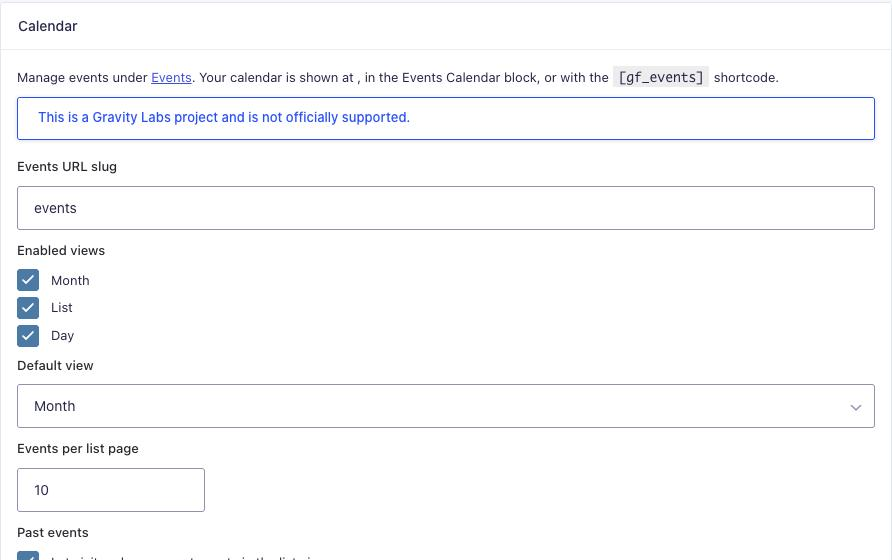
Check the URL before you save. If another plugin already uses /events/ (The Events Calendar does, and so did a custom post type on my test site), change one of them, or the two will fight over the same pages.
Adding Events
Events live under a new Events menu and use the block editor for the description. Below the content, the Event Details box holds the dates and everything else.
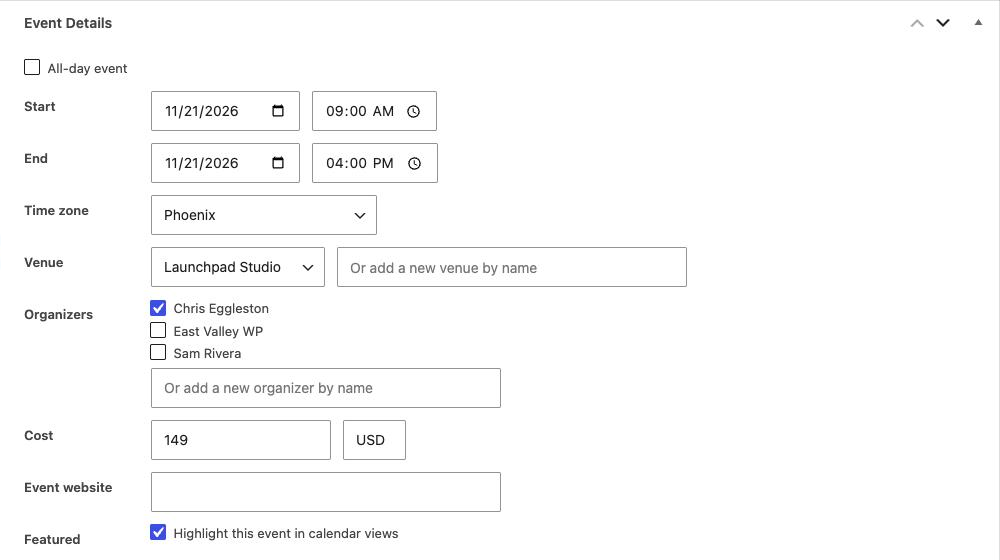
Two small things I liked: typing a name that already exists reused the existing organizer instead of making a duplicate, and each event keeps its own time zone, which matters if you run online sessions for people in other places.
Repeating events
The Recurrence box turns an event into a series. My office hours run every Tuesday for 8 weeks, skipping the week of Thanksgiving. Once saved, the box lists the upcoming dates, each with an Edit only this occurrence link.
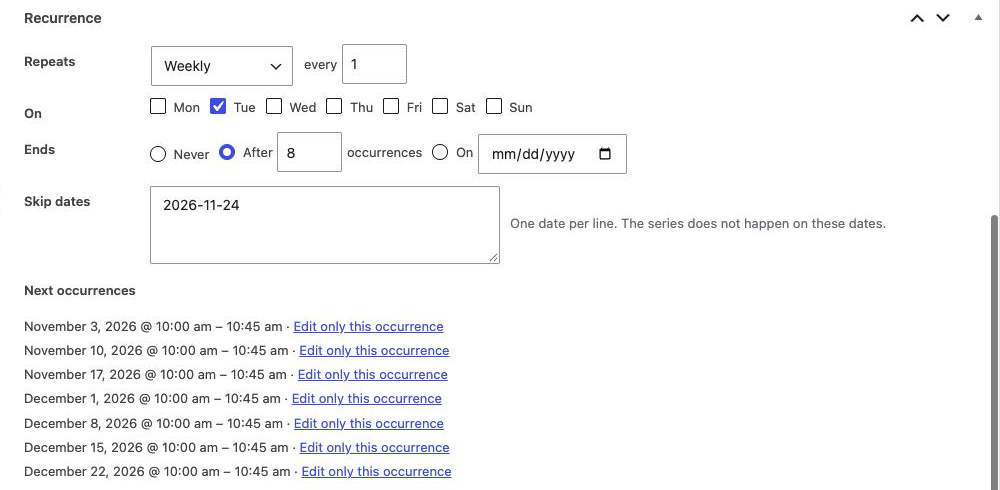
Two things to know here:
- Skipped dates still count toward “after 8 occurrences”. I got 7 sessions, not 8, and the event page still says “Every week on Tue, 8 times”. That’s how calendar apps handle it too, so if you want 8 real sessions, set 9.
- Edit only this occurrence makes a separate, published copy of that date and adds it to the series’ skip dates. Change the copy’s time or details freely. Anyone already registered for that date stays attached to the original series date, so do this before people sign up.
What Visitors See
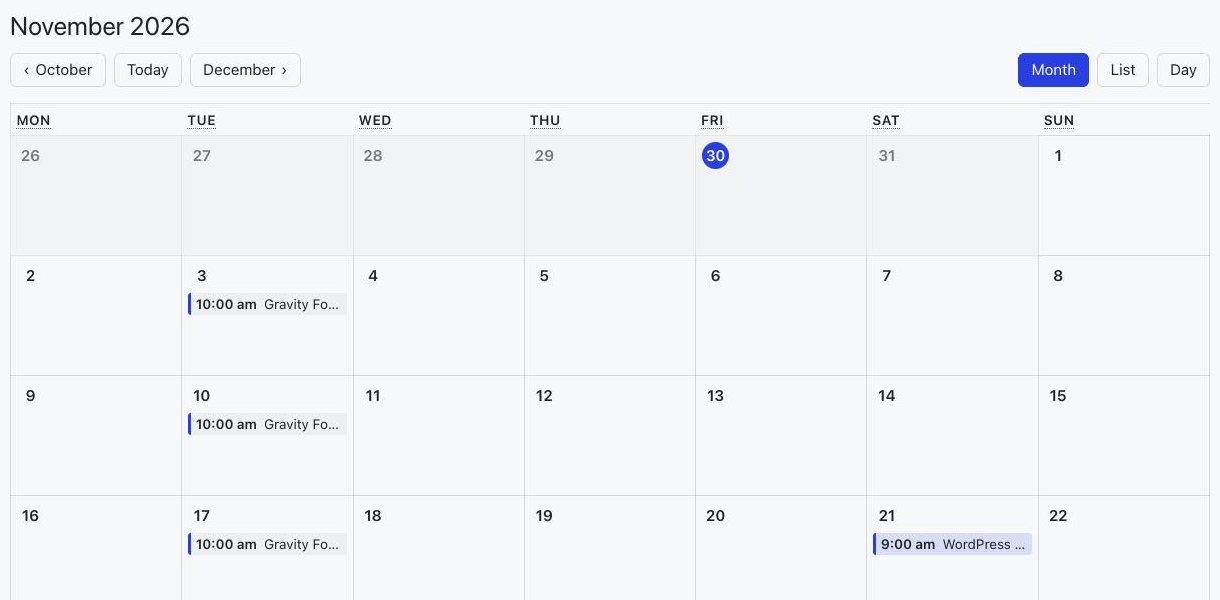
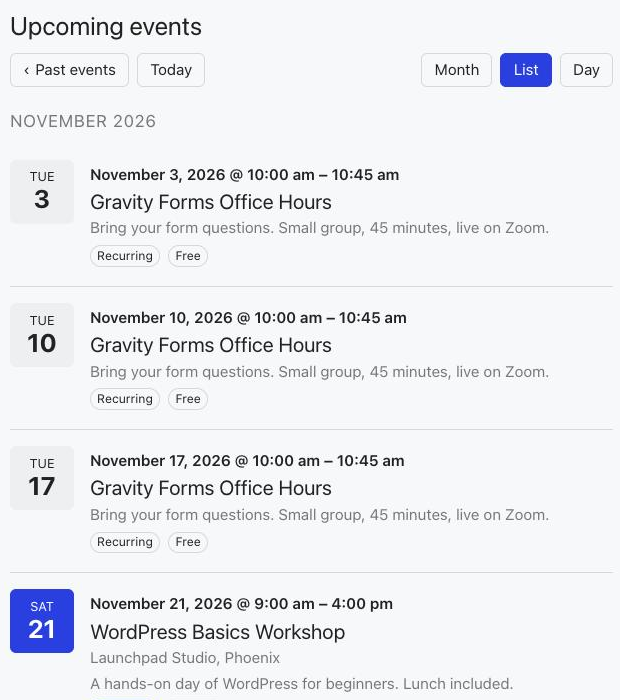
The calendar lives at /events/ with buttons to switch between month, list and day views and to move between months. Featured events are highlighted, and the skipped Tuesday is simply empty.
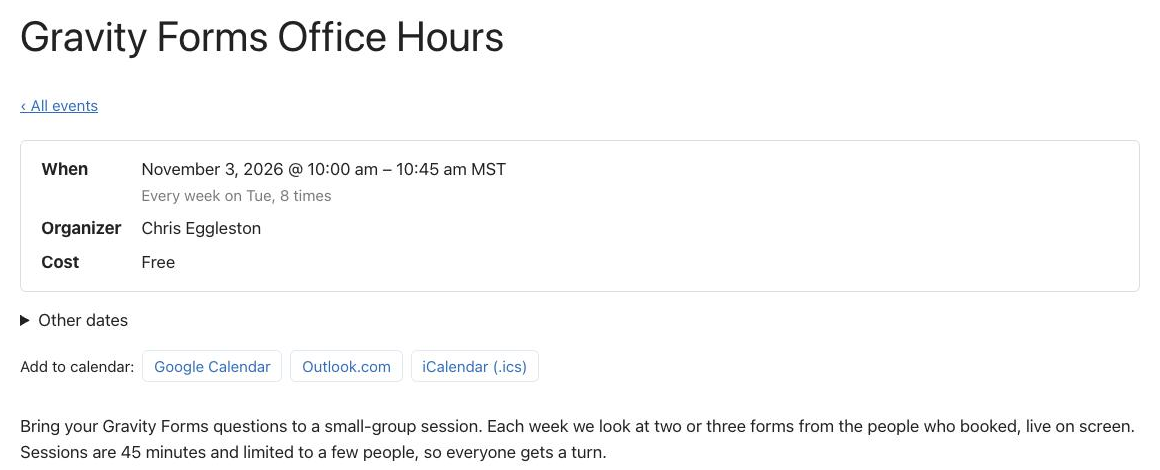
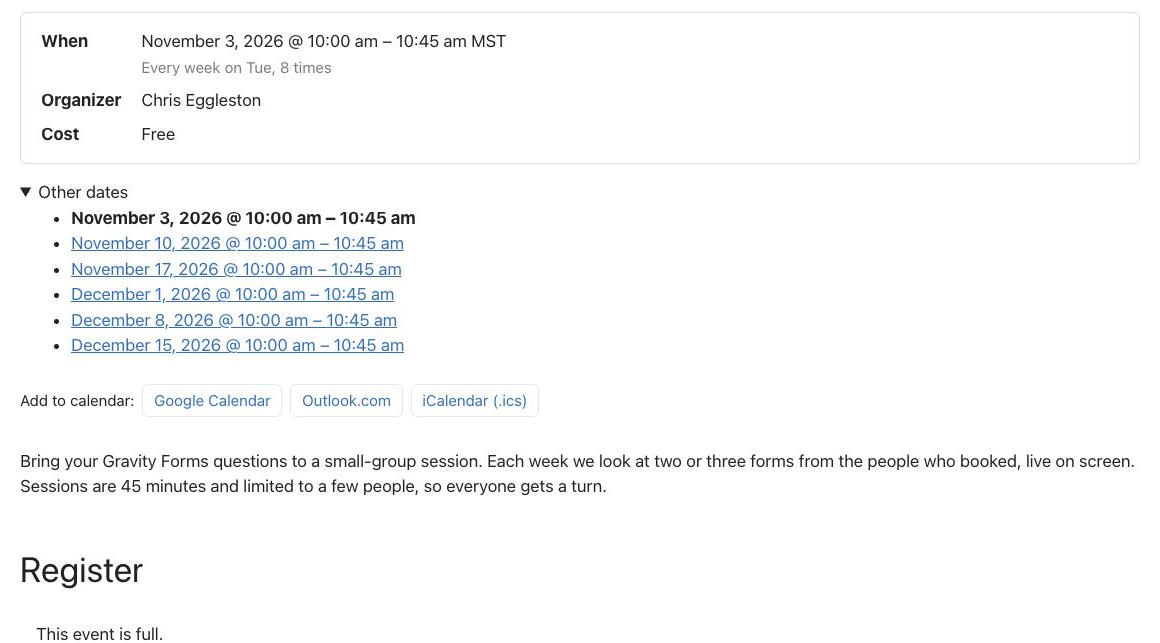
Each event (and each date of a series) has its own page with the date and time, the series pattern, organizer, cost, the other dates, and “Add to calendar” buttons for Google Calendar, Outlook.com and an .ics file.
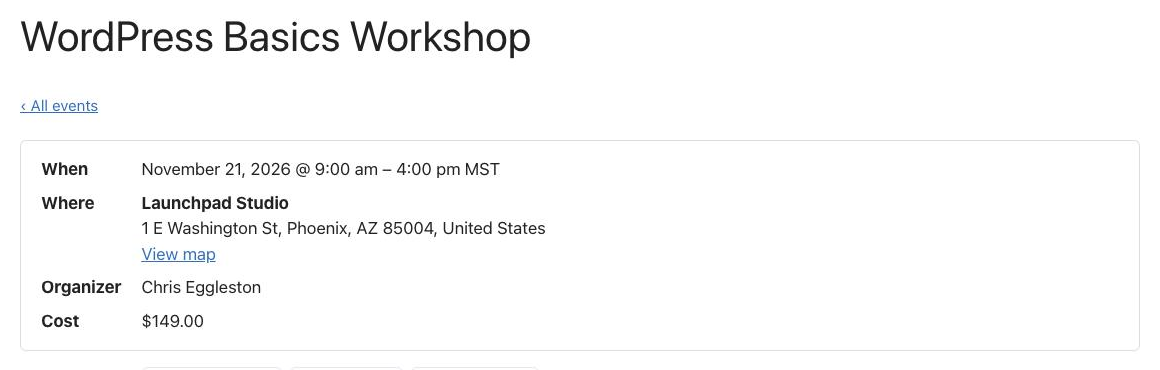
Events with a venue get the address and a View map link.
Behind the scenes, the event pages include schema.org Event data with the dates, venue address, organizer and price, which helps search engines show your events. The .ics file is a proper calendar file: for the series it contained the weekly rule and the skipped date, so calendar apps show the right dates.
The Events Calendar block
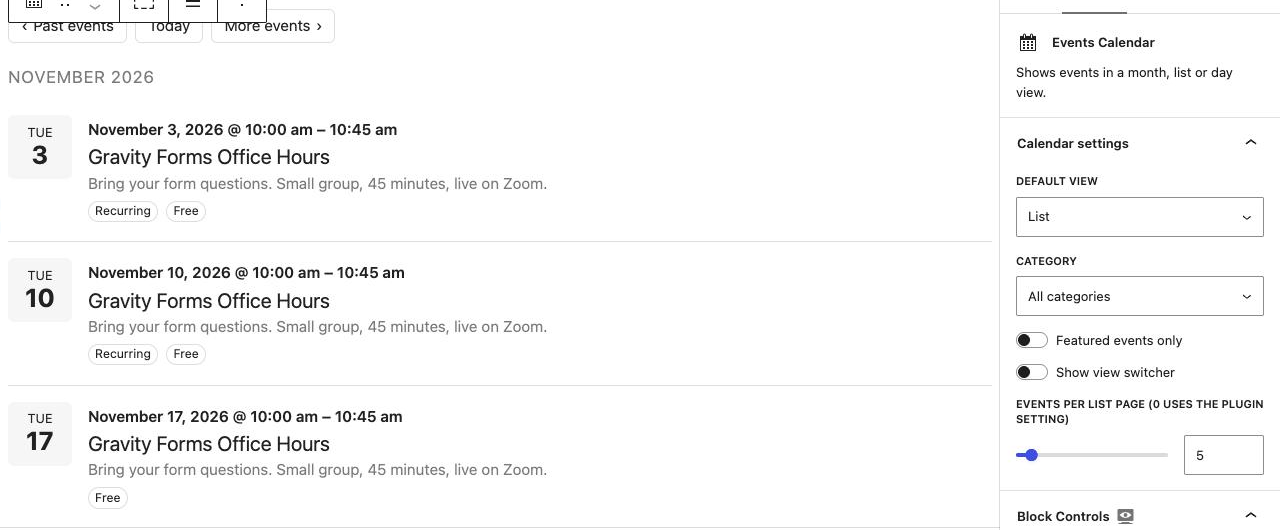
To show events on any other page, add the Events Calendar block (or the [gf_events] shortcode). You can choose the view, limit it to a category or featured events, hide the view switcher and set how many events to show. I used it for an “Upcoming Workshops” page with a short list.
Registration
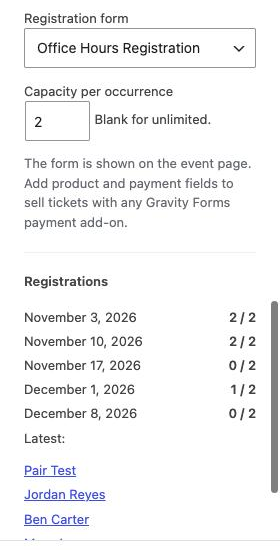
This is where Gravity Forms comes in. Build a normal form (mine has Name, Email and “What would you like help with?”), then pick it in the event’s Registration box and set a Capacity per occurrence. For a series, the limit applies to each date separately.
The form appears at the bottom of the event page with the number of places left.
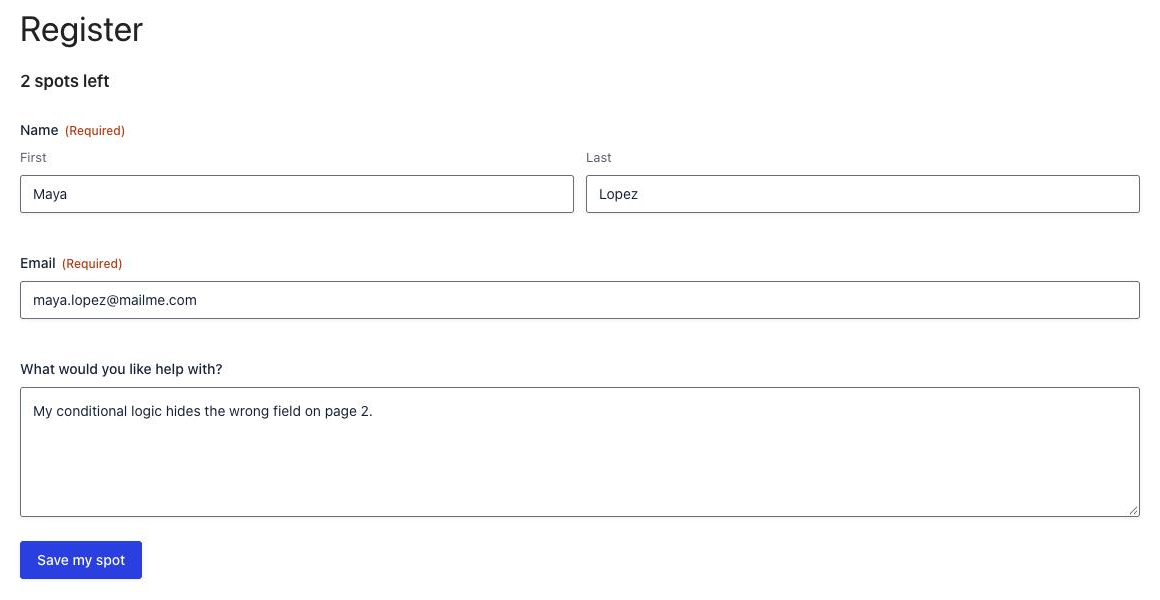
After submitting, the count went down to “1 spot left” without reloading the page, and the confirmation used the event merge tags to name the date.

A second registration filled the date, and the form was replaced with “This event is full.” I also tried to get around it: a form that was already open when the date filled up was refused with “Sorry, this event is now full.”, and so were a skipped date (“That event date is not available.”) and a different form pointed at the same event.
The Event field
The add-on also adds an Event field (Advanced Fields). It’s a drop-down of upcoming dates, so one form on any page can take bookings for all of them. It lists the dates of events that use this form as their registration form (or, if none do, events with no form at all), and it hides full dates.

Entries made through the Event field are linked to the event and date just like the ones made on the event page, and they count toward the same limit.
Merge tags for emails
Registration notifications can use these merge tags:
| Merge tag | Gives |
|---|---|
{event_title} | The event name |
{event_date} | The date and time of the date they registered for |
{event_start} / {event_end} | Start and end date and time |
{event_venue} | The venue name and address |
{event_url} | The page for that date |
{event_google_url} | An “add to Google Calendar” link for that date |
{event_ics_url} | An .ics download for the event |
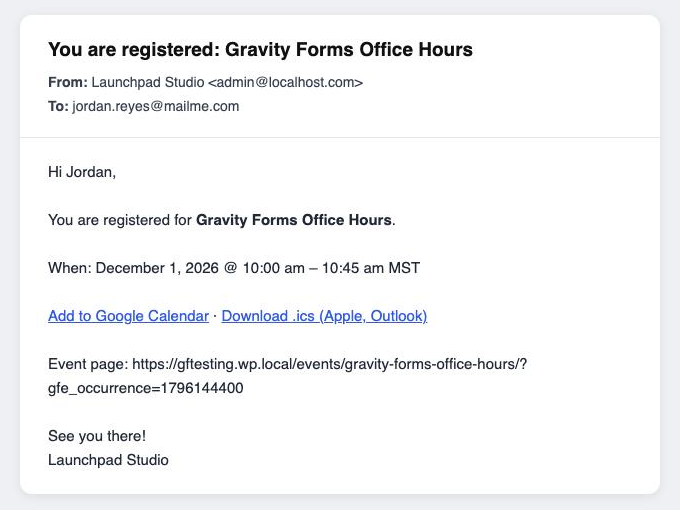
Two tips from setting this up. The {event_ics_url} file is for the whole event, so for a series it adds every date to the calendar, not only the one they booked; the Google link is for their date only. And online events have no venue, so {event_venue} is empty; I wrapped my “Where:” line in a conditional shortcode so it only shows when there is a venue:
[gravityforms action="conditional" merge_tag="{event_venue}" condition="isnot" value=""]Where: {event_venue}[/gravityforms]Paid tickets
There’s no special ticket setting: add a Product field, a Total and your payment field to the registration form, and set up the payment feed as usual. My workshop form has a $149 ticket and the Stripe Field, and it showed up on the event page with the card field and total. (I didn’t run a test payment through it this time; payments are handled by your payment add-on as on any other form.) The event’s Cost is only a label for the calendar, so keep it in step with your product price.
Two Things to Fix in Your Place Counts
The add-on counts one place per entry, and it counts every active entry. In testing that caused two problems:
- Group registrations are undercounted. If your form asks “How many people?”, a booking for two still uses one place. With 2 places on a date, that booking left “1 spot left”, so the date could be overbooked.
- Failed payments keep their place. An entry whose card payment failed still counted until I deleted it, so a paid workshop can look fuller than it is.
The add-on has two filters for this, gf_events_registration_count and gf_events_registration_quantity. This snippet uses both. Add it with a code snippets plugin or as a small plugin, then give your “How many people?” Number or Quantity field the CSS class gfe-quantity:
/**
 * Events Calendar (Gravity Labs): fairer place counts.
 * - Failed, refunded or cancelled payments give their places back.
 * - A field with the CSS class "gfe-quantity" sets how many places a registration takes.
 */
function gr_gfe_quantity_field( $form ) {
	foreach ( (array) rgar( $form, 'fields' ) as $field ) {
		if ( in_array( 'gfe-quantity', preg_split( '/\s+/', (string) $field->cssClass ), true ) ) {
			return $field;
		}
	}
	return null;
}

add_filter( 'gf_events_registration_count', function ( $count, $event_id, $occurrence ) {
	$entries = GFAPI::get_entries(
		0,
		array(
			'status'        => 'active',
			'field_filters' => array(
				array( 'key' => 'gfe_event_id', 'value' => (int) $event_id ),
				array( 'key' => 'gfe_occurrence', 'value' => (int) $occurrence ),
			),
		),
		null,
		array( 'page_size' => 2000 )
	);

	$places = 0;
	$forms  = array();
	foreach ( $entries as $entry ) {
		if ( in_array( rgar( $entry, 'payment_status' ), array( 'Failed', 'Refunded', 'Voided', 'Cancelled' ), true ) ) {
			continue;
		}
		$form_id = (int) $entry['form_id'];
		if ( ! isset( $forms[ $form_id ] ) ) {
			$forms[ $form_id ] = gr_gfe_quantity_field( GFAPI::get_form( $form_id ) );
		}
		$field   = $forms[ $form_id ];
		$places += $field ? max( 1, absint( rgar( $entry, (string) $field->id ) ) ) : 1;
	}

	return $places;
}, 10, 3 );

add_filter( 'gf_events_registration_quantity', function ( $quantity, $form ) {
	$field = gr_gfe_quantity_field( $form );
	return $field ? max( 1, absint( rgpost( 'input_' . $field->id ) ) ) : $quantity;
}, 10, 2 );
With it in place, a booking for three on a date with two places left was refused with “Sorry, only 2 places are left.”, a booking for two filled the date (the Registration box showed 2 / 2), and a failed payment no longer took a place. Entries still waiting for a payment to finish (Processing) do count, which is what you want.
Let Visitors Submit Events
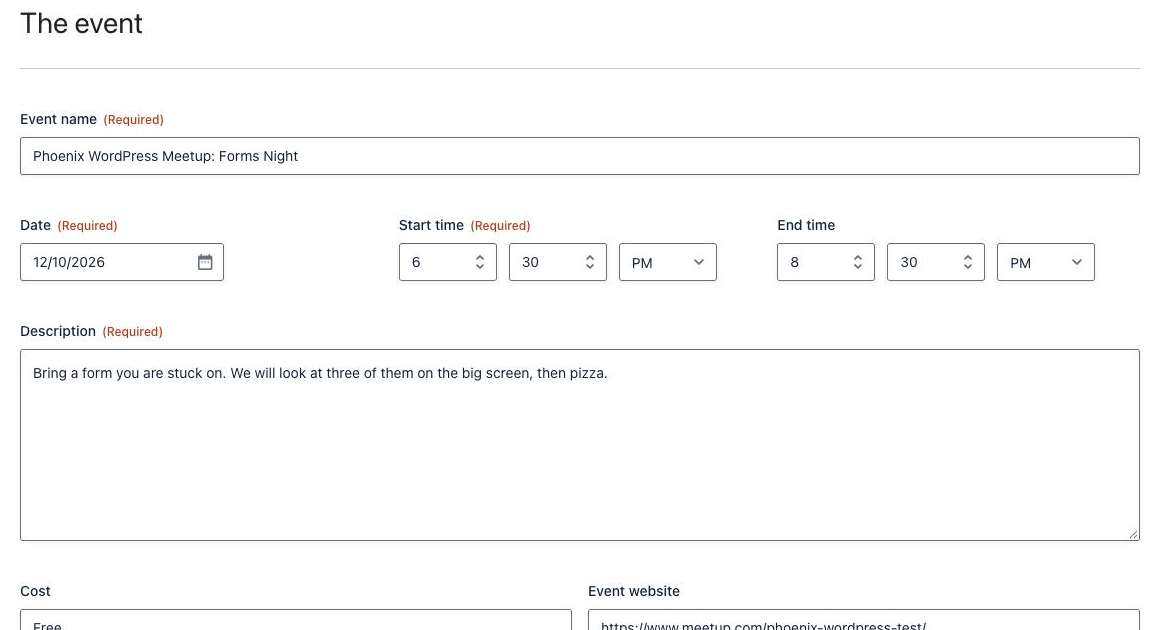
The Create Event feed turns a form into an event submission form. I made a “Submit Your Event” form for local meetups: event name, date, start and end time, description, cost, website, image, venue name and address, organizer and email.
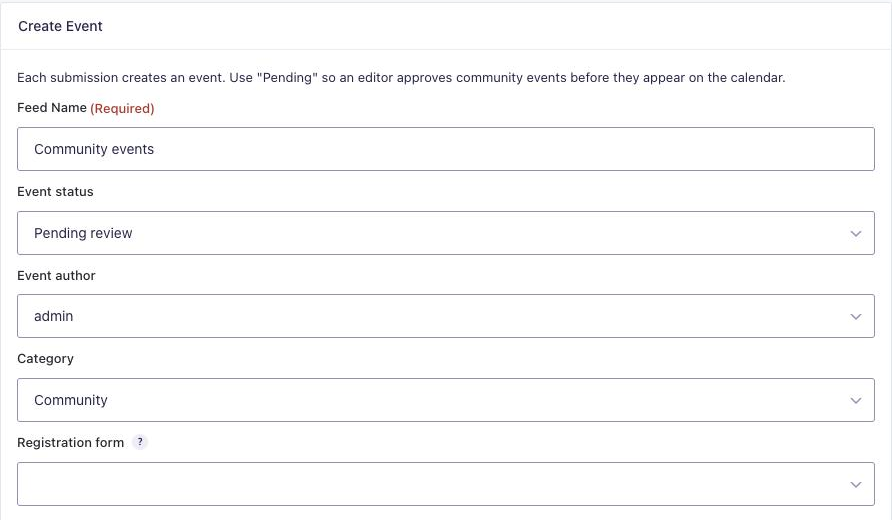
In the form’s Settings → Events Calendar, add a feed. Choose the status for new events (Pending review is the default, and the right choice for public forms), the author, a category and optionally a registration form, then map your fields to the event, venue and organizer.
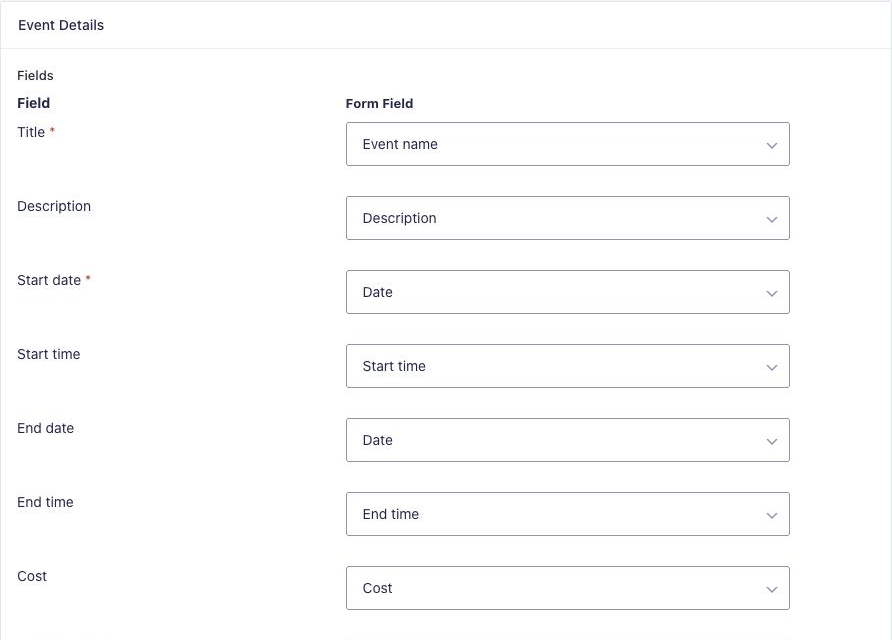
Check the mapping before you save: the feed filled in some fields on its own (Description, Start time, Venue name, City) but left Title and Start date empty, and those two are required. A submission with an empty title doesn’t create an event; the entry gets a note saying so.
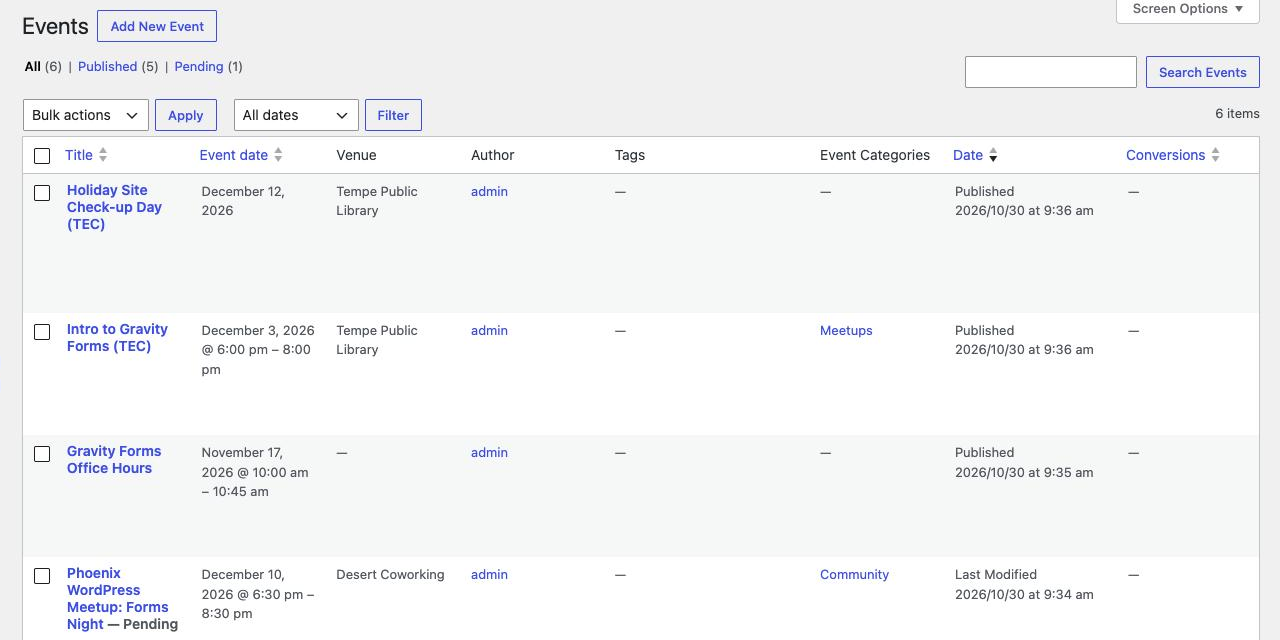
When my test meetup came in, the add-on created a pending event with the right date and time (6:30 to 8:30 pm), a new venue with the full address, a new organizer with the email, and the Community category. The entry got a note linking to the event, and the admin email used {created_event_edit_url} to link straight to its edit screen. Approving it is just clicking Publish.
Moving From The Events Calendar
To test the importer, I installed the free version of The Events Calendar, added a venue, an organizer, a category, an evening meetup and an all-day event, and ran the import (it’s under Events → Import from TEC, or wp gf-events import-tec with WP-CLI). Both events came across with the correct times, the all-day setting, the cost, the venue address, the organizer and the category. Running it a second time skipped everything that was already imported, and The Events Calendar’s own data was left alone.
I couldn’t test repeating events from The Events Calendar, because those need its Pro version. According to the add-on’s notes, simple series come across as series, and complex ones (several rules, or exclusions other than dates) become one event per date. The importer covers events, venues, organizers and categories; it doesn’t mention tickets or attendee lists, so plan to keep those records separately.
Things to Know
- It’s an alpha from Gravity Labs. The settings page says it plainly: “This is a Gravity Labs project and is not officially supported.” Try it on a test site first and send feedback through the Labs page.
- Small rough edges I noticed: the settings page says “Your calendar is shown at ,” with the address missing; the Google Calendar link on event pages runs the description into the event URL; and the schema data always says the event is in stock, even when it’s full.
- Entries hold the event and date (as entry meta,
gfe_event_idandgfe_occurrence). To export attendees for one event, filter the entry export by Event ID, as the Registration box suggests. - Waitlists aren’t built in. A full date just shows “This event is full.” If you need a waitlist, the registration-to-waitlist switch idea still applies.
- It has a REST API under
gf-events/v1for events, venues, organizers and calendar views, if you want to show events somewhere else. I didn’t test it.
Who Should Use It
If you already use Gravity Forms for registrations and want a calendar with real event pages, this is the simplest setup I’ve tried: no second form builder, no separate ticketing plugin, and registrations are ordinary Gravity Forms entries, so your feeds (CRM, email lists, Gravity Flow) keep working. Small workshops, classes, office hours, webinars and community calendars fit it well.
If you need seating charts, printed tickets with QR codes, check-in apps or multiple ticket types per event out of the box, a dedicated events plugin is still the better fit for now. And if you’d rather keep events in your own custom post type, you can do it without this add-on: One Registration Form for Many Events shows how with ACF and Populate Anything.
The Verdict
For a first alpha, it’s remarkably complete. Repeating events, per-date limits, calendar links, schema data, community submissions and an importer all worked in my tests. The place counting needs the small fix above if you register groups or take payments, and I’d wait for a stable release before running a busy paid event on it. For free events and small classes, it’s ready to try today.
Frequently Asked Questions
Does Gravity Forms have an events calendar?
Yes, as an experiment. The Events Calendar Add-On from Gravity Labs (version 0.1.0-alpha.1, October 2026) adds events, venues, organizers, a month, list and day calendar, and event registration with Gravity Forms. It’s labeled as a Gravity Labs project that isn’t officially supported.
Can I limit how many people register for an event?
Yes. Set a capacity per occurrence in the event’s Registration box. Each date of a repeating event has its own limit, and full dates show “This event is full” and drop out of the Event field. By default each entry takes one place, so use a snippet if one registration can include several people.
Can I sell event tickets with it?
Yes. Add Product and payment fields to the registration form and use any Gravity Forms payment add-on, such as Stripe or PayPal. The event’s Cost field is only shown on the calendar; the price people pay comes from the form.
Can visitors submit their own events?
Yes, with the Create Event feed. Each submission creates an event (pending review by default) and can create its venue and organizer too. Make sure Title and Start date are mapped, because the feed doesn’t fill them in on its own.
Can I move my events from The Events Calendar?
Yes. The built-in importer copies events, venues, organizers, categories and repeating series, and it’s safe to run more than once. Complex series are imported as one event per date, and The Events Calendar’s data isn’t changed.
Need More Help?
If you still need help, use the chat or leave a comment below and we’ll get back to you.
Comments