
Past a few dozen forms, the Gravity Forms admin starts working against you. The forms list is one long alphabetical table. Nothing tells you which forms break if an add-on is switched off. Every trip to notifications is four clicks. Gravity Hopper from Orbital Forge is a set of modules that fixes those daily annoyances for people who live in Gravity Forms.
Tested November 2026 with Gravity Hopper 2.7.6.2 on a test site with 85 forms, running Gravity Forms 3.2.2. I went hands-on with the modules you notice first: Form Overview, Form Integrity, Form Folders, Keyboard Shortcuts and Field Hinting. The rest are described from the settings screen and the developer’s documentation, and I say so where that is the case.
What Gravity Hopper Is
It adds no fields and changes nothing your visitors see. It is an admin toolkit. After activating, Forms → Settings → Gravity Hopper shows the modules as cards you can switch off one by one, plus two lists of smaller tweaks.
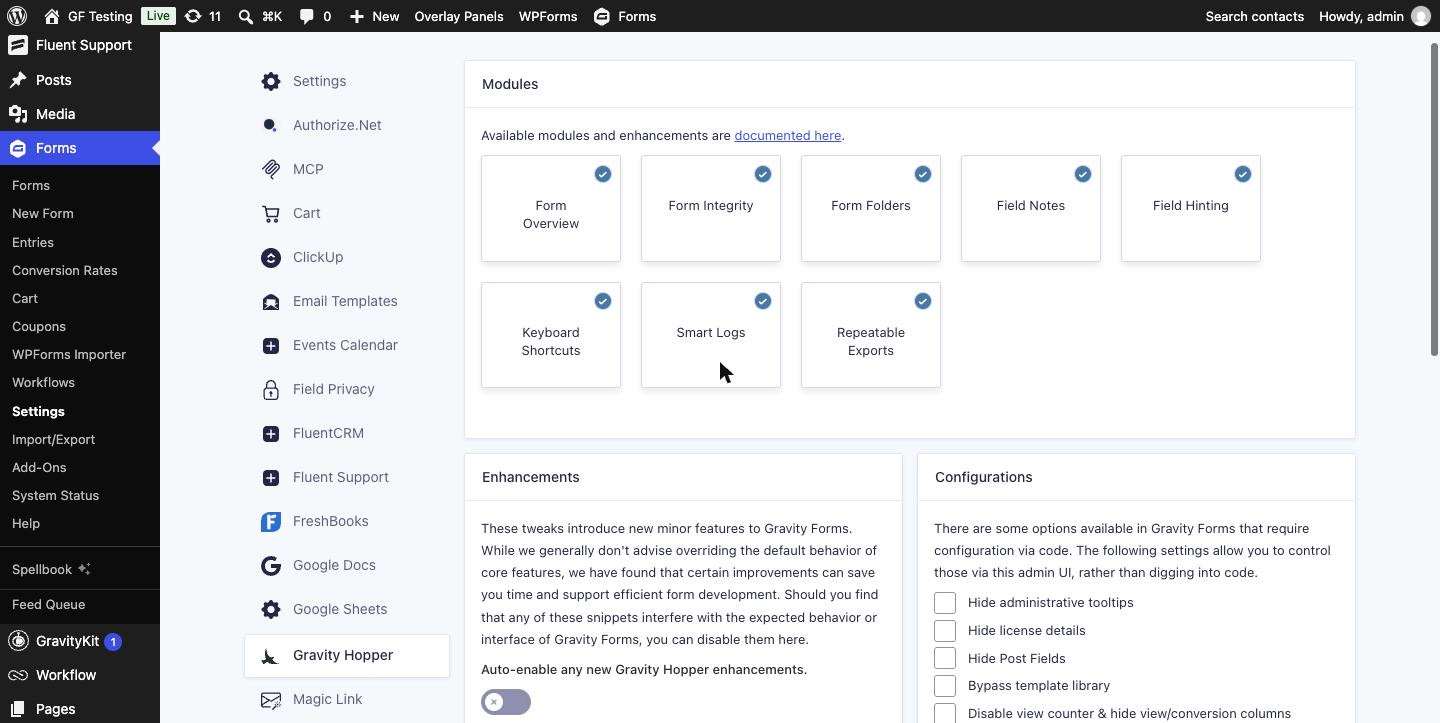
| Module | What it does | Tested here |
|---|---|---|
| Form Overview | Adds ID, field count, add-on icons and an entry status bar to the forms list | Yes |
| Form Integrity | Tracks which plugins each form depends on and warns when one is missing | Yes |
| Form Folders | Sorts forms into folders you can filter by | Yes |
| Keyboard Shortcuts | Navigation and editor shortcuts | Yes |
| Field Hinting | Marks which settings are in use on each field | Yes |
| Field Notes | Internal notes on fields and forms | No |
| Smart Logs | Easier access to Gravity Forms logs with form, entry and feed context | No |
| Repeatable Exports | Listed on the settings page; not covered in the developer’s module list | No |
What You Need
- Gravity Forms
- Gravity Hopper: $59 a year for one site, $129 for four, $199 unlimited, or in the Orbital Forge Toolkit from $99 a year (prices checked November 2026)
- PHP 8.0 or newer
Step 1: Read the New Forms List
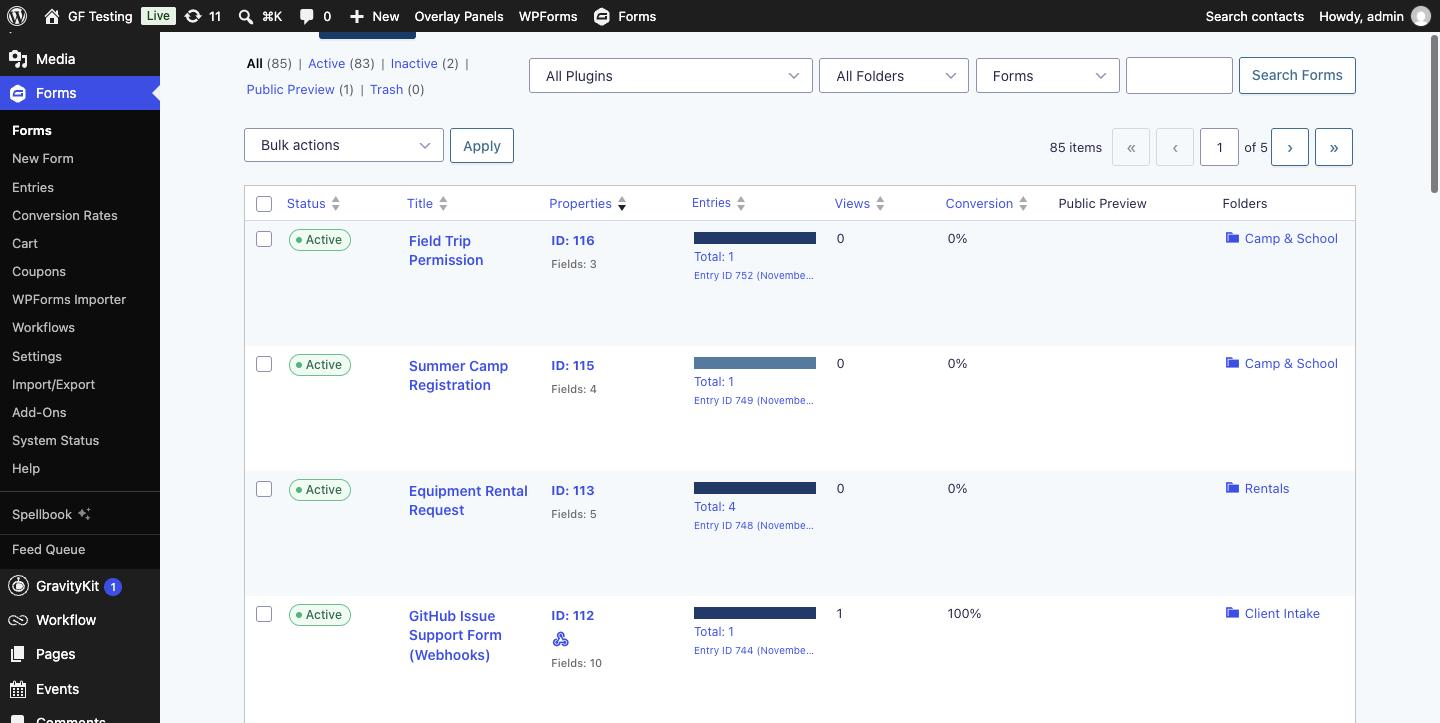
Nothing to configure. Open Forms and the table has changed.
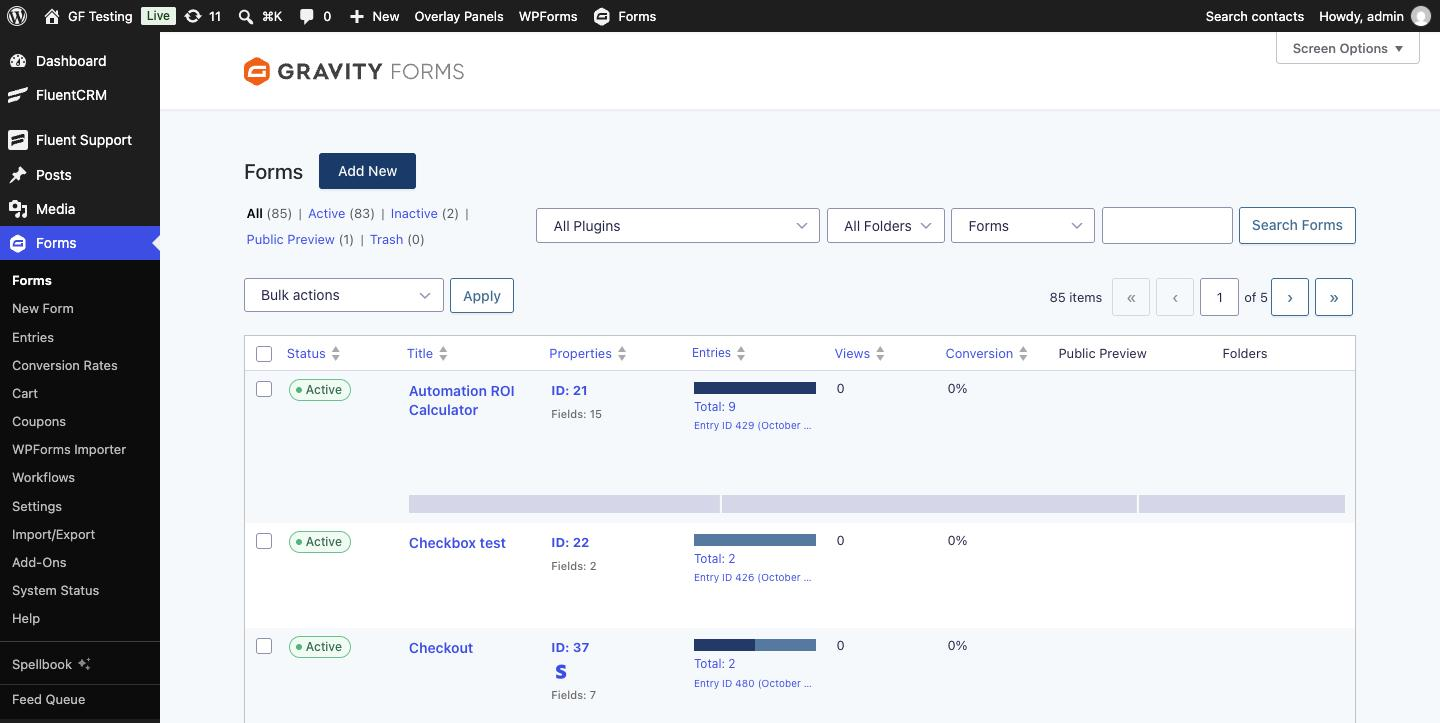
- Properties replaces the ID column: form ID, number of fields, and an icon for add-ons the form uses, such as the Stripe “S”.
- Entries gets a status bar, the total, and a link to the latest entry.
- All Plugins and All Folders dropdowns sit beside the search box.
- In form settings, the Confirmations and Notifications menu items show how many of each the form has.
Step 2: Find Out What Each Form Depends On
On the Gravity Hopper settings page, click Check & Add Plugins, then Run Dependency Check. That scans every form once; after that, a form is re-checked whenever it is saved.
Now the All Plugins filter is useful. On my site it listed Stripe Add-On (8 forms), User Registration Add-On (5), Populate Anything (3), Gravity Flow (3), Webhooks Add-On (3) and more. Pick one to see only the forms that need it, which is the question you have right before updating or removing an add-on.
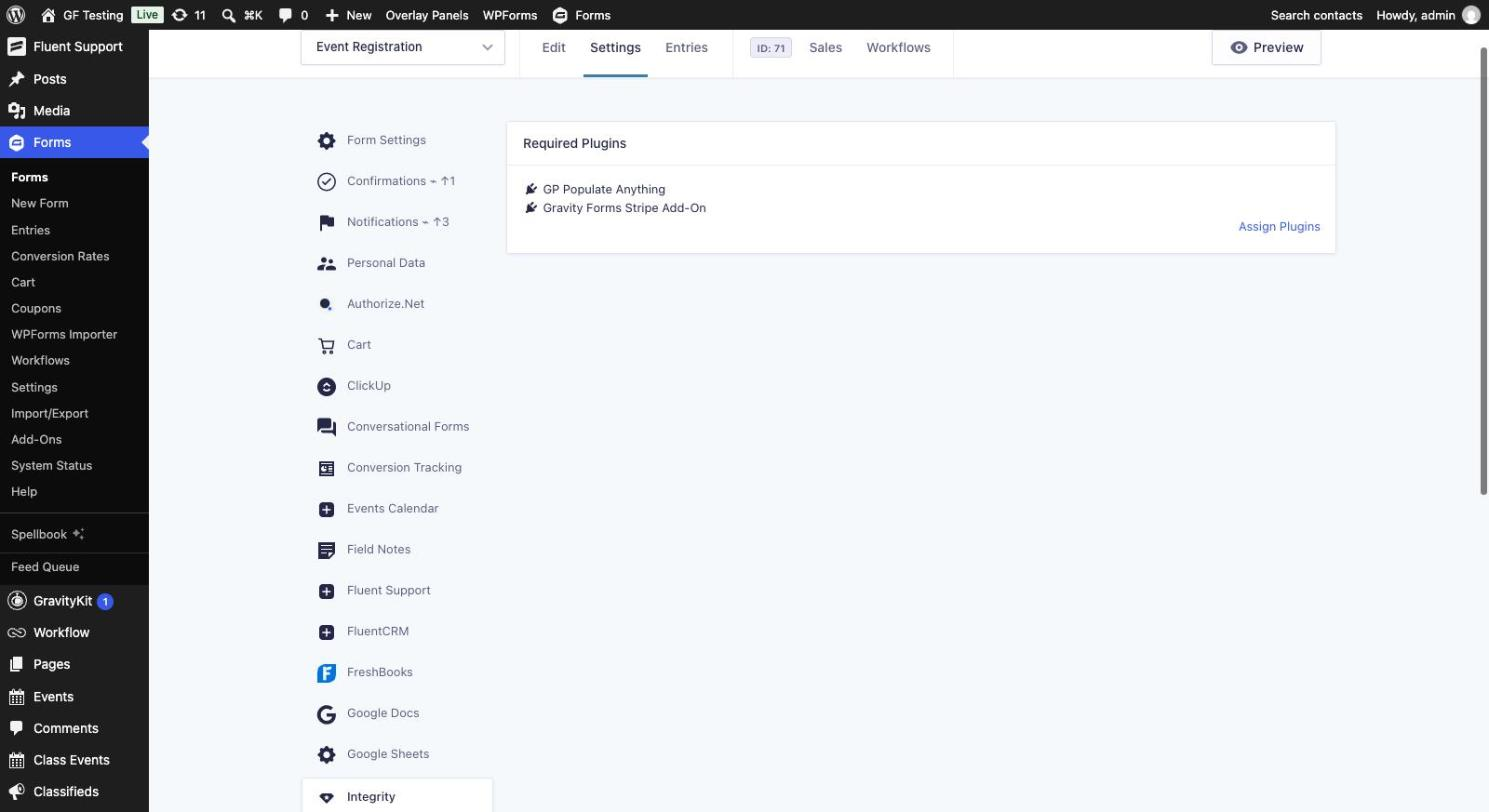
Each form also gets a Settings → Integrity tab listing its required plugins, with an Assign Plugins link for adding dependencies the scan cannot detect.
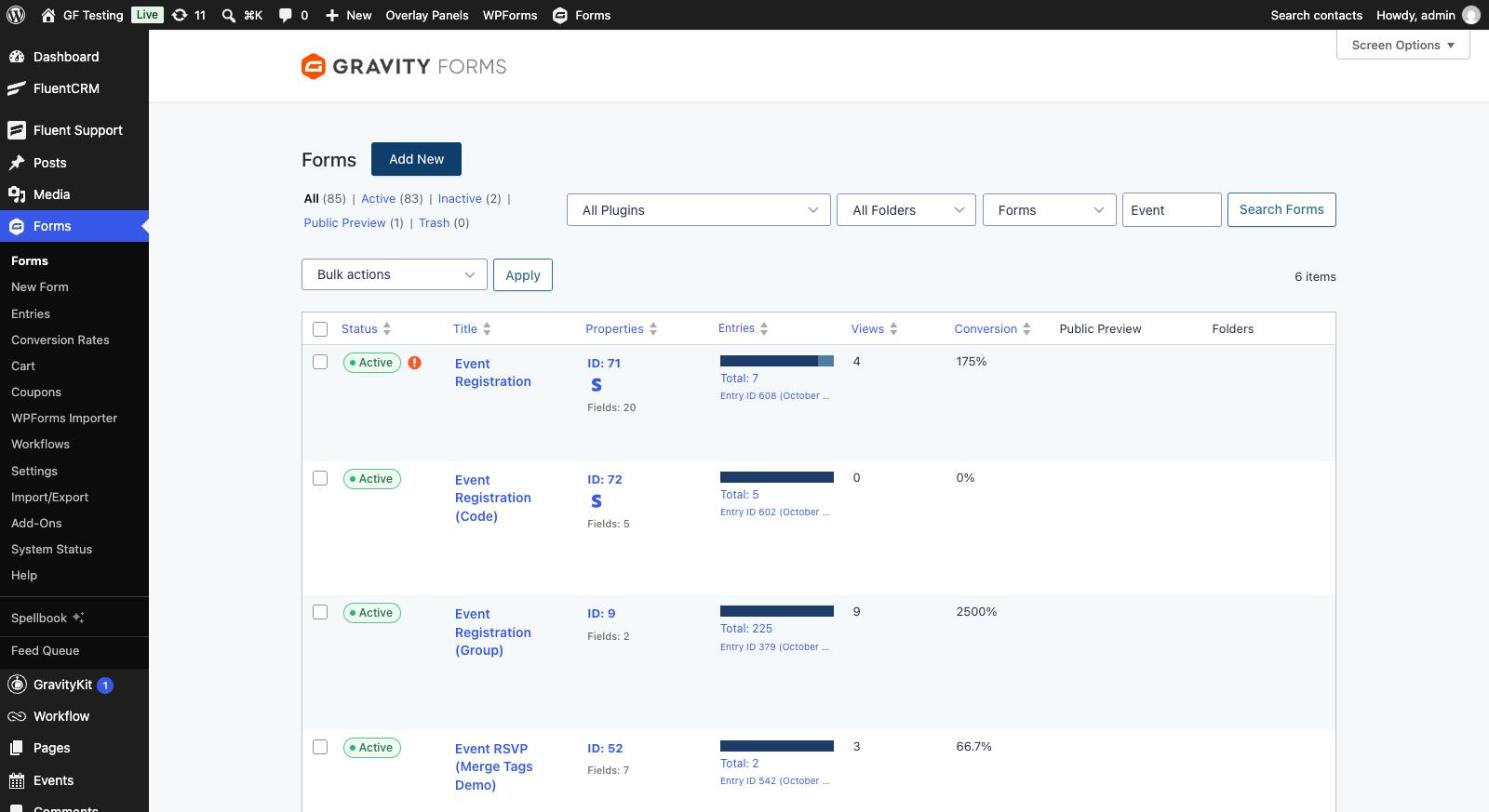
To see the warning, I deactivated Populate Anything. The form picked up a red alert icon next to its status on the forms list, and lost it when I reactivated the plugin.
Step 3: Put Forms in Folders
Folders are a standard WordPress taxonomy, so they are managed on a familiar category-style screen (/wp-admin/edit-tags.php?taxonomy=gh_form_folder&post_type=gh_form) and can be nested under a parent folder. I created Rentals, Camp & School, Payments and Client Intake.
To file a form, hover its Folders cell, click Assign Folders and tick one or more. It saves as you tick. There is also an Assign Folders bulk action.
Step 4: Learn Five Shortcuts
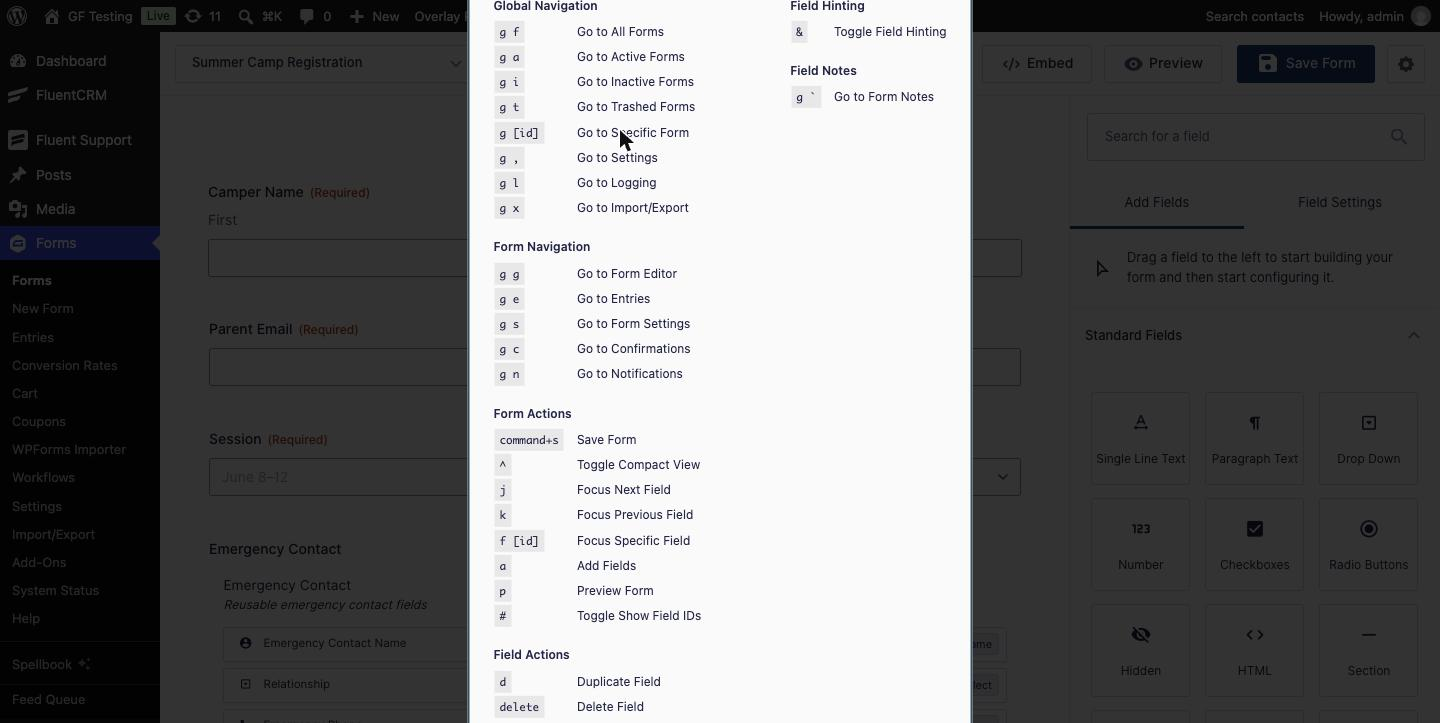
Press ? on a Gravity Forms admin screen for the full list. They are typed in sequence, Gmail style, not held together.
| Keys | Action |
|---|---|
g f | Go to all forms |
g e / g s / g n / g c | This form’s entries / settings / notifications / confirmations |
g then a form ID | Jump to that form |
j / k | Next / previous field in the editor |
p | Preview the form |
# and ^ | Toggle field IDs and compact view |
command+s | Save the form |
Step 5: Turn On Field Hinting
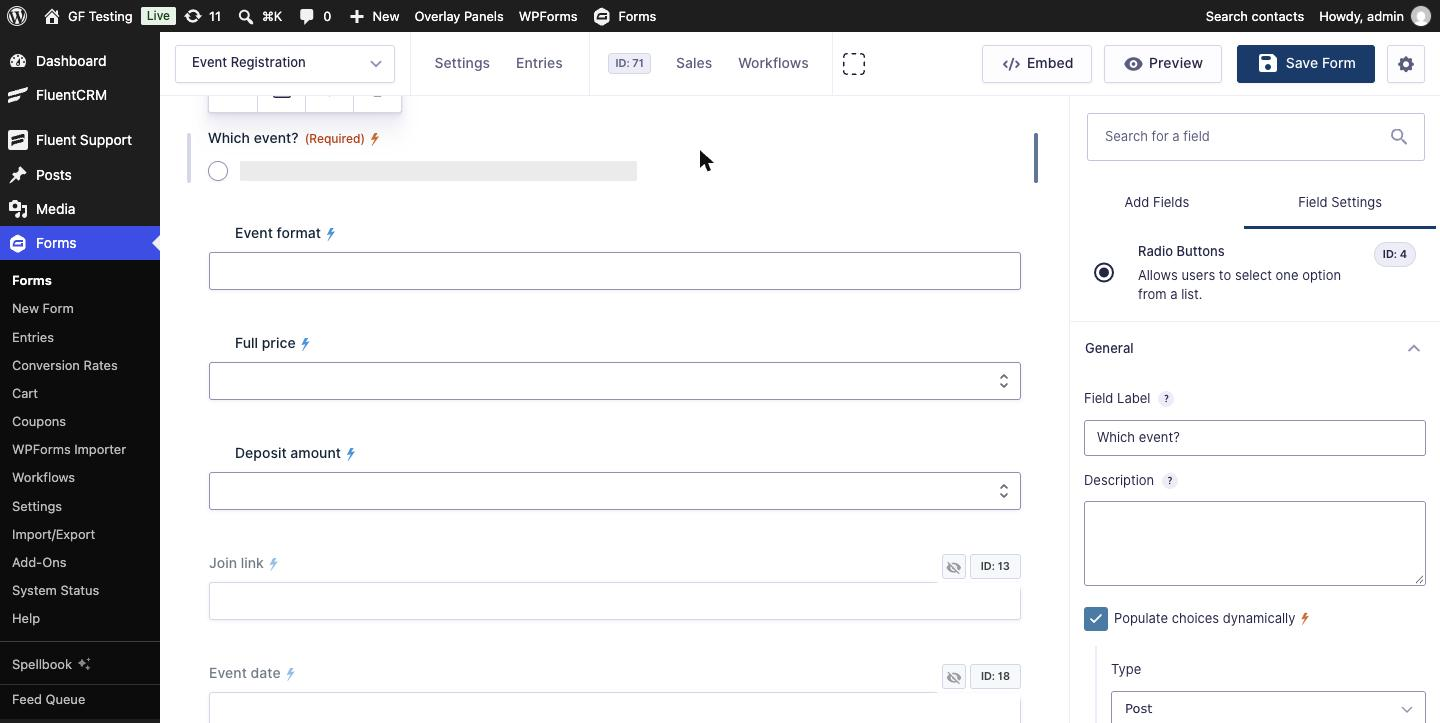
In the form editor press &. Small indicators appear next to field labels and inside Field Settings showing what is configured: visibility, conditional logic, dynamic population, calculations, custom CSS classes and more. Hidden fields are dimmed and show their IDs, and the editor toolbar shows the form ID. It answers “why is this field behaving like that?” without opening every setting.
The Smaller Switches
Below the modules are two lists I did not test one by one.
- Enhancements (14 toggles) include a dark mode for the Gravity Forms admin, a wider editor sidebar, copying the shortcode from the forms list, ordering the forms list by most recent, searching by form ID in the form switcher, keeping entry list columns when a form is duplicated, and exporting entry notes.
- Configurations expose options that normally need code: hide tooltips or license details, hide Post Fields, bypass the template library, disable the view counter, stop new forms getting a default notification, enable the cc field on notifications, set how long saved submissions last, how many times a background feed is retried, entries per page, and a custom export file name.
Things to Know
- Email Templates and Centralized Fields began as Gravity Hopper modules and are now separate Orbital Forge plugins. The 2.7 changelog says both modules are due to be removed from Gravity Hopper. With the standalone plugins active on my site, Gravity Hopper showed no cards for them. If you want those two, check with Orbital Forge what your license includes.
- It changes screens you know. The forms list is denser and the editor gains icons. Give it a day, and switch off the modules you do not use.
- Shortcuts are single keys. If another plugin also binds single keys in the admin, test for clashes.
- Folder management has no obvious menu link that I found; bookmark the URL above.
- Requires PHP 8.0.
Alternatives
- JetSloth Fetcher covers the “find my form” problem with spotlight search and folders. We reviewed it in JetSloth Fetcher Review. Fetcher is about getting to a form fast; Gravity Hopper adds dependency checks, hinting and the configuration switches.
- Gravity Forms’ own tools. Compact view and field IDs are built into the editor; see Gravity Forms Compact View and Show Field IDs in the Form Editor.
- More options in Improve the Gravity Forms Editor with These Add-Ons.
Who Should Use It
Agencies, in-house teams and support people who open Gravity Forms every day and manage more forms than fit on one screen. Form Integrity alone earns its keep the first time it stops you deactivating an add-on that eight payment forms rely on. With a handful of forms you rarely touch, you will not get the value.
Get Gravity Hopper from Orbital Forge
Frequently Asked Questions
What is Gravity Hopper?
Gravity Hopper is an admin toolkit for Gravity Forms from Orbital Forge. Its modules add form folders, a richer forms list, plugin dependency checks, keyboard shortcuts, field hinting, field notes and logging tools. It does not add form fields or change the front end.
Can I organize Gravity Forms into folders?
Not with Gravity Forms alone. Gravity Hopper’s Form Folders module adds a Folders column and filter to the forms list. Hover the Folders cell on a form, click Assign Folders and tick the folders it belongs to.
How do I see which Gravity Forms use a specific add-on?
With Gravity Hopper’s Form Integrity module, run the dependency check from its settings page, then use the All Plugins filter on the forms list. Each form also lists its required plugins under Settings, Integrity, and is flagged if one is deactivated.
Does Gravity Hopper have keyboard shortcuts for Gravity Forms?
Yes. Press the question mark key on a Gravity Forms admin screen to see them. Examples: g then f for all forms, g then e for entries, j and k to move between fields, and p to preview.
How much does Gravity Hopper cost?
As of November 2026: $59 a year for one site, $129 for four sites and $199 for unlimited sites. It is also part of the Orbital Forge Toolkit, which starts at $99 a year.
Need More Help?
If you still need help, use the chat or leave a comment below and we’ll get back to you.
Comments