
Multi Path Step for Gravity Flow
Add a multi-path decision step to Gravity Flow so form submissions can branch into up to 20 separate approval routes.
What it does
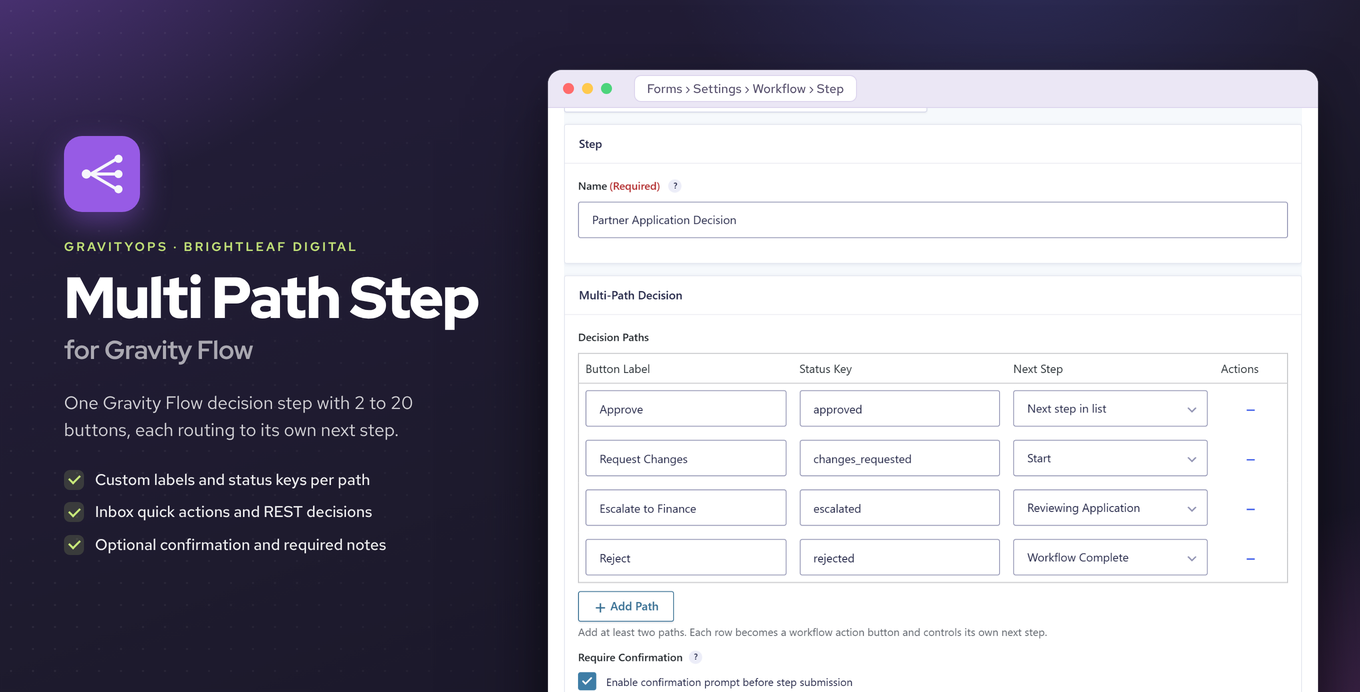
When you use Gravity Flow, the built-in approval step gives you two outcomes: approve or reject. If your workflow needs more options—escalate, send back for revision, route to a different team—you normally have to chain several steps together. Multi Path Step solves that by adding a dedicated step type with up to 20 configurable paths in one place.
You set up each path with its own button label, status key, and next-step destination. When an assignee opens the Gravity Flow inbox, every path appears as a quick action. An optional confirmation prompt can protect high-stakes decisions, and workflow notes can be hidden, optional, or required depending on the path.
The step works like any other Gravity Flow step, so assignees, instructions, notifications, and reporting all behave as you already expect. A REST endpoint also lets external systems submit decisions programmatically.
Key features
- Configure 2 to 20 decision paths per step, each with its own label, status key, and destination
- Paths appear as quick actions in the Gravity Flow inbox
- Optional confirmation prompt for high-stakes paths
- Workflow notes can be hidden, optional, or required
- Assignees, instructions, notifications, and reporting work like standard Gravity Flow steps
- REST endpoint lets external systems send decisions
Good for
Written from Brightleaf Digital’s own listing. Version and dates come straight from the source and are checked weekly.
How many paths can one step have?
Each step supports between 2 and 20 paths.
Does it work with existing Gravity Flow features like notifications and reporting?
Yes, assignees, instructions, notifications, and reporting all work the same way as any other Gravity Flow step.
Can I require a note before an assignee chooses a path?
Yes, workflow notes can be set to hidden, optional, or required per step.
Can an outside system trigger a path decision?
Yes, a REST endpoint accepts decisions from external systems.