
Gravity Forms is a premium WordPress plugin for building forms with a drag-and-drop editor. You can use it for contact forms, quote requests, event registrations, surveys, quizzes, order forms and payment forms. Every submission is saved as an entry in your WordPress dashboard, and Gravity Forms can email it, send it to other apps or take a payment. Licenses start at $59 a year.
Gravity Forms is made by Rocketgenius, Inc., which sells it under the “Gravity” brand at gravity.com. It’s a popular choice for business sites, agencies and developers who need more than a basic contact form.
What Can You Build With Gravity Forms?
Almost any form a website needs. A few examples, each with a Gravity Ranger guide:
- Contact and lead forms that route each message to the right person
- Quote requests and invoices, with approval steps and online payment (see Quote to Invoice with Gravity Flow)
- Order forms where customers pick several products (checkbox products)
- Calculators that show results as people type (lead-generating ROI calculator)
- Event registrations with limits and waitlists
- Surveys, polls and quizzes (with the Elite add-ons)
- Signed agreements using the Signature add-on
- User registration forms that create WordPress accounts
How Does Gravity Forms Work?
You build a form in the form editor by dragging fields onto it: text, email, phone, dropdowns, checkboxes, file uploads, dates, product and payment fields and more. Then you decide what happens when someone submits it:
- Notifications email the submission to you, the visitor or anyone else.
- Confirmations show a thank-you message, send them to a page or redirect to a URL.
- Entries store every submission in WordPress, where you can search, edit, export and print them.
- Add-ons send the data on: to Mailchimp, a CRM, Zapier, Stripe, Slack and many more.
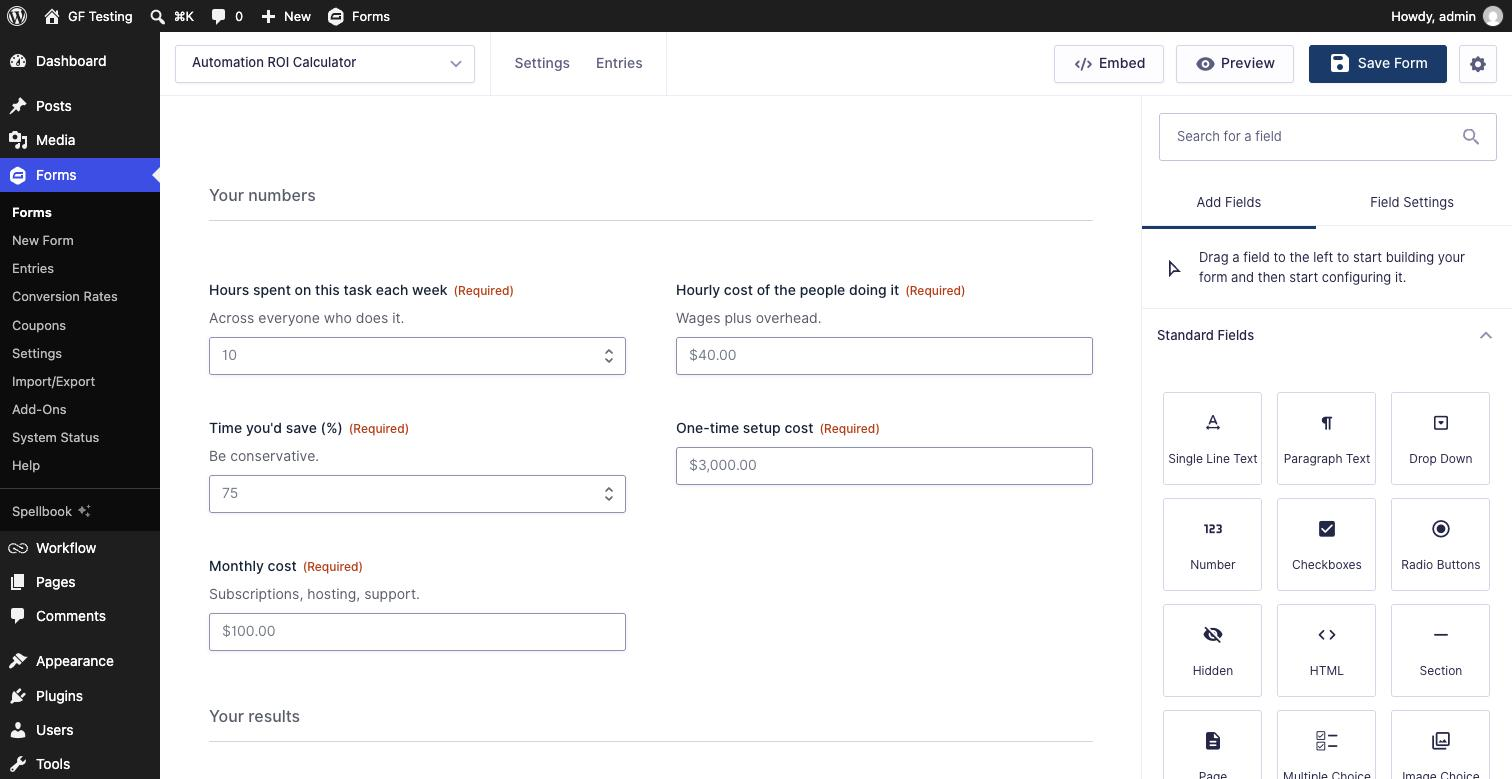
To show a form on your site, add the Gravity Forms block to any page or post, or paste its shortcode.
What Are Gravity Forms’ Main Features?
- Conditional logic: show or hide fields, sections, pages, notifications and confirmations based on answers.
- Calculations: number fields that calculate totals, quotes and results as people type.
- Multi-page forms with a progress bar, and Save and Continue so people can finish later.
- File uploads, including multiple files per field.
- Payments through official add-ons for Stripe, PayPal, Square and Mollie.
- Spam protection with a built-in honeypot plus add-ons for reCAPTCHA, Cloudflare Turnstile and Akismet.
- Styling with the Orbital theme and style settings in the block. See how to make Gravity Forms look good.
- Developer tools: hundreds of hooks, a REST API and a PHP API, so forms can do almost anything with a little code.
Is Gravity Forms Free?
No. Gravity Forms has no free version on WordPress.org. You need a paid license to download it, get updates and use the official add-ons. There’s a free Elite demo to try it first and a 30-day money-back guarantee. Registered nonprofits can apply for a nonprofit license. More here: How to get a free Gravity Forms license and Can you use Gravity Forms without a license?
How Much Does Gravity Forms Cost?
| License | Price | Sites | Best for |
|---|---|---|---|
| Basic | $59/year | 1 | A single site that needs forms and email marketing integrations |
| Pro | $159/year | 3 | Taking payments, Zapier and CRM integrations |
| Elite | $259/year | Unlimited | Agencies, and every add-on (Signature, User Registration, Surveys, Quizzes) |
Prices from gravityforms.com, checked October 2026. For a full breakdown of what each license includes, see Gravity Forms pricing: Basic vs Pro vs Elite.
Do You Need to Know Code to Use Gravity Forms?
No. You can build, style and connect forms entirely in the WordPress admin. Code is optional: if you want a form to do something unusual, Gravity Forms has hooks for it, and most Gravity Ranger tutorials include a ready-to-paste snippet.
Does Gravity Forms Work With Page Builders?
Yes. It works with the block editor out of the box, and the shortcode works anywhere shortcodes do. Builders such as Elementor, Divi and Beaver Builder have their own Gravity Forms widgets or modules. See Which page builders work best with Gravity Forms? and Is Gravity Forms compatible with Elementor?
Is Gravity Forms Worth It?
If your forms do real work for your business, usually yes. It stands out for complex forms: conditional logic, calculations, payments, approvals and integrations, plus a large ecosystem of third-party add-ons from developers like Gravity Wiz and GravityKit. If all you need is one simple contact form, a free plugin may be enough. Here are the best Gravity Forms alternatives.
Frequently Asked Questions
Is Gravity Forms a WordPress plugin?
Yes. Gravity Forms is a premium plugin for WordPress. It runs on your own WordPress site and stores form entries in your WordPress database.
Who makes Gravity Forms?
Gravity Forms is made by Rocketgenius, Inc., which sells it under the Gravity brand at gravity.com. The same company also makes Gravity SMTP and Gravity Flow.
Is there a free version of Gravity Forms?
No. Gravity Forms requires a paid license, starting at $59 a year. You can try a free Elite demo, and every license has a 30-day money-back guarantee.
Can I use Gravity Forms without WordPress?
Not directly. Gravity Forms is a WordPress plugin, so the form has to live on a WordPress site. More: Can I use Gravity Forms without WordPress?
What is Gravity Forms used for?
Contact forms, lead and quote forms, registrations, surveys and quizzes, order and payment forms, user registration, and multi-step workflows such as approvals.
What is the difference between Gravity Forms Basic, Pro and Elite?
All three include the full form builder. Basic covers 1 site with email marketing add-ons. Pro covers 3 sites and adds payment, CRM and automation add-ons. Elite covers unlimited sites, includes every official add-on and comes with priority support.
Need More Help?
If you still need help, use the chat or leave a comment below and we’ll get back to you.
Comments