
To add a repeater in Gravity Forms, update to Gravity Forms 3.2 or later, drag the Repeater field from Advanced Fields onto your form, then drag the fields you want to repeat inside it. Set the row label, the maximum number of rows and the button text in the field settings. Visitors can then add a row for each person or item, and every row is saved with the entry.
The Repeater field has been in Gravity Forms since version 2.4, but until now it was a beta you could only build with code. Gravity Forms 3.2 added it to the form editor. I built a team workshop registration form with it, with an attendee row per person, a ticket price in every row and a nested repeater for emergency contacts, and tested what works and what doesn’t.
What the Repeater Field Does
A repeater is a group of fields the visitor can repeat. Instead of guessing how many attendees, team members or vehicles someone has and adding “Attendee 1” to “Attendee 5” fields, you add one set of fields. The visitor clicks Add for each extra row.
It’s different from the List field, which repeats a row of plain text columns. A repeater row can hold Name, Email, radio buttons, drop downs, product fields and even another repeater, each with its own validation.
Step 1: Add the Repeater to Your Form
Open your form and find Repeater under Add Fields → Advanced Fields. Drag it onto the form. If you don’t see it, update Gravity Forms to 3.2 or later.
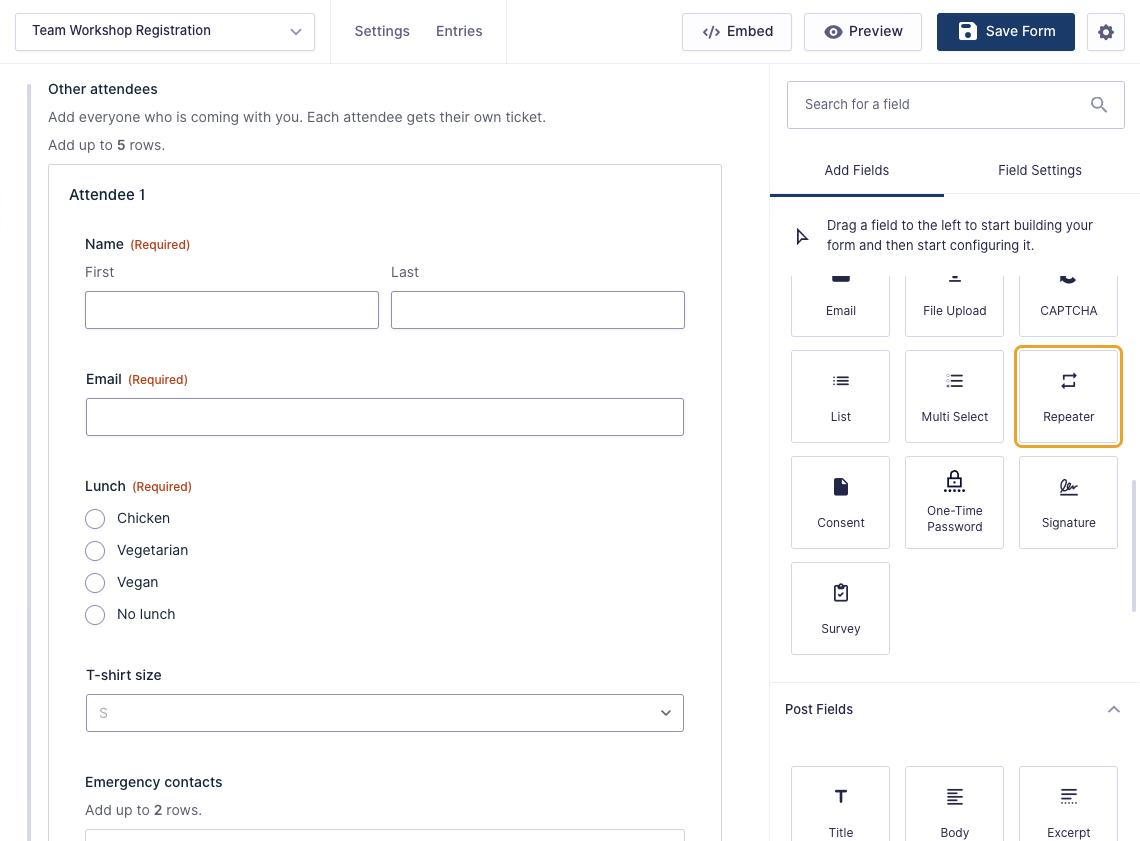
Then drag the fields you want to repeat into the repeater box. For my workshop form, each attendee row has:
- Name and Email (both required)
- Lunch (Radio Buttons: Chicken, Vegetarian, Vegan, No lunch)
- T-shirt size (Drop Down)
- Emergency contacts (a second repeater, up to 2 rows)
- Ticket (a Single Product field at $149)
The person filling in the form has their own Name, Email and $149 ticket above the repeater, so the repeater is only for the people coming with them.
Step 2: Set the Row Label, Limit and Buttons
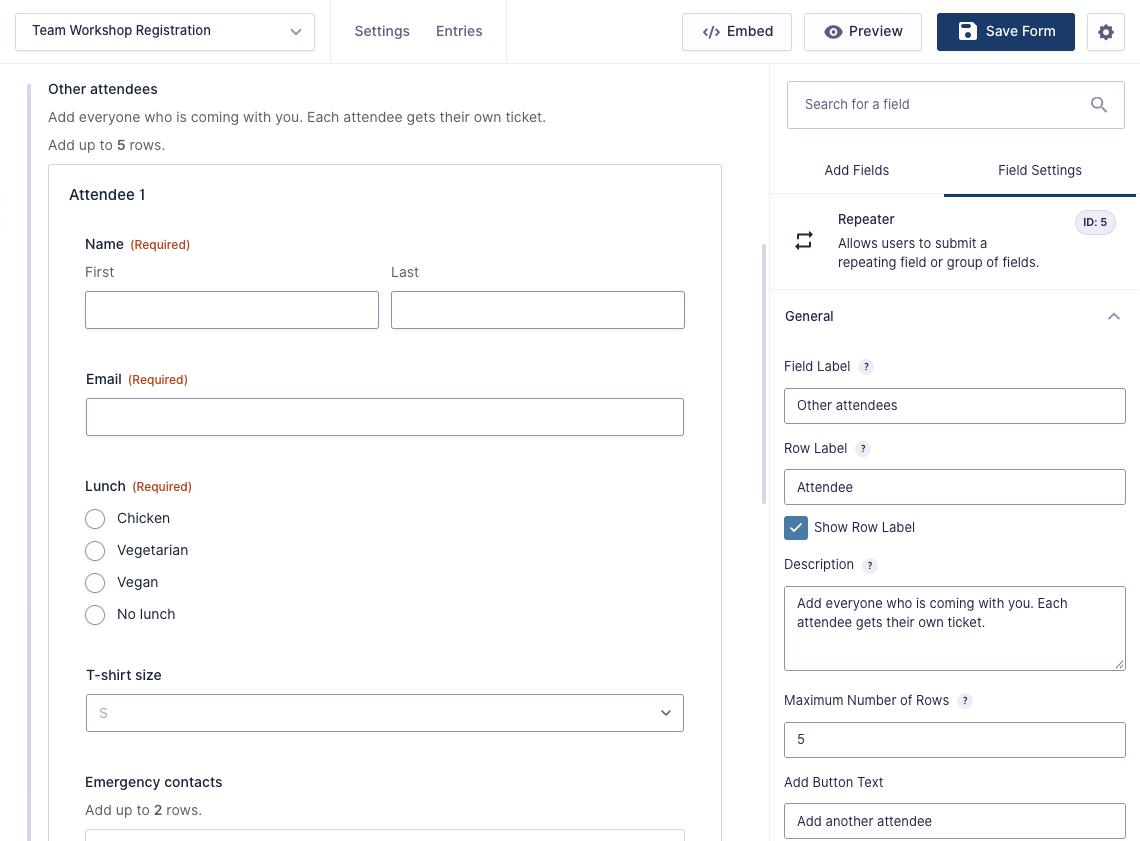
Click the repeater to open its settings:
- Row Label: the heading for each row. With “Attendee” and Show Row Label checked, rows are numbered Attendee 1, Attendee 2 and so on.
- Maximum Number of Rows: I set 5. The form shows “Add up to 5 rows” under the description. Leave it empty for no limit.
- Add Button Text and Remove Button Text: mine say “Add another attendee” and “Remove”.
Every row is a copy of the first one, so set up the fields inside the repeater (labels, required, choices) the same way you would anywhere else.
Step 3: Show the Repeater Only When It’s Needed
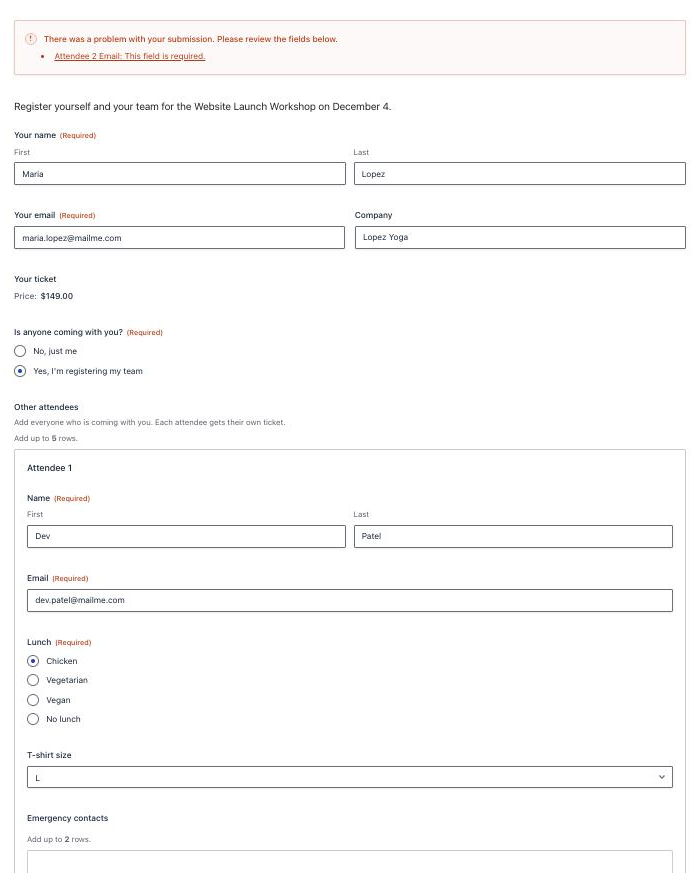
Fields inside a repeater can’t have conditional logic, but the repeater itself can. I added a question above it, “Is anyone coming with you?”, with the choices “No, just me” and “Yes, I’m registering my team”. The repeater’s conditional logic shows it only when the answer is the team choice. Someone coming alone never sees the attendee rows.
Step 4: Charge per Row With a Product Field
Product fields work inside a repeater. Each row’s Ticket adds $149 to the Total field, and the total updates as rows are added or removed. With two attendees plus the registrant, the total was $447.
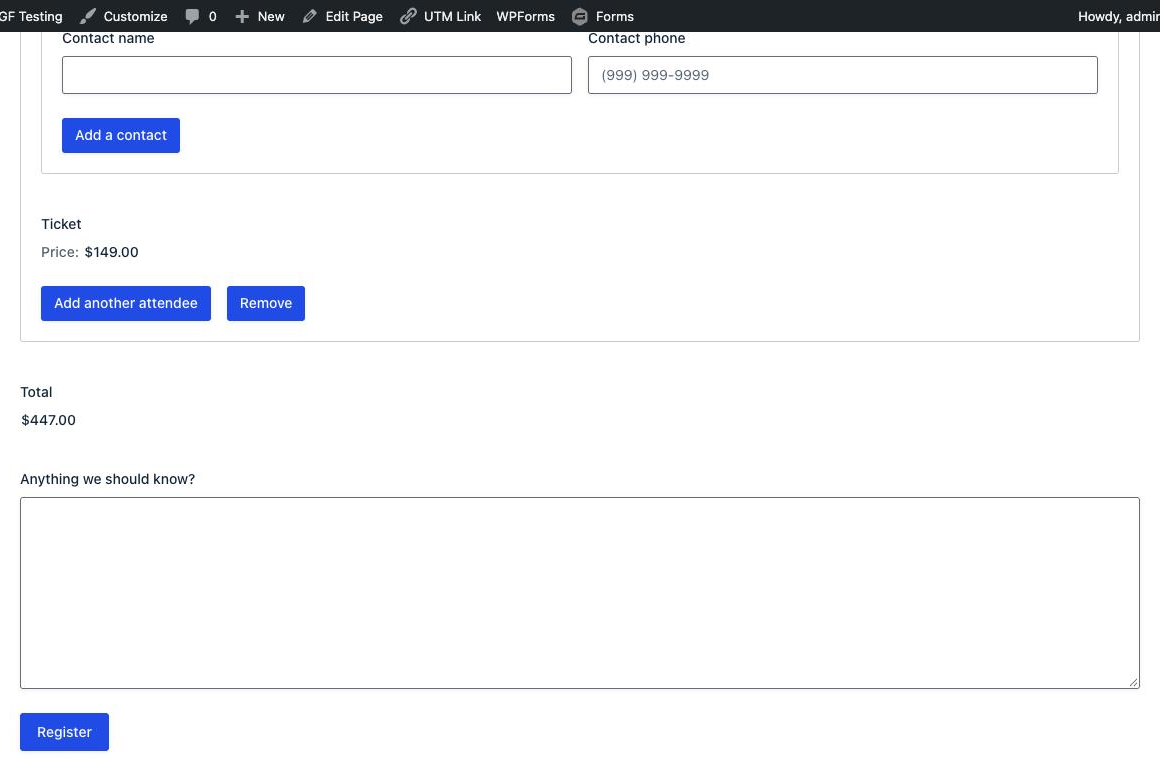
When someone clicks Remove, Gravity Forms asks them to confirm (“Are you sure you want to remove Attendee 2?”) before deleting the row.
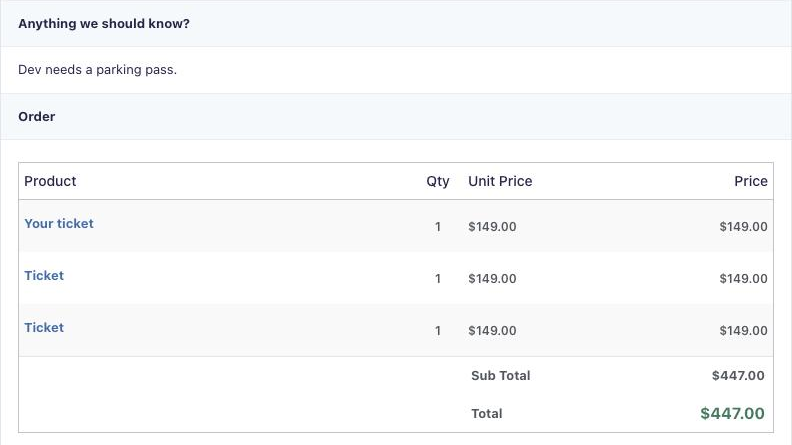
Each row’s product becomes its own line in the order, so payment add-ons such as Stripe charge the right amount. The lines all have the same name, though, so the order doesn’t say which ticket belongs to which attendee.
Step 5: Test the Validation
Required fields are checked in every row. I left the second attendee’s email empty and submitted. The error message names the row, and everything else the visitor entered, including the nested emergency contact, was still there.
How Repeater Entries Look
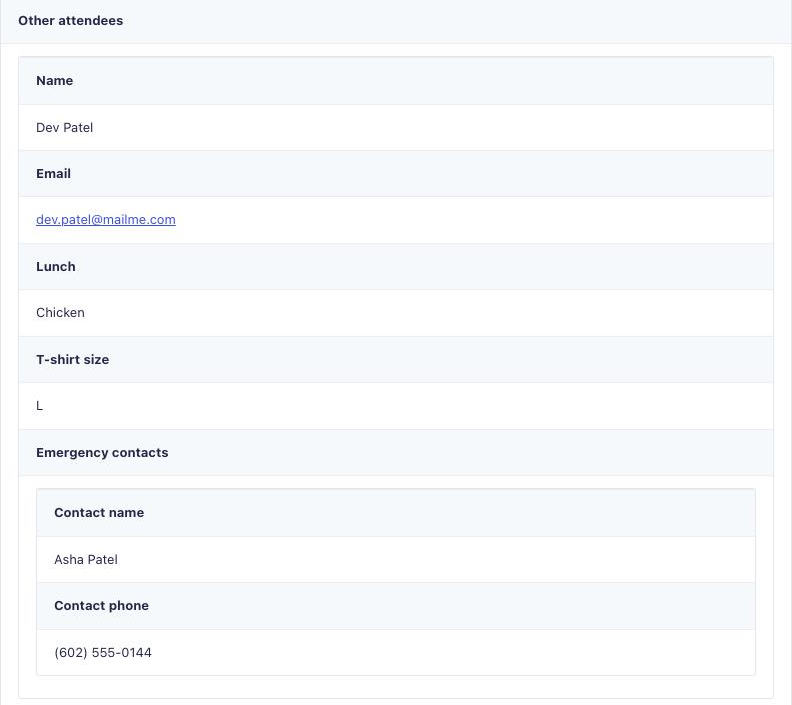
On the entry, each row is a small table, and a nested repeater shows as a table inside its row.
Use Repeater Data in Notifications
The repeater’s merge tag, such as {Other attendees:5}, outputs every row as a table. These modifiers worked in my tests:
| Merge tag | Output in my test |
|---|---|
{Other attendees:5} | A table for each row, including nested repeaters |
{Other attendees:5:count} | 2 (the number of rows) |
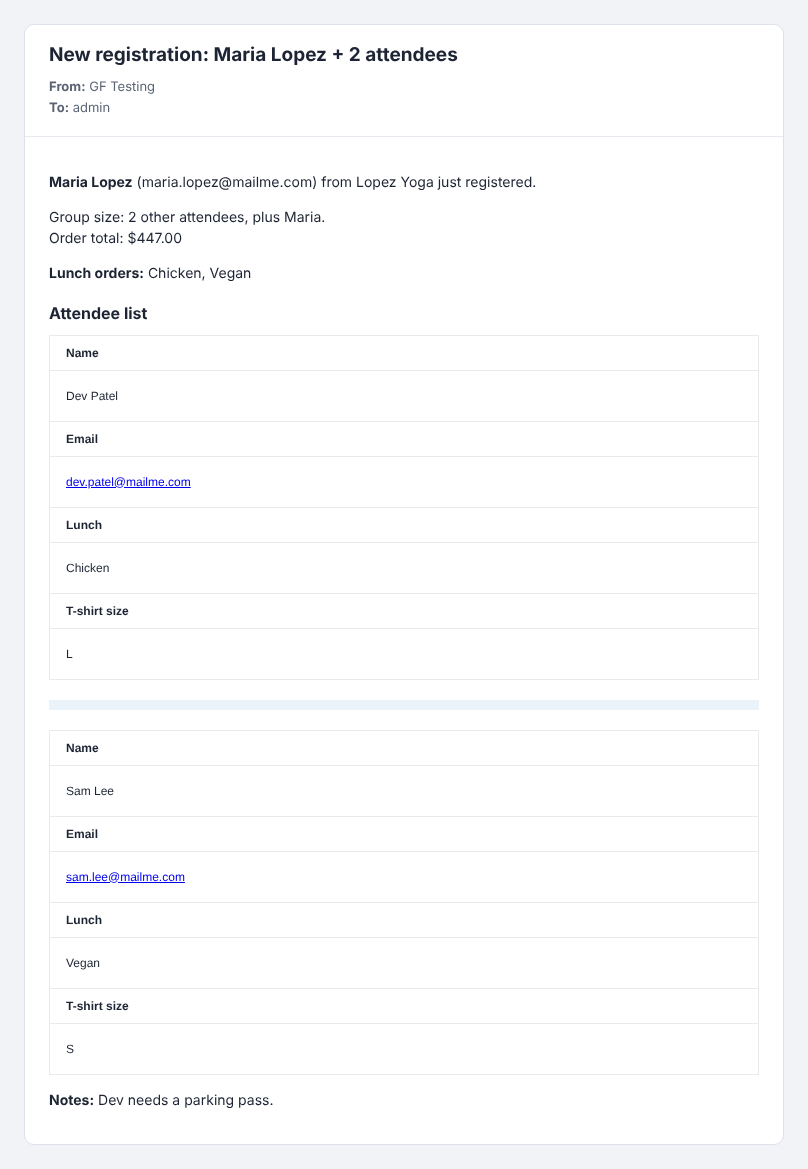
{Other attendees:5:field_ids=6|7|8|9} | Only the Name, Email, Lunch and T-shirt size fields of each row |
{Other attendees:5:field_ids=8,value} | Chicken, Vegan |
{all_fields} | Every row, with nested rows indented |
The Gravity Forms docs list :rowCount for the number of rows, but on 3.2.0 it printed the full table. :count gave the number. The field_ids modifier takes field IDs separated by |, and adding ,value gives a comma-separated list, which is handy for a lunch order.
Here’s the admin notification I set up, with the subject New registration: {Your name (First):1.3} {Your name (Last):1.6} + {Other attendees:5:count} attendees:
For more modifiers, see Gravity Forms Merge Tags.
Download the Form Template
It’s free. Get the team workshop registration form from this tutorial, with the attendee repeater, nested emergency contacts, per-row tickets and the admin notification, as a Gravity Forms import file.
Things to Know
- No conditional logic inside the repeater. You can show or hide the whole repeater, but not a field inside a row.
- No calculations. Number fields with calculations aren’t supported inside a repeater. Product fields with a fixed price do work.
- Some fields can’t go inside, including File Upload, CAPTCHA, Page, Post fields, Total, Coupon, Shipping, payment fields such as Stripe, and Poll, Survey and Quiz fields.
- Order lines share a name. Each row’s product shows in the order with the same label, so use the attendee list to see who each ticket is for.
- Check your add-ons. Before mapping repeater fields in a CRM or email marketing feed, test that the add-on handles repeater data.
When to Use Nested Forms Instead
If you need conditional logic or calculations inside each row, file uploads per row, or a separate entry for each child item, use Gravity Wiz Nested Forms. Each row is an entry in a separate child form, so it can use conditional logic, calculations and file uploads. For simple repeating groups like attendees, the built-in repeater is now enough, and it’s free with any Gravity Forms license.
Frequently Asked Questions
Does Gravity Forms have a repeater field?
Yes. The Repeater field has been in Gravity Forms since version 2.4 as a beta you could only add with code. Since Gravity Forms 3.2 it is in the form editor under Advanced Fields, and it is included with every Gravity Forms license.
Can I use conditional logic inside a repeater?
Not on the fields inside it. Fields in a repeater row cannot have conditional logic. You can add conditional logic to the repeater itself, so the whole group shows or hides based on another field.
Can I add product fields to a repeater?
Yes. A product field with a fixed price inside a repeater adds its price to the Total for every row, and the total updates as rows are added or removed. Each row becomes its own line in the order. Calculated fields are not supported inside a repeater.
How do I show repeater data in a notification?
Use the repeater merge tag, such as {Other attendees:5}, to output every row. Add :count for the number of rows, :field_ids=6|8 to include only certain fields, and :field_ids=8,value for a comma-separated list of one field.
Can I put a repeater inside a repeater?
Yes. A repeater can contain another repeater, such as emergency contacts inside each attendee row. Each nested repeater has its own row label, button text and row limit, and nested rows are saved inside their parent row.
Need More Help?
If you still need help, use the chat or leave a comment below and we’ll get back to you.
Comments