
To stop spam in Gravity Forms, turn on the Advanced Honeypot in each form’s settings, set it to flag links and run the Submission Speed Check, and keep spam entries instead of discarding them. That catches most bot spam with nothing for real visitors to click. If spam still gets through, add one invisible check on top (Cloudflare Turnstile or reCAPTCHA v3), and use Akismet or the Moderation add-on for the spam that real people type by hand.
Gravity Forms’ built-in spam protection got a lot better over the last year, and most guides haven’t caught up. I tested the current settings (Gravity Forms 3.2) on a contact form with a real visitor and three kinds of spam. Here’s what each setting does, what caught what, and which add-ons are worth adding.
Why Gravity Forms Gets Spam (Even With a Captcha)
Form spam comes from three places, and each needs a different fix:
- Simple bots post straight to your form without loading it in a browser. A honeypot catches these.
- Browser bots load the page, run JavaScript and fill in the fields. They’re fast, and they love pasting links. The speed check and link detection catch these.
- Human spammers (often paid, sometimes using AI to write the message) type into your form like anyone else. No captcha stops a person. Content filters such as Akismet are the tool here.
That’s why “I added reCAPTCHA and still get spam” is so common. One tool only covers one kind. A few layers that don’t bother real visitors work far better than one annoying puzzle.
Step 1: Turn On the Advanced Honeypot
Open your form and go to Settings → Form Settings, then scroll to Spam Detection. Everything below is free and included with every license.
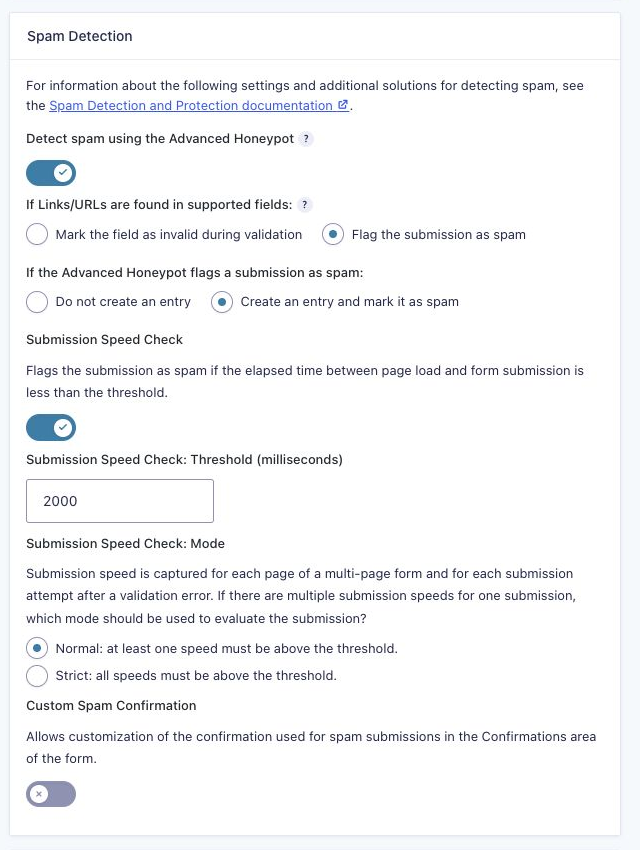
Switch on Detect spam using the Advanced Honeypot. It used to be called just “Honeypot”, and it’s no longer just a hidden field. It now runs several checks on each submission:
- A hidden field that people never see but bots fill in.
- A value that the form’s own JavaScript adds when it’s submitted. A bot that posts to your form without loading it can’t supply it.
- A check that the form’s hidden state data wasn’t tampered with (added in 3.0).
- Repeat detection (also 3.0): when the same visitor keeps submitting the same form with identical timing, about once a minute or faster, Gravity Forms starts flagging those submissions after a few in a row.
Keep spam entries, don’t discard them
Under If the Advanced Honeypot flags a submission as spam, choose Create an entry and mark it as spam. Spam goes to the form’s Spam folder and no notifications are sent, but if a real customer is ever caught by mistake, you can find them and click Not Spam. With “Do not create an entry”, a false positive is simply gone.
Step 2: Flag Links in Fields That Shouldn’t Have Them
New in Gravity Forms 3.1, this is the single most useful setting for contact forms. A lot of spam exists only to drop a link, and most real messages don’t need one.
- In the form editor, select your Paragraph (or Single Line Text) field, open the Advanced tab and check No Links/URLs. It’s also available on List and Hidden fields.
- Back in Spam Detection, set If Links/URLs are found in supported fields to Flag the submission as spam.
The other choice, Mark the field as invalid during validation, shows the visitor an error and asks them to remove the link. Use that on forms where honest people might paste a URL by habit (a support form, for example), so they get a chance to fix it instead of landing in your spam folder.
Name, Address and Phone fields set to the International (unformatted) format are checked for links automatically. Spammers often stuff a URL into the name field.
Step 3: Turn On the Submission Speed Check
Added in Gravity Forms 2.9.21, the speed check flags any submission that arrives too soon after the page loaded. No person reads a form, fills in their name, email and a message, and clicks Submit in under two seconds. Bots do it all the time.
- Threshold: 2000 milliseconds (2 seconds) is the default and a safe starting point. For a long form you can raise it. Don’t go much higher on a one-field newsletter form, where a fast typist with autofill really can finish in a few seconds.
- Mode: speed is measured for each page of a multi-page form and for each attempt after a validation error. Normal passes the submission if at least one of those times is over the threshold. Strict requires all of them to be. Start with Normal.
What Caught What: My Test
I built a simple contact form (name, email, message with No Links/URLs) with the settings above and sent four submissions:
| Submission | Result | Reason Gravity Forms gave |
|---|---|---|
| A real visitor, typed by hand (12 seconds) | Saved as a normal entry | Passed every check |
| Human-speed, with a link in the message | Spam | A link or URL was found in field: Message |
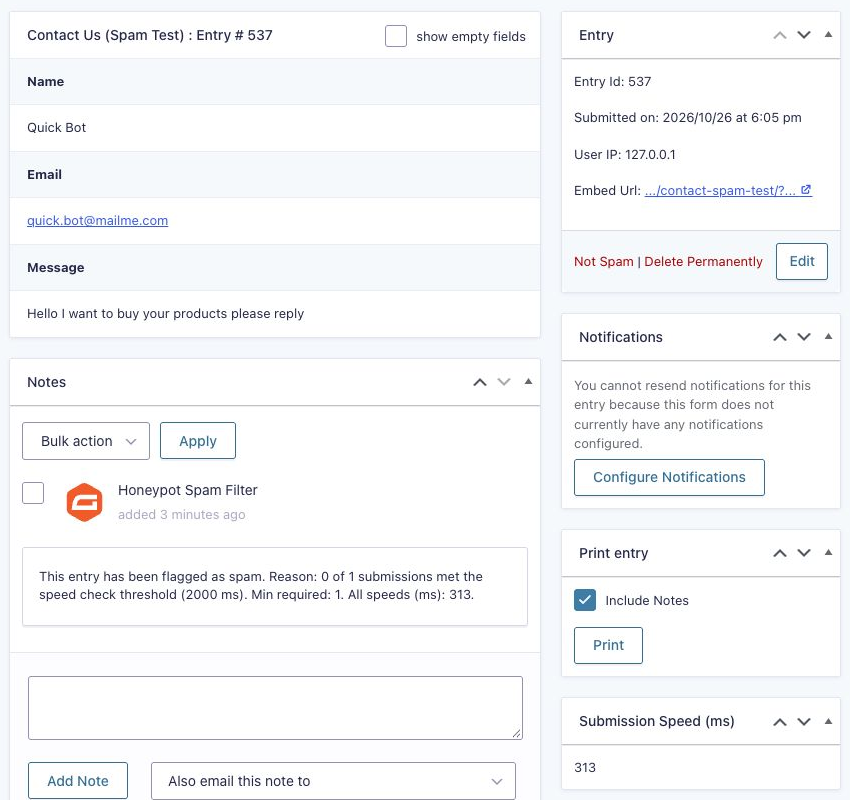
| A browser bot that filled the form in 0.3 seconds | Spam | 0 of 1 submissions met the speed check threshold (2000 ms) |
| A bot posting straight to the form, no browser | Spam | The form’s hidden state input didn’t match |
All three spam submissions saw the normal “Thanks for contacting us” message, so a spammer can’t tell they were caught. None of them sent a notification email.
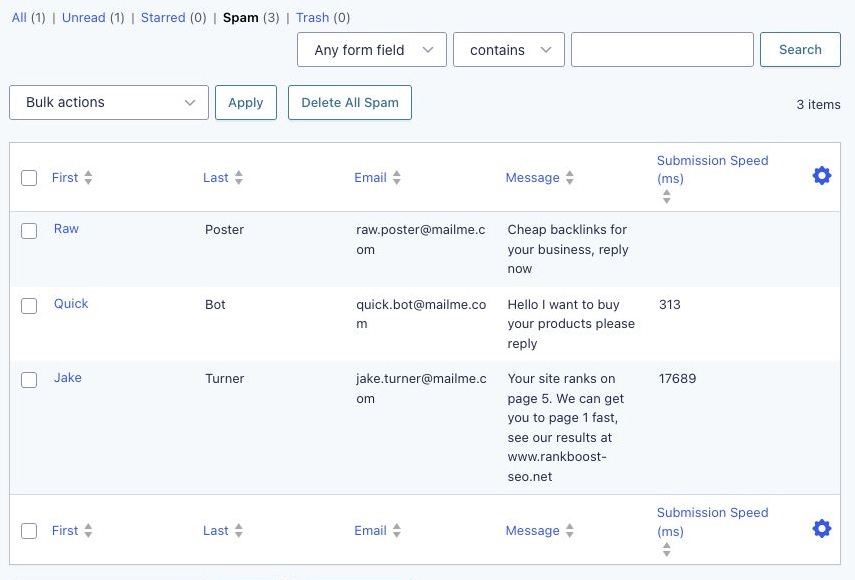
Open any spam entry and the note at the bottom tells you exactly why it was flagged. That’s the first place to look when you’re tuning the settings.
Step 4: Add an Invisible Challenge If Spam Still Gets Through
If bots still slip past the honeypot, add one of these. Pick one, not several: stacking challenges slows your form down and adds more ways for a real visitor to fail.
| Option | What visitors see | Needs | License |
|---|---|---|---|
| Cloudflare Turnstile | Usually nothing, sometimes a quick checkbox | A free Cloudflare account (your site doesn’t have to use Cloudflare) | All licenses |
| reCAPTCHA v3 (add-on) | Nothing | Google reCAPTCHA v3 Classic keys or a reCAPTCHA Enterprise account | All licenses |
| reCAPTCHA v2 (CAPTCHA field) | “I’m not a robot” checkbox or invisible badge | Google reCAPTCHA v2 keys | Built into Gravity Forms core |
My pick is Cloudflare Turnstile. It’s free, it’s built with privacy in mind, and it rarely asks real people to do anything. You add a Turnstile field to each form you want to protect.
The reCAPTCHA Add-On (v3) runs on every form automatically once it’s connected (you can switch it off per form). Google scores each submission from 0.0 (bot) to 1.0 (human), and anything at or below your threshold goes to spam. The default threshold is 0.5. Two tips: never set it to 1.0, which sends every entry to spam, and add the reCAPTCHA Score column to your entries list so you can see the scores your real visitors get before you raise it.
Step 5: Filter Spam That Real People Type
When a person fills in your form by hand, it passes the honeypot, the speed check and any captcha. To catch those, you need something that reads the content.
- Akismet Add-On (all licenses) sends each entry to Akismet, which compares it against the spam it sees across millions of sites. It works with the Akismet plugin, and you map your form fields so Akismet gets the right name, email and message. Akismet’s own plan is free for personal sites and paid for business sites. More about the Akismet add-on.
- Moderation Add-On is for abusive or toxic messages rather than sales spam. It scores each entry with Google’s Perspective API and moves anything over your threshold to a separate Toxic folder (or deletes it). More about Moderation.
Free Third-Party Plugins Worth Knowing
These aren’t official Gravity Forms add-ons, but they’re well maintained and listed in our add-on directory:
- Gravity Forms Zero Spam by GravityKit: a free, no-settings plugin that blocks bots without a captcha. It overlaps with the Advanced Honeypot, so try the built-in settings first. Directory page.
- Gravity Forms Spam Hexer by Gravity Wiz: free. It makes each visitor’s browser solve a small proof-of-work puzzle before the form can submit, and it can optionally ask an AI model to judge each submission. Directory page.
- Other options: Friendly Captcha and hCaptcha (captcha alternatives), AbuseIPDB (checks the visitor’s IP against reported abusers), Blocklist (uses WordPress’s disallowed words list) and Formsieve (server checks plus an AI review).
From Gravity Ranger Labs: Spam Challenger
I’m building a captcha alternative that loads nothing from third parties: a simple math question (“What’s 3 + 7?”) checked on the server, with no cookies or API keys. It’s a Gravity Ranger Labs project for Insider Plus and Elite members, who can try the test builds and help shape it.
My Recommended Setup
- Advanced Honeypot on, set to Create an entry and mark it as spam.
- No Links/URLs on message fields, with links flagged as spam.
- Submission Speed Check on at 2000 ms, Normal mode.
- Still getting bot spam? Add Cloudflare Turnstile.
- Getting hand-typed spam? Add Akismet.
- Check the Spam folder once a week for the first month, and read the note on anything that looks real.
When Real Entries End Up in Spam
Open the entry and read the spam note, then match it to the cause:
- Every entry is marked as spam: the honeypot relies on the form’s JavaScript, so caching, script optimization (delaying or combining JavaScript) or a plugin conflict can make it fail. Exclude Gravity Forms’ scripts from your optimization plugin, clear your cache, and test again.
- Link detected: switch that form to “Mark the field as invalid” so people can remove the link, or turn off No Links/URLs on that field.
- Speed check failed: lower the threshold, or switch from Strict to Normal on multi-page forms.
- Low reCAPTCHA score: lower the threshold a little (0.3 is common).
Gravity Forms doesn’t send notifications for spam entries, so a misflagged lead stays silent until you look. If that worries you, you can get an email when an entry is marked as spam. And if you’d like spam submitters to see a different message, turn on Custom Spam Confirmation in the same settings section and add that confirmation under Confirmations.
Frequently Asked Questions
Does Gravity Forms have built-in spam protection?
Yes. Every license includes the Advanced Honeypot, link detection, the Submission Speed Check and reCAPTCHA v2, all set per form under Settings, Form Settings, Spam Detection. The reCAPTCHA v3, Cloudflare Turnstile and Akismet add-ons are also included with every license.
Why am I still getting spam with reCAPTCHA?
A captcha only stops bots, and some bots get through. Spam typed by real people passes every captcha. Turn on the Advanced Honeypot with link detection and the speed check, and add Akismet for hand-typed spam.
Is Cloudflare Turnstile better than reCAPTCHA for Gravity Forms?
For most sites, yes. It’s free, it’s privacy-focused, it rarely asks visitors to do anything, and you don’t need to use Cloudflare for your site. reCAPTCHA v3 is also invisible, but you’ll need to tune its score threshold.
Do spam entries send notifications?
No. Entries marked as spam don’t send notifications or run add-on feeds. If you move an entry out of spam with Not Spam, you can resend its notifications from the entry page.
How do I delete all Gravity Forms spam entries at once?
Go to the form’s Entries page, click the Spam filter and use the Delete All Spam button.
Need More Help?
If you still need help, use the chat or leave a comment below and we’ll get back to you.
Comments